
Where they act
On the track you name (vocals, bass, #2), on all tracks or on the MixBus. If you name none: the track focused with ✦, then the ticked tracks, then the MixBus. In Mastering, on the master.
The most used mixing and mastering commands, ready to type in AudioChat, the AI chat inside the MixingMusic.AI mixer. They start with "/", apply instantly to the real controls, undo in one click and use no AI messages.
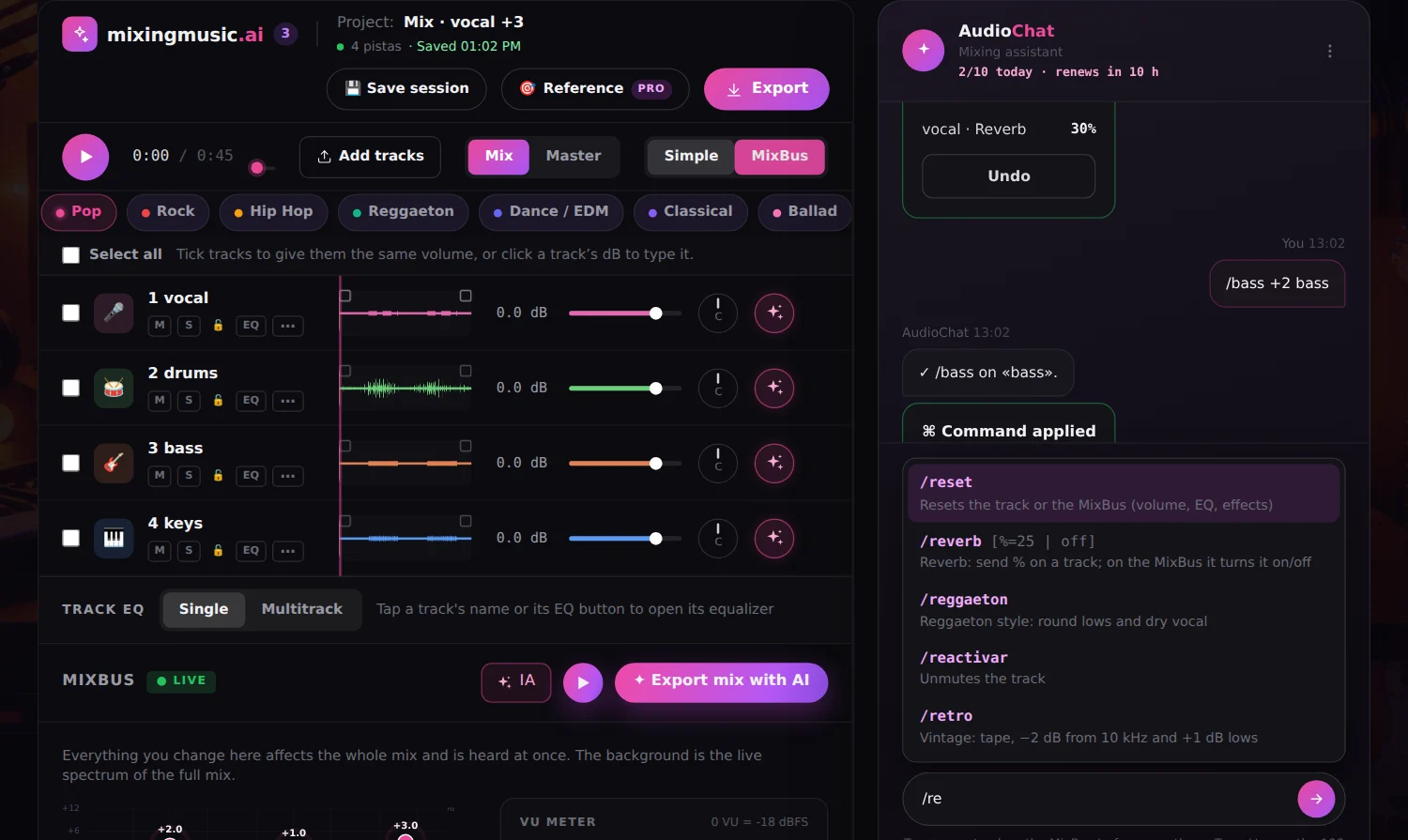
On the track you name (vocals, bass, #2), on all tracks or on the MixBus. If you name none: the track focused with ✦, then the ticked tracks, then the MixBus. In Mastering, on the master.
A number sets (/bass 3); with a sign it adds or subtracts (/bass +2). 3k = 3000 Hz, L30 and R20 for pan, on and off to switch.
Every command shows what changed with an Undo button (or type /undo). Protected tracks 🔒 are left alone and commands use no AI messages.
/reverb 30 vocals/vol -6 all/pan L30 guitar/listen car mixbus/sync 120 1/8 vocals/loudness -14 (in Mastering)| Command | Spanish | Usage | What it does | Where |
|---|---|---|---|---|
/volume | /volumen | <dB> | Sets the volume in dB (track −40 to +12, MixBus −24 to +6) | track, MixBus |
/up | /subir | [dB=1] | Turns the volume up (1 dB by default) | track, MixBus |
/down | /bajar | [dB=1] | Turns the volume down (1 dB by default) | track, MixBus |
/pan | /paneo | <L30 | R20 | C | −50…50> | Places the track in the stereo field (L = left, R = right) | track, MixBus |
/center | /centro | Pans the track to the center | track, MixBus | |
/left | /izquierda | [amount=30] | Pans the track left | track, MixBus |
/right | /derecha | [amount=30] | Pans the track right | track, MixBus |
/mute | /silenciar | Mutes the track | track, MixBus | |
/unmute | /reactivar | Unmutes the track | track, MixBus | |
/solo | /solo | Solos the track | track, MixBus | |
/unsolo | /quitarsolo | Removes the solo | track, MixBus | |
/lock | /bloquear | Protects the track: AI and commands leave it alone | track, MixBus | |
/unlock | /desbloquear | Removes the protection | track, MixBus | |
/reset | /reiniciar | Resets the track or the MixBus (volume, EQ, effects) | track, MixBus |
| Command | Spanish | Usage | What it does | Where |
|---|---|---|---|---|
/bass | /graves | <dB> [Hz] | Lows: a number sets, +/− adds. Optional: frequency | track, MixBus |
/mid | /medios | <dB> [Hz] | Mids: a number sets, +/− adds. Optional: frequency | track, MixBus |
/treble | /agudos | <dB> [Hz] | Highs: a number sets, +/− adds. Optional: frequency | track, MixBus |
/bassfreq | /frecgraves | <Hz> | Moves the low band frequency (40–500 Hz) | track, MixBus |
/midfreq | /frecmedios | <Hz> | Moves the mid band frequency (150–6000 Hz) | track, MixBus |
/treblefreq | /frecagudos | <Hz> | Moves the high band frequency (1.5–18 kHz) | track, MixBus |
/flat | /eqplano | Flattens the EQ to 0 at its default frequencies | track, MixBus |
| Command | Spanish | Usage | What it does | Where |
|---|---|---|---|---|
/lowcut | /cortegraves | [Hz=80 | off] | Cuts lows below the frequency (high-pass filter) | track, MixBus |
/warm | /calido | Warmer: +2 dB at 150 Hz and −1.5 dB highs | track, MixBus | |
/bright | /brillo | Brighter: +3 dB from 8 kHz | track, MixBus | |
/dark | /oscuro | Darker: −3 dB from 8 kHz | track, MixBus | |
/air | /aire | Air: +2.5 dB from 12 kHz | track, MixBus | |
/demud | /barro | Removes mud: −3 dB at 300 Hz | track, MixBus | |
/boxy | /caja | Removes boxiness: −3 dB at 500 Hz | track, MixBus | |
/nasal | /nasal | Removes nasal tone: −3 dB at 1 kHz | track, MixBus | |
/harsh | /aspero | Less harshness: −2.5 dB at 3 kHz | track, MixBus | |
/presence | /presencia | More presence: +2.5 dB at 3 kHz | track, MixBus | |
/deess | /sibilancia | Softens esses: −3 dB from 7 kHz (static cut, not dynamic) | track, MixBus | |
/sub | /subgrave | More sub: +3 dB at 60 Hz | track, MixBus | |
/body | /cuerpo | More body: +2 dB at 200 Hz | track, MixBus | |
/thin | /adelgazar | Thins out: −3 dB at 200 Hz | track, MixBus | |
/clarity | /claridad | Clarity: −2 dB at 400 Hz and +2 dB highs | track, MixBus | |
/crisp | /nitidez | Crisp: +2 dB at 5 kHz | track, MixBus | |
/scoop | /vaciar | Scooped mids: −3 dB at 800 Hz | track, MixBus | |
/makeroom | /hacerespacio | Makes room for the vocal: −2 dB at 2.5 kHz | track, MixBus | |
/telephone | /telefono | Telephone effect: cut at 400 Hz, +4 dB at 1.5 kHz, −8 dB from 3 kHz | track, MixBus | |
/radio | /radio | Radio effect: cut at 200 Hz, +2 dB at 1.5 kHz, −4 dB from 6 kHz | track, MixBus | |
/lofi | /lofi | Lo-fi: cut at 150 Hz, −6 dB from 5 kHz and tape | track, MixBus | |
/vintage | /vintage | Vintage: tape, −2 dB from 10 kHz and +1 dB lows | track, MixBus | |
/modern | /moderno | Modern: +2 dB from 10 kHz, cut at 40 Hz and 3:1 compression | track, MixBus | |
/fatten | /engordar | Fattens: +2 dB at 150 Hz and tape | track, MixBus |
| Command | Spanish | Usage | What it does | Where |
|---|---|---|---|---|
/compression | /compresion | [ratio=4] | Compression at the ratio you type (1 = off, up to 8:1) | track, MixBus |
/nocomp | /sincompresion | Turns compression off | track, MixBus | |
/gentle | /suave | Gentle 2:1 compression | track, MixBus | |
/squash | /aplastar | Heavy 8:1 compression | track, MixBus | |
/punch | /pegada | Punch: 4:1 compression and +1.5 dB at 2 kHz | track, MixBus | |
/tighten | /apretar | Tighter: 4:1 compression and cut at 100 Hz | track, MixBus | |
/tape | /cinta | [on | off] | Tape saturation (on/off) | track, MixBus |
/limit | /limitar | <natural | balanced | intense> | How hard the master limiter pushes | track, MixBus, Mastering |
| Command | Spanish | Usage | What it does | Where |
|---|---|---|---|---|
/reverb | /reverb | [%=25 | off] | Reverb: send % on a track; on the MixBus it turns it on/off | track, MixBus |
/noreverb | /sinreverb | Removes the reverb | track, MixBus | |
/ambience | /ambiente | A touch of ambience: 12% reverb | track, MixBus | |
/space | /espacio | More space: 30% reverb | track, MixBus | |
/bigreverb | /reverbgrande | Big reverb: 45% | track, MixBus | |
/delay | /delay | [%=20 | off] | Delay: send % on a track; on the MixBus it turns it on/off | track, MixBus |
/nodelay | /sindelay | Removes the delay | track, MixBus | |
/delaytime | /tiempodelay | <ms> | Delay time (20–1000 ms) | track, MixBus |
/slapback | /slapback | Slapback: 20% delay at 110 ms | track, MixBus | |
/longdelay | /delaylargo | Long delay: 22% at 450 ms | track, MixBus | |
/sync | /tempo | <bpm> [1/4 | 1/8 | 1/8d | 1/16] | Syncs the delay to the song tempo | track, MixBus |
/dry | /seco | Dry: no reverb or delay | track, MixBus |
| Command | Spanish | Usage | What it does | Where |
|---|---|---|---|---|
/widener | /ensanchar | [on | off] | MixBus stereo widener (on/off) | track, MixBus, Mastering |
/stereo | /estereo | <% 0–60> | Master stereo width (in the mixer it toggles the widener) | track, MixBus, Mastering |
/mixbus | /mixbus | Focuses the chat on the MixBus (the whole mix) | chat | |
/listen | /escuchar | <car | iphone | headphones | tv | …> | IA EQ curve for where the song will be played | track, MixBus |
/iaeq | /eqia | <band: 30…16k> <dB> | Moves one band of the 12-band IA EQ (e.g. /iaeq 3k −2) | track, MixBus |
/preamp | /preamp | <dB> | IA EQ preamp | track, MixBus |
/autoeq | /eqauto | The AI sets the 12-band IA EQ (uses 1 AI message) | chat | |
/analyze | /analiza | The AI analyzes and adjusts the track or MixBus (uses 1 AI message) | chat |
| Command | Spanish | Usage | What it does | Where |
|---|---|---|---|---|
/pop | /pop | Pop style: vocal clarity and shine | track, MixBus, Mastering | |
/rock | /rock | Rock style: strong lows and attack | track, MixBus, Mastering | |
/hiphop | /hiphop | Hip Hop style: deep 808 and vocal up front | track, MixBus, Mastering | |
/reggaeton | /reggaeton | Reggaeton style: round lows and dry vocal | track, MixBus, Mastering | |
/dance | /dance | Dance/EDM style: strong kick and wide stereo | track, MixBus, Mastering | |
/classical | /clasica | Classical style: natural and dynamic | track, MixBus, Mastering | |
/ballad | /balada | Ballad style: lead vocal and warm ambience | track, MixBus, Mastering | |
/acoustic | /acustico | Acoustic style: intimate and natural | track, MixBus, Mastering | |
/gospel | /gospel | Gospel style: full choirs and church reverb | track, MixBus, Mastering | |
/neutral | /neutro | Neutral: keeps the original sound | track, MixBus, Mastering | |
/nopreset | /sinpreset | Removes the track preset (EQ, compression and effects to zero) | track, MixBus |
| Command | Spanish | Usage | What it does | Where |
|---|---|---|---|---|
/fadein | /fadein | [seconds=2] | Fades the track in | track, MixBus |
/fadeout | /fadeout | [seconds=3] | Fades the track out | track, MixBus |
/nofades | /sinfades | Removes the fades | track, MixBus |
| Command | Spanish | Usage | What it does | Where |
|---|---|---|---|---|
/loudness | /loudness | <−16 | −14 | −11 | natural | balanced | intense> | Master loudness intent | track, MixBus, Mastering |
/natural | /natural | Natural master (−16 LUFS) | Mastering | |
/balanced | /equilibrado | Balanced master (−14 LUFS) | Mastering | |
/intense | /intenso | Intense master (−11 LUFS) | Mastering | |
/strength | /intensidad | <% 0–100> | How much of the mastering preset is applied | Mastering |
/platform | /plataforma | <spotify | youtube | apple | soundcloud | tiktok | club> | Loudness for where you will publish | Mastering |
| Command | Spanish | Usage | What it does | Where |
|---|---|---|---|---|
/help | /ayuda | [command] | Lists the commands or explains one | chat |
/undo | /deshacer | Undoes the chat’s last change | chat | |
/status | /estado | Shows the current settings of the track or MixBus | chat | |
/focus | /enfocar | <track> | Focuses the chat on a track (by name or number) | chat |
/select | /seleccionar | <tracks | all | none> | Ticks tracks in the mixer (e.g. /select 1,3,5) | chat |
/play | /reproducir | Plays or pauses the mix | chat | |
/stop | /detener | Stops and goes back to the start | chat |
Open the mixer or Mastering, type "/" in AudioChat and pick a command from the list, or type it in full: for example "/reverb 30 vocals". It applies instantly and an undo button appears.
No. They run in your browser on the mixer’s real controls, so they don’t count toward your daily limit. Only /autoeq and /analyze use the AI on purpose and spend 1 message.
On the track you name ("vocals", "bass", "#2", "all" or "mixbus"). If you name none, on the track focused with ✦; if there is none, on the ticked tracks; and otherwise on the MixBus.
Yes. Every command has an English and a Spanish name plus aliases: /bass and /graves, /comp and /compresion, /delay and /eco. The list shows in the app’s language.
Yes. On the Mastering screen commands act on the master: /loudness -14, /limit intense, /platform spotify, /strength 60 or a style such as /rock.
A track with a lock 🔒 is not changed by any command or by the AI. Type /unlock and its name to adjust it.
Load your stems, open AudioChat and type "/".
No monthly renewal, confusing credits, or annual contracts. Free to try it, Unlimited for the whole studio and AI Advanced to work with the AI every day.
No card and no expiration.
One payment with Mercado Pago or PayPal.
One payment. Already on Unlimited? Pay only the difference.