
AI CHAT FOR MIXING MUSIC

Mix with an AI chat:ask in your own words.

AudioChat is the artificial intelligence chat inside the MixingMusic.AI mixer. It analyzes each track or the MixBus and adjusts it on its own, or does exactly what you ask: volume, pan, EQ, compression, reverb and delay. You listen and decide.

See plans ↓
AUDIOCHAT AI

A mixing engineer that understands what you ask

AudioChat is the AI assistant inside the mixer and the mastering screen. It really measures your audio (levels, dynamics, frequency balance and stereo) and adjusts volume, pan, EQ, compression, reverb and delay on each track, or the whole MixBus. You listen, and every change can be undone in one click.
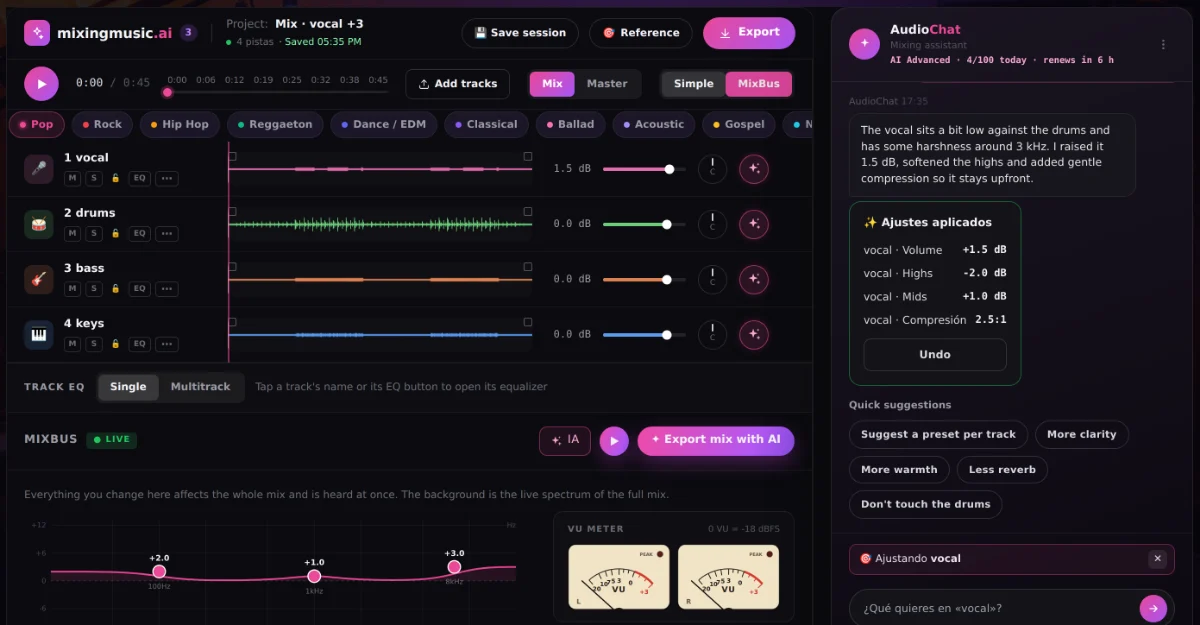
  1. 1Tap ✦ on a track or on the MixBusThe chat focuses only on what you picked, so the rest of the mix stays as it is.
  2. 2Choose how to work"Analyze and adjust automatically": the AI measures and applies the changes. "I'll tell you what to do": type, for example, "vocal more upfront and less harsh".
  3. 3Listen and decideYou see every change with its value. Apply, discard or undo. Tracks with a lock πŸ”’ are never touched.
Free
1 "Analyze and adjust" to try it
Unlimited
10 messages a day
AI Advanced
Up to 100 messages a day
MixingMusic.AI AudioChat AI focused on one track: the AI analyzed the vocal and applied EQ and compression changes that can be undone
WHAT IT CAN ADJUST

The same controls you would use.

  • βœ“ Volume and pan per track
  • βœ“ Low, mid and high EQ
  • βœ“ Compression, reverb and delay per track
  • βœ“ Presets per instrument
  • βœ“ MixBus EQ and volume
  • βœ“ Master preset, intensity and loudness

It does not invent audio or separate stems: it works on your tracks with the same controls you would use, and you can always undo.

How the MixBus works with LUFS and VU meter β†’
EXAMPLES

Ask the way you would ask an engineer.

  • "Vocal more upfront and less harsh"
  • "More punch on the drums without raising the level"
  • "The bass is eating the kick, fix it"
  • "Less reverb on the backing vocals"
  • "Track 3 a little to the left"
  • "More brightness on the MixBus"
See the 100 chat commands β†’
PLANS Β· ONE-TIME PAYMENT

Choose how much AI you need.

Free to try it, Unlimited with 10 messages a day or AI Advanced with up to 100. Pay once and keep it forever.

FREE

Try it

US$0

No card and no expiration.

  • βœ“ 1 mix from stems
  • βœ“ 1 downloadable MP3 master
  • βœ“ Up to 12 stems per song
  • βœ“ 1 AudioChat AI "Analyze and adjust"
  • βœ“ Presets and AI recommendation
FOUNDING PRICEUNLIMITED FOREVER

The whole studio

US$14.99COP $49.900

One payment with Mercado Pago or PayPal.

  • βœ“ Unlimited mixes and masters
  • βœ“ True 24-bit PCM WAV
  • βœ“ Album mode up to 12 songs
  • βœ“ Reference track: tone, dynamics and loudness
  • βœ“ AudioChat AI: 10 messages a day
FeatureFreeUnlimitedAI Advanced
PriceUS$0US$14.99 Β· one-timeUS$69 (was US$99) Β· one-time
Automatic mixing from stems1 songUnlimitedUnlimited
Stems per songUp to 12Up to 12Up to 12
Stereo mix mastering1 song (MP3)UnlimitedUnlimited
24-bit PCM WAV downloadβ€”UnlimitedUnlimited
MixBus with EQ, LUFS and VU meterIncludedIncludedIncluded
Album modeβ€”Up to 12 songsUp to 12 songs
Reference trackβ€”In mixing and masteringIn mixing and mastering
AudioChat AI: messages1 "Analyze and adjust"10 a dayUp to 100 a day (30 per hour)
AudioChat AI: per track and on the MixBusYes (1 try)YesYes
AudioChat AI: automatic "Analyze and adjust"OnceYesYes
AudioChat AI: ask for changes in your wordsβ€”YesYes
Message renewalβ€”Every midnight (local time)Every midnight (local time)
FAQ

Questions about AudioChat

What is AudioChat?

It is MixingMusic's AI assistant inside the mixer and the mastering screen. It understands requests in English or Spanish, measures your audio and adjusts volume, pan, EQ, compression, reverb, delay and the MixBus. You approve or undo every change.

How many messages do I get?

Free: 1 "Analyze and adjust" to try it. Unlimited: 10 messages a day. AI Advanced: up to 100 a day (30 per hour at most). Messages renew every midnight in your local time, and a message that fails is not counted.

What does "Analyze and adjust" do?

It measures the track or the MixBus you picked (RMS and peak level, dynamics, band balance and stereo correlation) and applies moderate changes. You can undo them in one click.

Is it a subscription?

No. Unlimited (US$14.99) and AI Advanced (US$69, was US$99) are one-time payments, forever. Already on Unlimited? Move to AI Advanced paying only the difference.

Can I ask for changes on a single track?

Yes. Tap ✦ on the track or name it in the chat ("track 3", "the vocal") and AudioChat changes only that track. With ✦ on the MixBus it works on the whole mix.

Can AudioChat touch a track I do not want changed?

Not if you protect it: a track with a lock πŸ”’ is never modified, even if you ask. Every proposal can also be discarded or undone.

Does it work with Suno songs and stems?

Yes. Load the stems you export from Suno (or any DAW) and ask, for example, "more present vocal and less reverb"; AudioChat adjusts each track and the MixBus before mastering.

Your next mix, with an AI engineer by your side.

Start free with 1 mix and 1 "Analyze and adjust".