
Listen to the problem first.
Do you need to adjust vocals and instruments or finish a stereo mix? These are different tasks. Processing the entire song does not offer the same control as working with individual tracks.
A guide to browser-based music production: understand mixing, mastering and how to use AI while staying in control. Start from stems or a stereo song and follow a process you can audition, compare and review.
Start mixing →Master a stereo mix →Do you need to adjust vocals and instruments or finish a stereo mix? These are different tasks. Processing the entire song does not offer the same control as working with individual tracks.
Mix tracks in MixingStudio, compare your manual export with an AI mixing proposal if needed, then master the approved result. Presets and AudioChat support decisions; you verify the outcome.
Upload aligned stems or separate a WAV with a compatible plan.
Balance instruments, use EQ and dynamics and compare versions.
Choose final character and level, compare A/B and back up the approved file.
Load up to 12 stems and adjust each track. Export your manual mix or generate a separate AI version from the originals or your current settings. Audition the result before downloading.
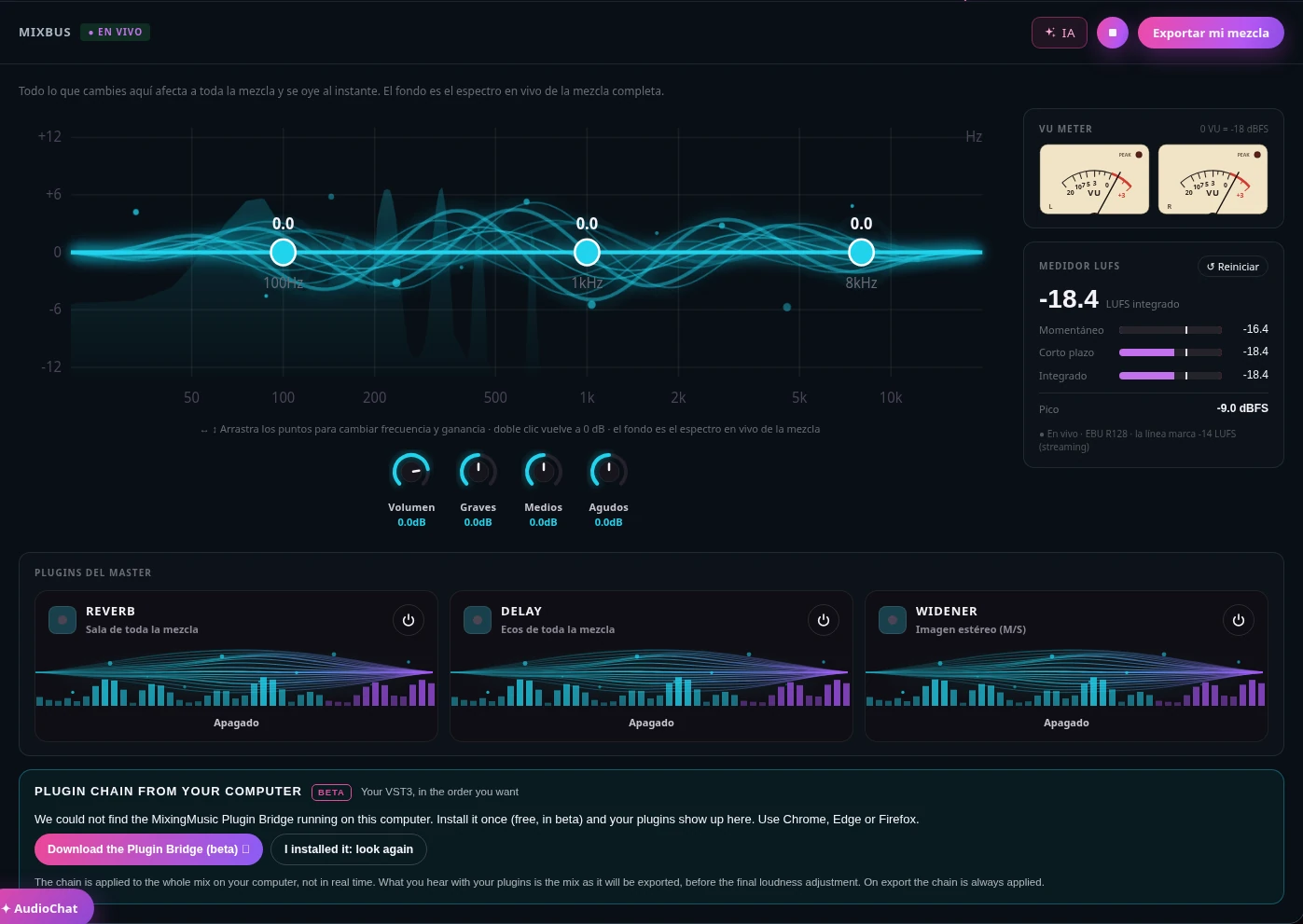
The whole-mix EQ over its live spectrum, overall volume and master effects, with no menus to dig through.
L/R needles with classic VU ballistics and an EBU R128 meter: momentary, short-term, integrated and peak.
Bring your mix closer to the tone, dynamics and loudness of a song you love, before mastering.
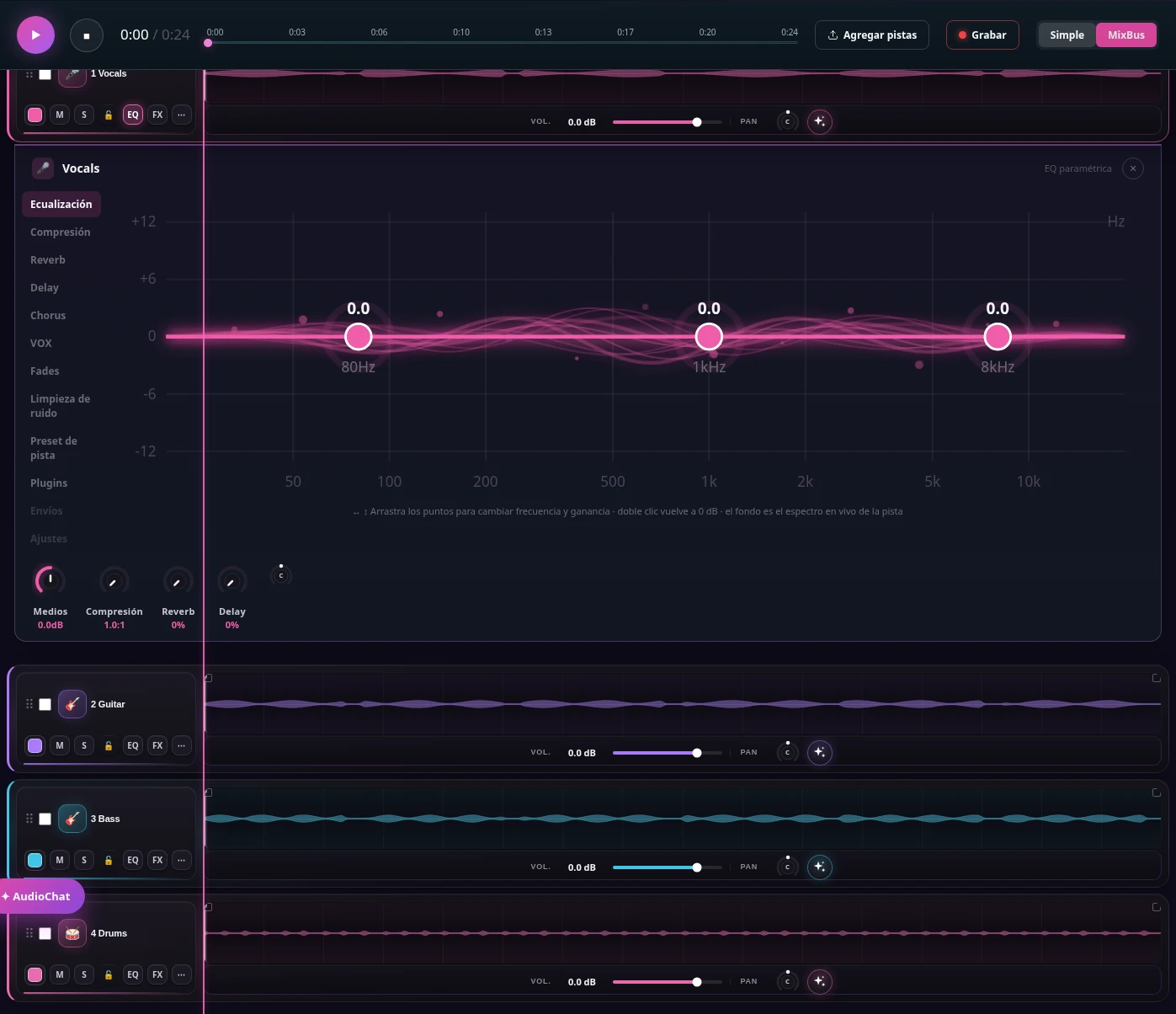
Drag the points over each instrument’s spectrum. Open one EQ or several at once and close them whenever you like.
Vocals, drums, bass, guitars and keys get EQ, compression, reverb and delay designed for each.
Type "more clarity on the vocal" and the assistant adjusts level, EQ or effects. You hear it and you can undo it.

Double-click a track to select a range, split it or delete the selection while leaving silence.
Adjust gain for a selection, a clip or the whole track. Use fades, zoom and beat snapping.
Play from the editor, undo or redo changes and restore a saved version. Edits are heard in the mix and included in exports.
AI music production needs good source material. Clipped, noisy or differently aligned files are not fixed simply by choosing a preset. Keep original backups and decide what should stand out: vocals, groove, guitar or atmosphere.
Upload separate tracks with a common export start and duration. Identify lead vocals, backing vocals, drums, bass and accompaniment. Do not trim each file’s initial silence independently: that would break alignment.
Master a stereo mix directly. If you need to change vocal or instrument balance, separate the WAV first: Unlimited offers 6 stems for 1 song; Advanced offers 6 for 1 or up to 12 for 2. Separation estimates components and may introduce artifacts.
Use your own or authorized song with similar arrangement and genre. Describe what matters: vocal clarity, depth, bass balance or dynamics. A reference guides decisions; it does not guarantee reproducing another recording’s sound.
Mixing means deciding how tracks fit together before processing the complete song. Start with level and pan, check entrances, then use equalization, compression and ambience. The objective is a clear arrangement, not using every available effect.
Listen to vocals, drums and bass together. If lyrics disappear, check relative levels and frequencies competing with the vocal. More treble or compression cannot replace a correct balance. Add accompaniment gradually and listen at low volume too.
EQ changes frequency balance; compression controls level variation. Apply each process for an audible reason. Drums may need preserved transients while vocals need uneven phrases controlled. Compare enabled and bypassed without being misled by a level increase.
Use pan to distribute accompaniment and reverb to suggest distance or a shared room. Delay can add depth without filling everything with reverberation. Check bass and vocal stability and audition in mono when possible.
MixingMusic distinguishes the mix you build with controls from the AI-generated proposal. This lets you experiment without confusing a manual export with an automatic decision. In either case, listen and approve the result before mastering.
Use this when you have chosen levels, EQ, compression and effects. Export uses the session state. Check the beginning, ending, effect tails and peaks before moving to the next process.
Start from original stems or current settings. Describe the musical goal and compare the proposal with your version. This does not include mastering: it is a mix needing review and, where appropriate, final preparation. Generating the AI mix uses no AudioChat interactions; download rules follow the plan.
Make specific requests: “reduce the bass where it competes with vocals” or “less reverb on the lead vocal.” Review applied changes and listen in context. Chat messages, songs and covers have different allowances; a parameter adjustment should not be confused with new audio generation.
The MixBus affects the entire song. It helps with small overall changes but is not the right place to fix a defect isolated to one track. Meters show part of the signal’s behavior; listening determines whether emotion and clarity remain.
Watch the live spectrum and listen for excessive bass, harsh mids or tiring brightness. Adjust moderately: cutting overall mids may also remove vocal presence. If one guitar causes the problem, return to its channel.
VU meters help show average level and peak meters show maxima; LUFS estimates loudness using a different method. The values are not interchangeable. A -14 LUFS target can be a useful working reference, but does not guarantee a better song or apply as a universal release requirement.
These effects act on the entire mix. Excessive widening may weaken mono compatibility, and too much reverb can push back a vocal you just brought forward. Compare enabled and bypassed, preserve headroom and listen to the exported file.
Mastering starts when instrument balance works. Upload the stereo mix to the mastering tool, review the recommended preset and adjust character and intensity. This stage prepares tone, dynamics and final level; it does not replace editing original tracks.
Use a good-quality WAV and avoid exporting a clipped mix. Leave room for processing and retain the unmastered version. Converting an MP3 to WAV does not restore information lost during the original compression.
Treat the preset as a starting point and adapt intensity to the song. Listen to vocal consonants, drum hits, sibilance and bass stability. If processing flattens movement or makes the sound harsher, reduce intensity or revisit the mix.
A/B at matched loudness, check the beginning and ending and test several playback devices. Unlimited and AI Advanced allow unlimited masters and mixes within normal use and plan terms; generating songs and separating stems do consume balance. Download and back up final files.
The final step in music production is reviewing what listeners will receive rather than looking at a meter. A correct export preserves duration, endings and the character you approved. Albums also need attention to transitions and contrast between songs.
Album mode supports up to 12 songs with a shared direction for tone, intensity and loudness. Listen through the sequence: a ballad can need less density than the previous song and still belong on the same record.
Keep source audio, your mix and the approved master in your own storage. Stems are retained for 7 days and songs normally for 30, with specific rules for Free. Downloading an available file again is different from generating a new separation.
Check rights for vocals, lyrics and references; listen for silence, clicks, distortion and level changes. MixingMusic prepares files, but a mix or master does not itself include distribution to Spotify, Apple Music or other services.
Check capabilities, limits and sources in the comparison; choose for your task rather than a feature count.
Read the sourced comparison →No. Mixing balances tracks and instruments. Mastering processes the approved stereo mix to prepare final tone, dynamics and level.
Yes. Master the WAV directly or separate stems to change its balance: Unlimited supports 6 for 1 song; AI Advanced supports 6 for 1 or up to 12 for 2. Maximum 65 MB and 6 minutes. Free excludes separation.
No. AI mixing creates a mixing proposal. Mastering is a separate subsequent step.
No. LUFS describes loudness; quality depends on source material, decisions and listening. Compare dynamics, tone and distortion rather than just a number.
Buy a pack to refill it. Packs do not change your plan: 12-stem separation still requires AI Advanced. Mixing and mastering follow your plan.
No monthly renewal, confusing credits, or annual contracts. Free to try it, Unlimited for the whole studio and AI Advanced to work with the AI every day.
No card and no expiration.
One payment, no renewals. Mixing and mastering forever; AI songs last until you use them up.
Loading secure payment…
One payment. Mixing and mastering forever; AI songs until you use them up. Already on Unlimited? Pay only US$7.01.
Loading secure payment…
Pay once and create at your own pace. Usage depends on the model. Packs refill balance without changing your plan: 6-stem separation uses 1 song on Unlimited or Advanced; up to 12 uses 2 on Advanced. Free excludes separation.
Loading secure payment…
Loading secure payment…
Love songs, christian, reggaeton, pop, rock and more. New songs every day: play them, like them and share them.
Listen to the songs →