FREE TOOL · KARAOKE VIDEO

Karaoke video with synced lyricsin 1080p, ready for YouTube and Shorts.

Turn your audio and lyrics into a landscape or portrait 1080p karaoke video. MixingMusic retrieves word timings or transcribes audio when available; review synchronization before exporting. Without an account, timing is estimated.

Create my Karaoke Video →See plans →
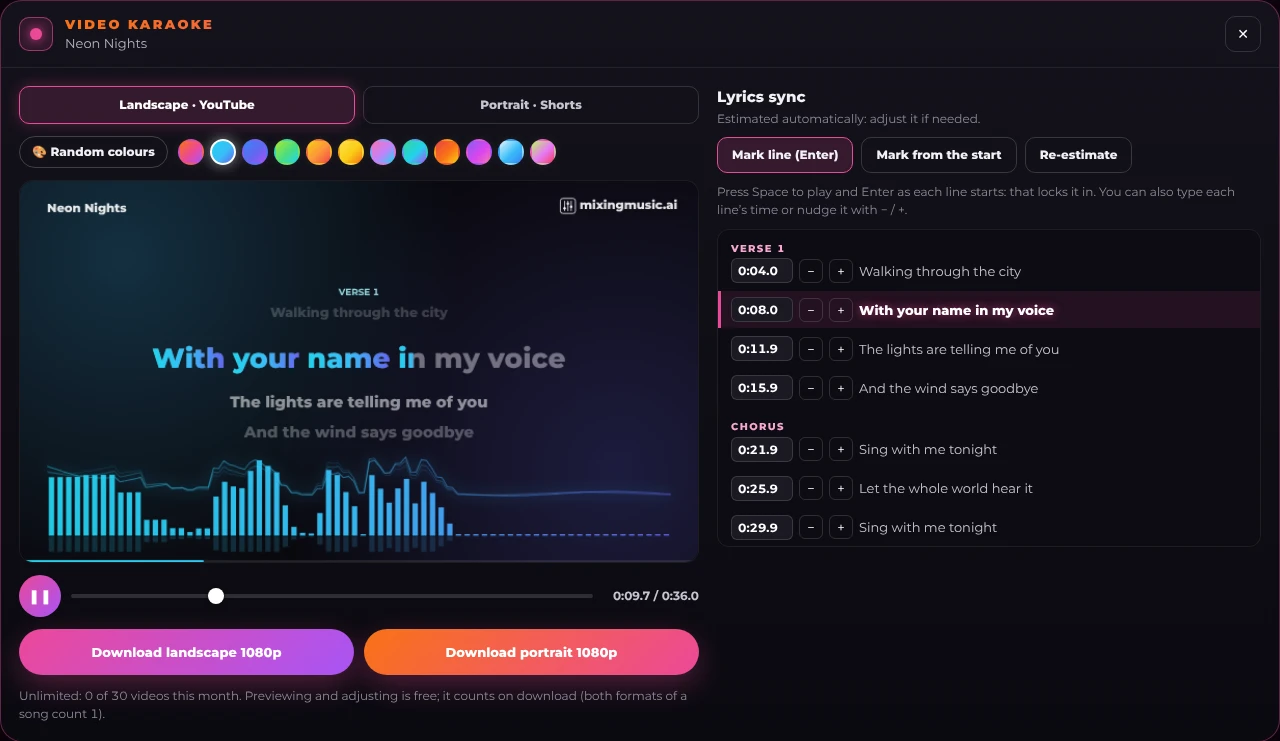
MixingMusic Karaoke Video panel with the video preview, colour picker and lyrics sync editor
The Karaoke Video: preview, random colours and sync editor.
THE CHALLENGE

What do you need to make a karaoke video?

To post a song on YouTube or Shorts you need a video. Making one in an editor means syncing the lyrics by hand, line by line, then exporting. And for an AI-made song you usually do not even know the second each word is sung.

THE DIRECTION

How lyric timing is obtained

Available Suno timestamps are used when the song has them. Mureka songs without those timestamps and audio uploaded by signed-in users can request transcription with word timings. If usable timings are unavailable, an estimate is shown for review; instrumental intros can be misaligned.

Resolution1920×1080 and 1080×1920
FormatMP4 (H.264) or WebM
SyncAI or estimated + editor
Colours12 neon palettes
RECOMMENDED FLOW

From audio to video in three steps

01

Open a song or upload audio

Choose Karaoke Video in the generator, or add audio and lyrics to the public tool, with one phrase per line.

02

Review the timing source

Wait for synchronization. Check the first vocal entrance and choruses; with an estimate, tap or type the timings.

03

Export and play the file

Choose 16:9 or 9:16 and check audio, duration and lyrics in the downloaded video.

IN THIS GUIDE

Karaoke video formats and limits

  • ✓ Landscape 1920×1080 and portrait 1080×1920
  • ✓ MP4 when browser encoding is supported; otherwise WebM
  • ✓ Free: 3 songs/month; Unlimited: 30; AI Advanced: 60
  • ✓ Both formats of one song count once
  • ✓ Automatic synchronization when useful timings are available; review remains available

How can you compare the options?

Check capabilities, limits and sources in the comparison; choose for your task rather than a feature count.

Read the sourced comparison →
FAQ

Frequently asked questions

Are lyrics synchronized automatically?

Available Suno timestamps are used when the song has them. Mureka songs without those timestamps and audio uploaded by signed-in users can request transcription with word timings. If usable timings are unavailable, an estimate is shown for review; instrumental intros can be misaligned.

Why can lyrics start before the vocal?

An estimate can mistake instruments for vocals. Check whether the panel reports aligned or estimated times, then review the first phrase and choruses before downloading.

Do I need to generate another song?

No. Open an existing song and request its available timings. Timing depends on that audio version.

Is it free and what are the limits?

Free permits 3 song videos per month, Unlimited 30 and AI Advanced 60. Both orientations count once per song. Previewing and editing use no generator songs; AI synchronization uses provider services.

What file is downloaded?

Landscape or portrait 1080p. The browser creates MP4 when the required encoders are available; otherwise it downloads WebM. Play the file to check that the audio is present.

Can I use any recording?

You need the necessary rights to the audio and lyrics. Making a video grants neither usage rights nor exclusivity.
SIMPLE PRICING

Start free. Pay only once.

No monthly renewal, confusing credits, or annual contracts. Free to try it, Unlimited for the whole studio and AI Advanced to work with the AI every day.

FREE

Try it

US$0

No card and no expiration.

  • ✓ 1 song created with AI (1:00), no stems
  • ✓ 1 cover to hear in full (download from US$1.99)
  • ✓ 1 mix from stems
  • ✓ 1 downloadable MP3 master
  • ✓ Mix up to 12 existing stems; no separation
  • ✓ 1 AudioChat AI "Analyze and adjust"
  • ✓ Presets and AI recommendation
BLACK FRIDAY-60%BLACK FRIDAYUNLIMITED · ONE-TIME PAYMENT

The whole studio

US$19.99US$7.99ONE-TIME PAYMENT · NO SUBSCRIPTION

One payment, no renewals. Mixing and mastering forever; AI songs last until you use them up.

  • ✓ 450 AI songs (up to 30 a month)
  • ✓ 5 AI covers of your songs
  • ✓ 20 AI instruments a month from the chat
  • ✓ Split uploaded or generated songs: 6 stems · uses 1 song
  • ✓ 1 custom song included
  • ✓ Unlimited mixes and masters, 24-bit WAV
  • ✓ 9 studio plugins, Record and live mode
  • ✓ AudioChat AI: 10 messages a day (5 with no songs left)

Loading secure payment…

NEW · SONG CREDITS

Just want songs? Buy credits, not subscriptions.

Pay once and create at your own pace. Usage depends on the model. Packs refill balance without changing your plan: 6-stem separation uses 1 song on Unlimited or Advanced; up to 12 uses 2 on Advanced. Free excludes separation.

  • No monthly plans
  • No hidden fees
  • Never expire
20 songsUS$8.99US$0.45 per song

Loading secure payment…

50 songsUS$14.99US$0.30 per song

Loading secure payment…

See the full plan comparison →

MIXINGMUSIC COMMUNITY

Listen to 251 songs made with AI by our community

Love songs, christian, reggaeton, pop, rock and more. New songs every day: play them, like them and share them.

Listen to the songs →