
From stems to master.
From one song to an album.
A clear view of the tools available to create mixes, enhance them and master them.
SIMPLE COMPARISON
MixingMusic compared with a traditional mastering platform.
A generic comparison based on the usual model in the category; specific features vary between services.
FeatureFreeUnlimitedOther services
Create mixes from stemsFREE3 songsUNLIMITEDUnlimitedOTHER SERVICESUsually not
Stems per songFREEUp to 12UNLIMITEDUp to 12OTHER SERVICESStereo mix only
Per-track EQ, single or multitrack, with a live spectrumFREEIncludedUNLIMITEDIncludedOTHER SERVICESRare
MixBus: whole-mix EQ, volume and master effectsFREEIncludedUNLIMITEDIncludedOTHER SERVICESRare
Live stereo VU meter and LUFS (EBU R128) meterFREEIncludedUNLIMITEDIncludedOTHER SERVICESRare
Per-instrument presets (vocals, drums, bass, guitars…)FREEIncludedUNLIMITEDIncludedOTHER SERVICESRare
Enhance a stereo mixFREEIncludedUNLIMITEDUnlimitedOTHER SERVICESYes
Automatic masteringFREE1 songUNLIMITEDUnlimitedOTHER SERVICESDepends on credits or plan
Presets with musical characterFREEIncludedUNLIMITEDIncludedOTHER SERVICESGeneral styles
Automatic preset recommendationFREEIncludedUNLIMITEDIncludedOTHER SERVICESVaries
Mastering controlFREEEssentialUNLIMITEDAdvanced and editableOTHER SERVICESBasic intensity
Original vs. result comparisonFREEIncludedUNLIMITEDIncludedOTHER SERVICESCommon
Peak and clipping protectionFREEIncludedUNLIMITEDIncludedOTHER SERVICESCommon
MP3 downloadFREE1 masterUNLIMITEDUnlimitedOTHER SERVICESDepends on credits
True 24-bit WAV downloadFREE—UNLIMITEDIncludedOTHER SERVICESDepends on plan
Save and reuse settingsFREE—UNLIMITEDIncludedOTHER SERVICESDepends on plan
Album modeFREE—UNLIMITEDUp to 12 songsOTHER SERVICESLimited or per credit
Tonal, dynamic and loudness cohesionFREE—UNLIMITEDIncludedOTHER SERVICESNot always included
Reference track (tone, dynamics and loudness)FREE—UNLIMITEDIn mixing and masteringOTHER SERVICESMastering only, depending on plan
Batch processing and downloadFREE—UNLIMITEDIncludedOTHER SERVICESDepends on plan
AudioChat: AI chat that adjusts each track and the MixBusFREE1 "Analyze and adjust"UNLIMITED10 messages/day · up to 100 with AI AdvancedOTHER SERVICESRare
Access modelFREEFreeUNLIMITEDOne paymentOTHER SERVICESSubscription or credits
THE MIXER
A real mixer, with AI at your side.
Load up to 12 stems and control every track like in a studio. The AI proposes the mix; you decide every change and hear it instantly.
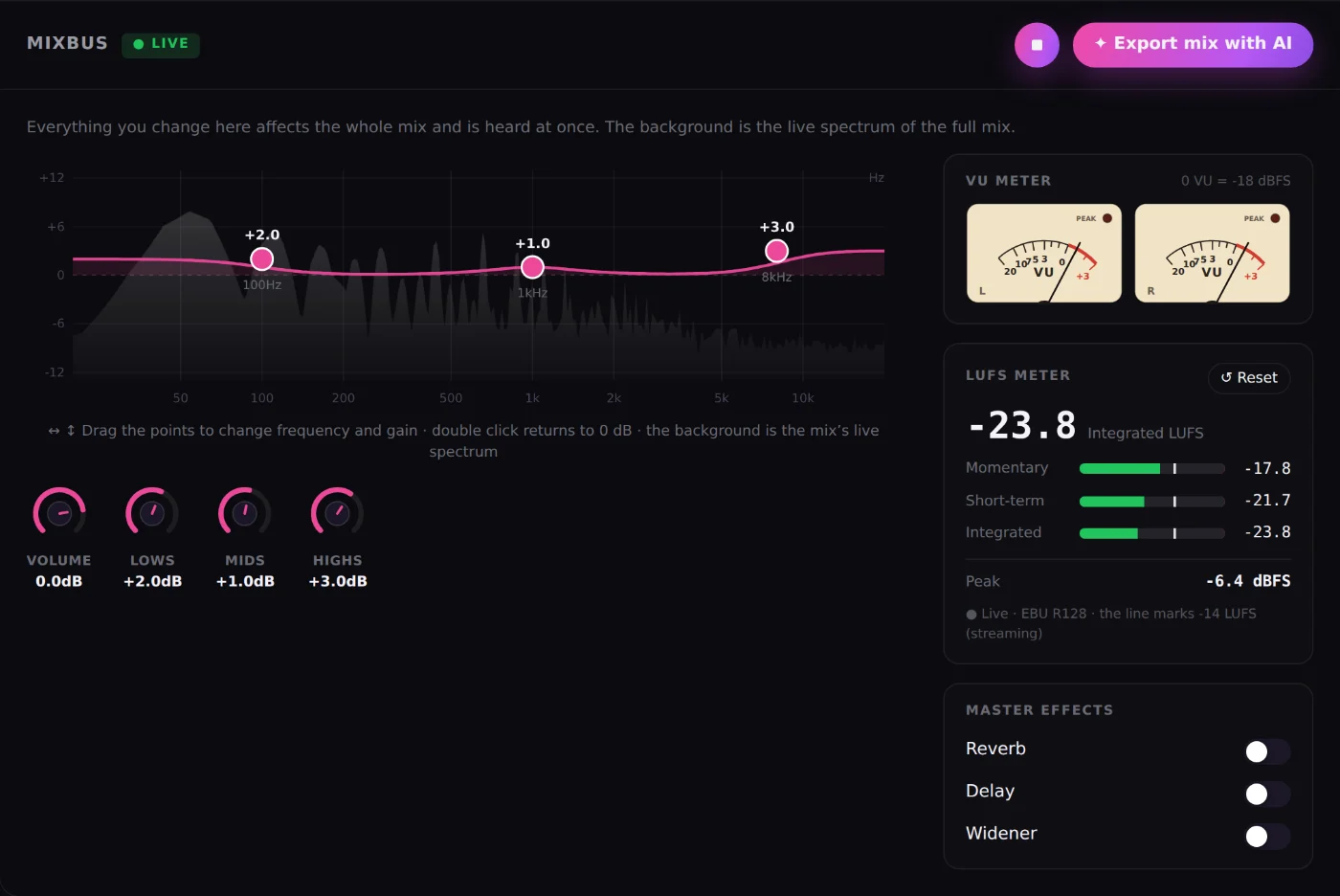
MixBus always in view
The whole-mix EQ over its live spectrum, overall volume and master effects, with no menus to dig through.
Real-time VU meter and LUFS
L/R needles with classic VU ballistics and an EBU R128 meter: momentary, short-term, integrated and peak.
Reference trackUNLIMITED
Bring your mix closer to the tone, dynamics and loudness of a song you love, before mastering.
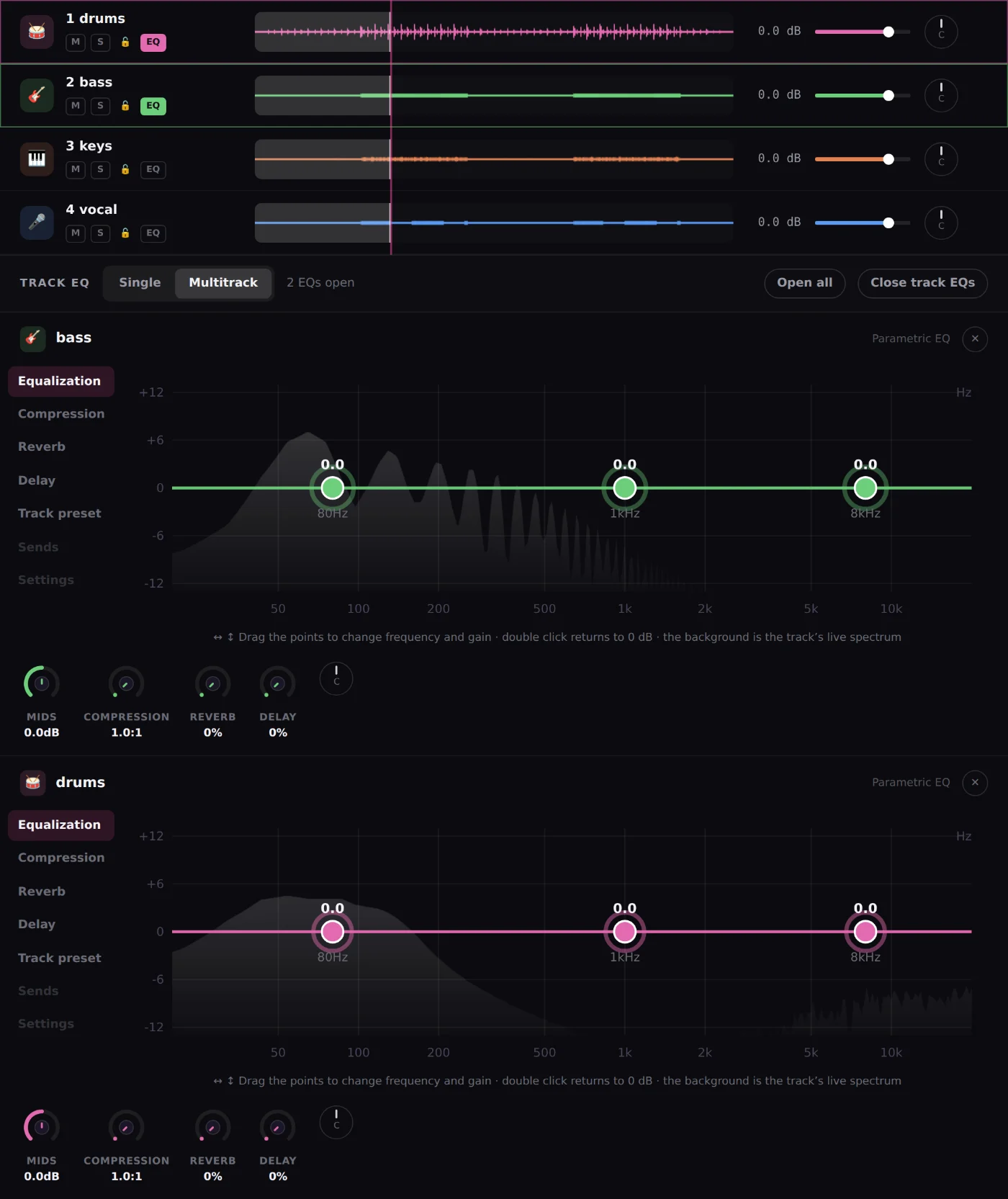
Per-track EQ, single or multitrack
Drag the points over each instrument’s spectrum. Open one EQ or several at once and close them whenever you like.
Per-instrument presets
Vocals, drums, bass, guitars and keys get EQ, compression, reverb and delay designed for each.
AudioChatUNLIMITED
Type "more clarity on the vocal" and the assistant adjusts level, EQ or effects. You hear it and you can undo it.
COMPARISON
What your mix gains with MixingMusic.AI
Against eMastered, LANDR, Moises, Suno and Waves, feature by feature. Data from their official pages.
| Feature | MixingMusic.AIMixing + mastering | eMasteredAI mastering | LANDRMastering and more | MoisesApp and AI Studio | SunoGenerator + Studio | WavesOnline Mastering |
|---|---|---|---|---|---|---|
| Online mixing of your stems with per-track controlsUp to 12 tracks: volume, pan, EQ, compression, reverb and delay on each. | YesUp to 12 stems | Not in their public information | Not in their public information | PartlyAI Studio: presence, pan and reverb per track | PartlySuno Studio (Premier plan): volume, EQ and effects | Not in their public informationIts plugins run inside a DAW |
| Record vocals or instruments over the mix, in the browserInterface, computer or phone microphone; two inputs at once on separate tracks, re-record a section and compensated sync. | YesUp to 2 inputs at once, each on its own track | Not in their public information | Not in their public information | PartlyMobile app: video of you playing along and voice memos | YesSuno Studio (Premier plan) | Not in their public informationRecording happens inside a DAW |
| Per-track and whole-mix (MixBus) EQ with a live spectrumDraggable points; several EQs open at once in Multitrack mode. | Yes | Not in their public information | Not in their public information | Not in their public information | Partly6-band EQ in Studio | Not in their public information |
| LUFS (EBU R128) meter and stereo VU meter while you mixMomentary, short-term, integrated, peak and L/R needles in real time. | Yes | Not in their public information | Not in their public information | Not in their public information | Not in their public information | Not in their public information |
| Chat assistant that applies changes to your mixAudioChat: tap ✦ on a track or on the MixBus and ask, for example, "clearer vocal". It adjusts volume, pan, EQ, compression, reverb or delay; hear it and undo it. | YesFree: 1 try · Unlimited: 10/day · AI Advanced: up to 100/day | Not in their public information | Not in their public information | Not in their public information | Not in their public information | Not in their public information |
| AI that analyzes a track and adjusts it on its own"Analyze and adjust": measures level, dynamics, band balance and stereo of the track or the MixBus, and applies moderate changes you can undo. | YesPer track and on the MixBus | Not in their public information | Not in their public information | Not in their public information | Not in their public information | Not in their public information |
| Reference track applied from the mixTone, dynamics and loudness of a song you like, before mastering. | YesUnlimited plan | Not in their public information | Not in their public information | Not in their public information | Not in their public information | Not in their public information |
| Coherent album mastering | YesUp to 12 songs · Unlimited | Not in their public information | Yes | Not in their public information | Not in their public information | Not in their public information |
| Unlimited use for one payment, no subscription | YesUnlimited or AI Advanced: one payment | Not in their public informationSubscription | Not in their public informationSubscription or pay per master | Not in their public informationSubscription | Not in their public informationSubscription | Not in their public informationCredits per song |
✓ Available◐ Partly or with conditions— Not in their public information as of September 28, 2026
See the full comparison with sources →UNLIMITED DIFFERENCE
An album is not a row of singles.
Album mode analyzes up to 12 mixes as one body of work to share tonal identity, dynamic range and perceived loudness without erasing each song’s character.
Frequently asked questions
What is MixingMusic.AI?
A platform that mixes stems and masters finished songs in the browser using real audio processing (EQ, compression, stereo imaging, loudness) guided by AI — not a music generator or a text-only advisor.
How is AudioChat different from asking a chatbot for mixing advice?
AudioChat does not just describe what to do: it proposes concrete parameter changes (level, pan, EQ bands, compression ratio, reverb, stereo width) that are applied directly to the real audio chain you are editing, and you can hear and undo every change before committing to it.
Can MixingMusic.AI master a full album with a coherent sound?
Yes, with Album Mode: up to 12 songs get the same preset, intensity, stereo width and loudness target, so the whole release has a coherent tonal character and perceived loudness.
What audio formats does MixingMusic.AI accept and export?
It accepts WAV, AIFF, MP3, FLAC and M4A. It exports 24-bit WAV and 320 kbps MP3.
Is MixingMusic.AI free?
There is a free plan (1 mix, 1 MP3 master and 1 AudioChat AI try), Unlimited for US$14.99 and AI Advanced for US$69 (was US$99). Both paid plans are one-time payments, not subscriptions: they remove the limits and unlock Album Mode; AI Advanced raises AudioChat to up to 100 messages a day.
Does MixingMusic.AI protect mono compatibility?
Yes. It detects dual-mono or highly correlated files during analysis and automatically disables stereo widening on them, so a mono-sourced file never loses its phase coherence to an automatic width adjustment.