
AI INSTRUMENTS · FROM THE MIXER CHAT
Add instruments to your song with AI: ask for them in the chat and they arrive as new tracks
Type “add drums” or “give it a bass and a piano”. The AI listens to your mix, writes the instrument following its tempo, key and chords, and adds it as one more track for you to mix.
Try it in the mixer →You need an account: each instrument uses 1 song from your balance. Free includes 1; Unlimited 20 a month and AI Advanced 60.
- Follows your tempo and chords
- Each instrument is a new track
- Shows as a track while it is generated
- No subscription
From “it needs drums” to a new track, in four steps
Open your mix
Upload your tracks to the mixer or open a song made here. A single track (a vocal, a guitar, a piano) is already a base for the AI to write the rest.
Ask for it in the chat
Type “add ballad-style drums”, “give it a bass and a piano” or “which instruments is the song missing?”. You can also ask for a specific style: “soft drums with brushes”.
Watch it being written
As soon as you ask, a track with moving waves appears in the mixer saying “AI generating instrument”. There is nothing to confirm: each instrument uses 1 song from your balance.
Mix the new track
Each instrument takes about a minute and arrives as a track as long as the song. You adjust its volume, EQ, pan or plugin like any other, or remove it if you do not like it.
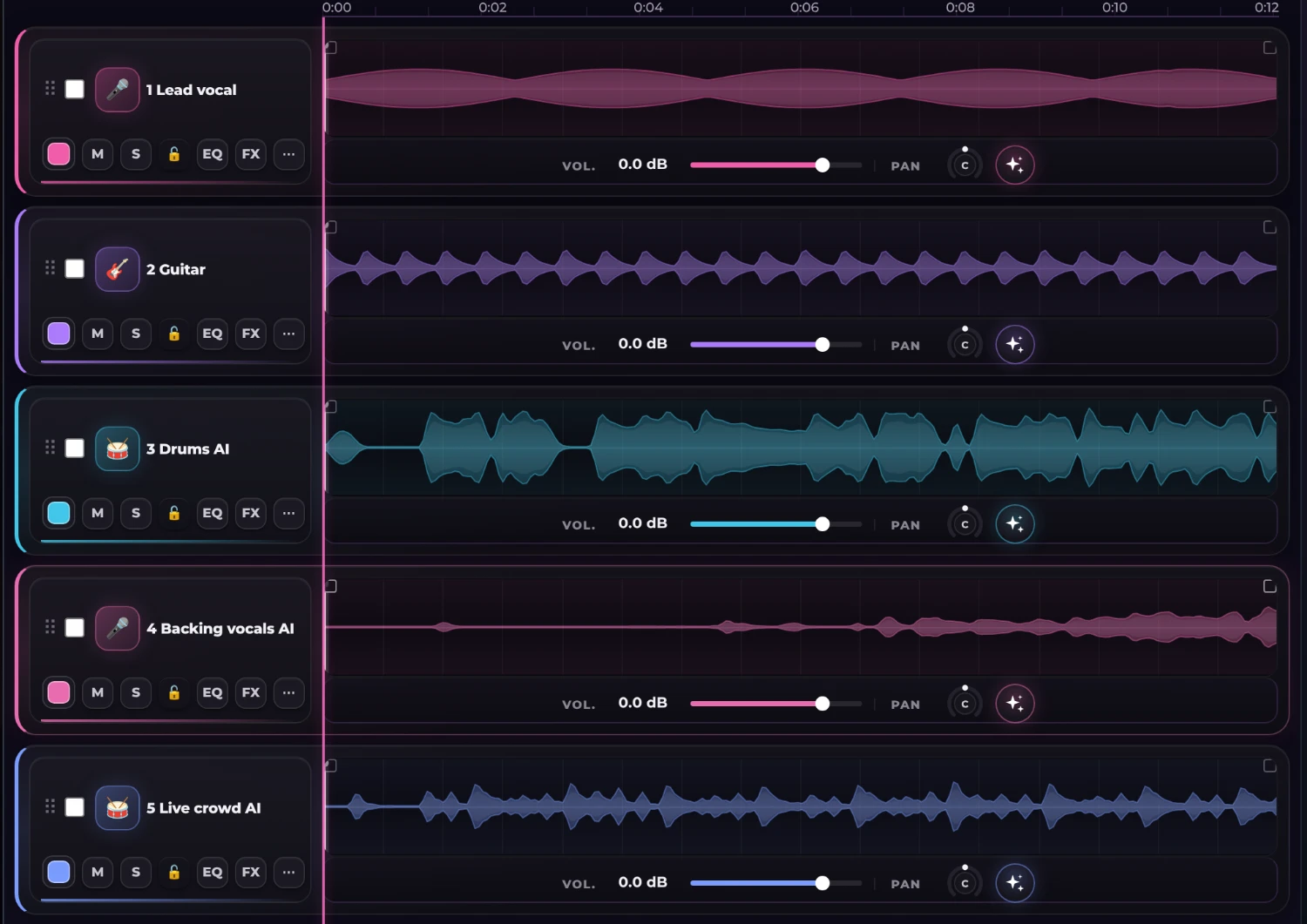
The new tracks, next to yours
Here a vocal and a guitar received drums, backing vocals and a live crowd. The AI tracks are recognised by their name, go into the export and the MixBus, and are saved with the session.
- As long as your song, ready to mix
- With volume, EQ, plugins and presets like any track
- Exported with the mix and with the stems
Which instruments it can write
Rhythm section
Drums, percussion and bass. If you ask for several, the AI writes the rhythm section first and the rest builds on it.
Harmony
Guitar, keys or piano, strings, brass, woodwinds and synth, following your song’s chords.
Choir and crowd
Backing vocals with wordless harmonies and a live crowd with applause and cheers, for a live feel.
Effects
Sound effects and ambiences to lift a transition or open a section.
Asking the AI versus recording it or hunting for loops
A session musician or a loop library is still the best option when you want one very specific sound. This is the honest comparison for finishing a song quickly.
| Loops or a session musician | AI instruments here | |
|---|---|---|
| Fit to your song | Tempo and key must be matched by hand | The AI listens to your mix and follows its tempo and chords |
| Time | Hours of searching or recording | About a minute per instrument |
| Control of the sound | Total, if you record it yourself | You ask for the style in words and mix it afterwards |
| Cost | Paid per loop, per session or per hour | 1 song from your balance per instrument |
You can combine: record your guitar or vocal and ask the AI only for what is missing. Try it in the mixer →
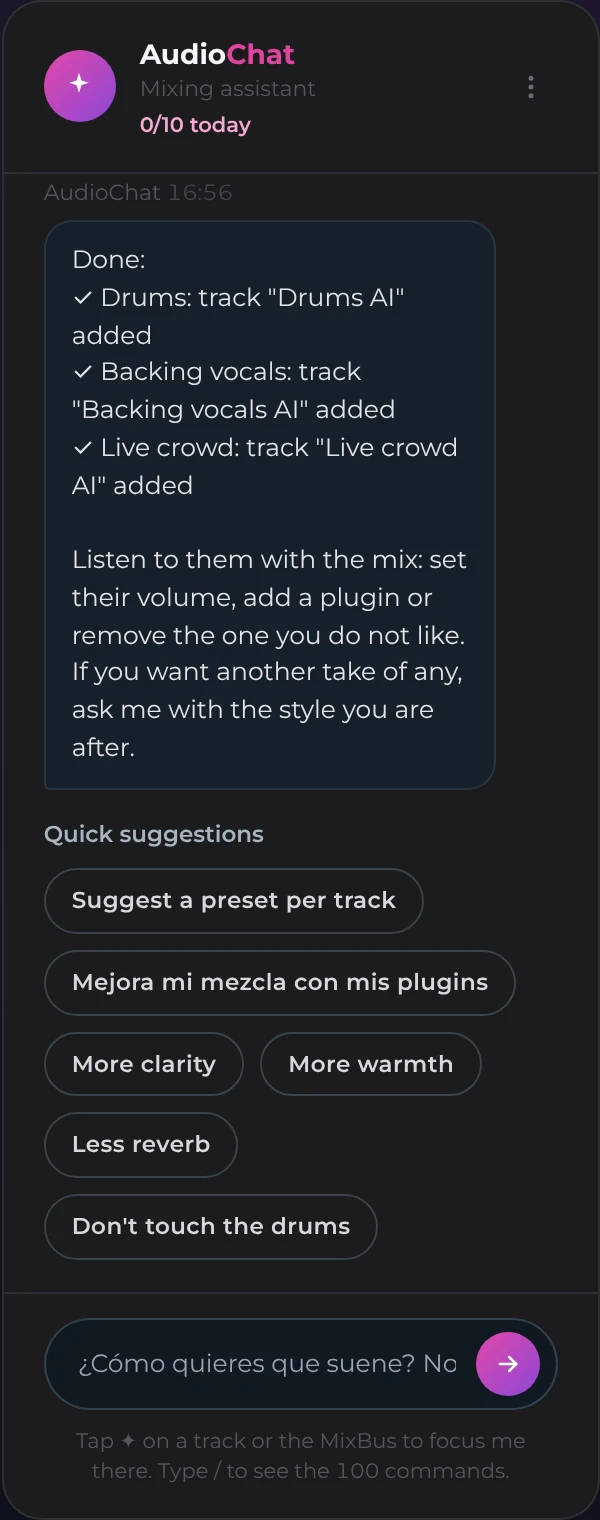
The chat tells you what it did and what it used
While it generates, the mixer shows the track being written. When it finishes, the chat summarises what it added track by track, how many songs it used and how many instruments you have left this month.
- It generates as soon as you ask
- If an instrument fails, it is not counted
- You can ask for another take in another style
What to expect from the result
Each instrument is written by an AI model that listens to your mix at that moment: it follows its tempo, key and the shape of the song. It is a very fast starting point, not a human recording, and it is worth listening to it with the mix before you keep it.
If it does not convince you, ask for another take in other words (“softer”, “more groove”, “only in the choruses”) or remove it. Each instrument inherits what is already in the mix, so order matters: the rhythm section first and then the rest.
Ask your mix for what it is missing
Open the mixer, type what you want in the chat and hear your song with its new band.
Try it in the mixer →Frequently asked questions
How much does an instrument cost?
Each instrument uses 1 song from your balance. The free plan includes 3 trial instruments; Unlimited allows 20 a month and AI Advanced 60. If an instrument fails, it is not counted.
Which instruments can it generate?
Drums, percussion, bass, guitar, keys or piano, strings, brass, woodwinds, synth, sound effects, backing vocals with wordless harmonies and a live crowd.
Does it follow my song’s tempo and key?
Yes: the AI listens to your mix as it sounds at that moment and writes the instrument following its tempo, key, chords and structure. It is worth listening to it with the mix, because it is an AI generation and does not always get it right on the first try.
How long does it take?
About a minute per instrument. If you ask for several, they are generated one after another, starting with the rhythm section.
Can I change or remove an instrument I do not like?
Yes. It is a track like any other: you mix it, mute it or delete it, and you can ask for another take in another style.
What is sent to the AI?
The mix as it sounds in the mixer, as an audio file, so the AI can listen to it. It is sent only when you ask to generate an instrument.