
LIVE CROWD · A LIVE FEEL
A live crowd for your song, with AI: applause, cheers and ovation as a separate track
Ask “add a live crowd” in the mixer chat and the AI creates an audience track (applause, cheers, people singing along) designed to accompany your song, for a concert feel.
Try it in the mixer →It counts as one instrument: it uses 1 song from your balance. Unlimited allows 20 instruments a month and AI Advanced 60.
- Applause, cheers and ovation
- A separate track, at your volume
- Shows as a track while it is generated
- No subscription
Your song with a concert feel, in three steps
Open your mix
Upload your tracks to the mixer or open a song made here. The AI listens to the mix so the crowd accompanies the song.
Type “add a live crowd”
“Applause”, “ovation” or “audience singing along” also work. It is generated as soon as you ask.
Set the crowd volume
It arrives as a new track (“Live crowd AI”): lower it for a subtle ambience, raise it in the chorus or trim it to leave the applause only at the end.
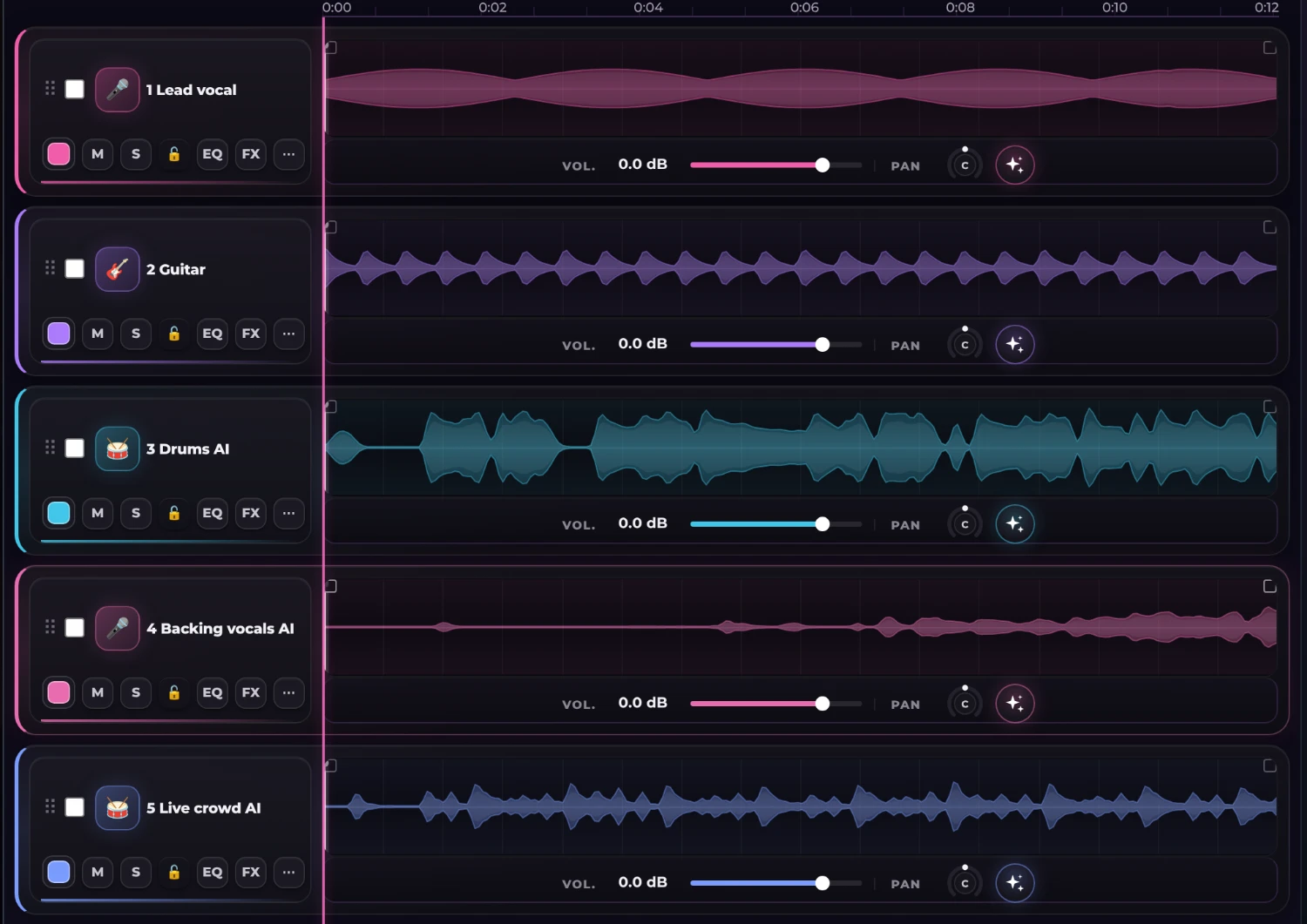
The crowd track, in your mix
The fifth track is the crowd: it has its own waveform and blends with the rest; you decide how much it shows without covering the vocal.
- Applause, cheers and people singing along
- No music: only the audience
- A separate track with volume, EQ and pan
What it is for
To give a studio song the air of a live recording: a home “live” album, a demo you want to present as a concert, a video with a room atmosphere or the intro and ending of a performance. The crowd is mixed like any track, so you decide how much it shows.
It is an AI-generated ambience, not a recording of a real concert. It works best subtle and low in the mix; if you raise it a lot you can tell it is synthetic.
Tips to mix it
Trim the crowd so it comes in at the end of each section, lower its volume during the verses and raise it in the chorus. A bit of reverb on the MixBus blends it with the vocal and the instruments.
Fill the room
Open the mixer, ask for the crowd in the chat and make your song sound live.
Try it in the mixer →Frequently asked questions
Does the crowd come with music or just the audience?
Just the audience: applause, cheers and people singing along, with no music. It mixes with your tracks like any other.
Is it a recording of a real concert?
No. It is an AI-generated ambience to give a live feel. It works best subtle and low in the mix.
How much does it cost?
It counts as one instrument. Each instrument uses 1 song from your balance. The free plan includes 3 trial instruments; Unlimited allows 20 a month and AI Advanced 60. If an instrument fails, it is not counted.
Can I trim or move the crowd?
Yes, it is a track as long as the song: you trim it, move it, lower its volume in the verses or mute it where you do not want it.
Does it work for songs I did not make here?
Yes. Upload your tracks to the mixer (2 to 12 stems) and ask for it in the chat.