

MIXING FOR BEGINNERS · WITH AI
How to mix a song if you are starting today: with presets, an AI chat and no jargon
Mixing is balancing the tracks so each one is heard and all sound good together. Here you learn the basics as you do them: the AI proposes, you listen and decide.
Try my first mix →The first mix is free and with every adjustment you see and hear what changed.
- Genre presets
- AI chat in your language
- Undo any adjustment
- No prior experience
The five ideas you need
Balance
How loud each track is compared to the others. It comes first and changes a mix the most.
EQ
Raises or lowers bass, mid and treble zones of a track so tracks do not mask each other.
Compression
Brings the loud and the quiet parts of a track closer so it sounds more even.
Pan
Spreads the tracks between left and right so each has its own place.
Reverb and delay
They give a sense of space and depth. A little usually sounds better than a lot.
Final loudness
It is set at the end, in mastering, so your song sounds good next to others on the platforms.
What to adjust when something sounds wrong
A starter guide to the most common problems of a first mix. They are starting points, not rules: always trust what you hear.
| What you hear | What is usually going on | What to try |
|---|---|---|
| The vocal sits behind | The instruments take its space | Raise the vocal and trim the mids of the guitar or keys |
| It sounds muddy or boxed in | Low and low-mid frequencies pile up | Cut lows on the tracks that do not need them |
| The highs sting | Too much brightness in vocals or cymbals | Lower the highs of that track a little |
| It lacks air or space | Everything sounds dry and flat | Add a little reverb to the vocal and spread with pan |
With the AI chat you can ask for each adjustment in your own words. Try my first mix →
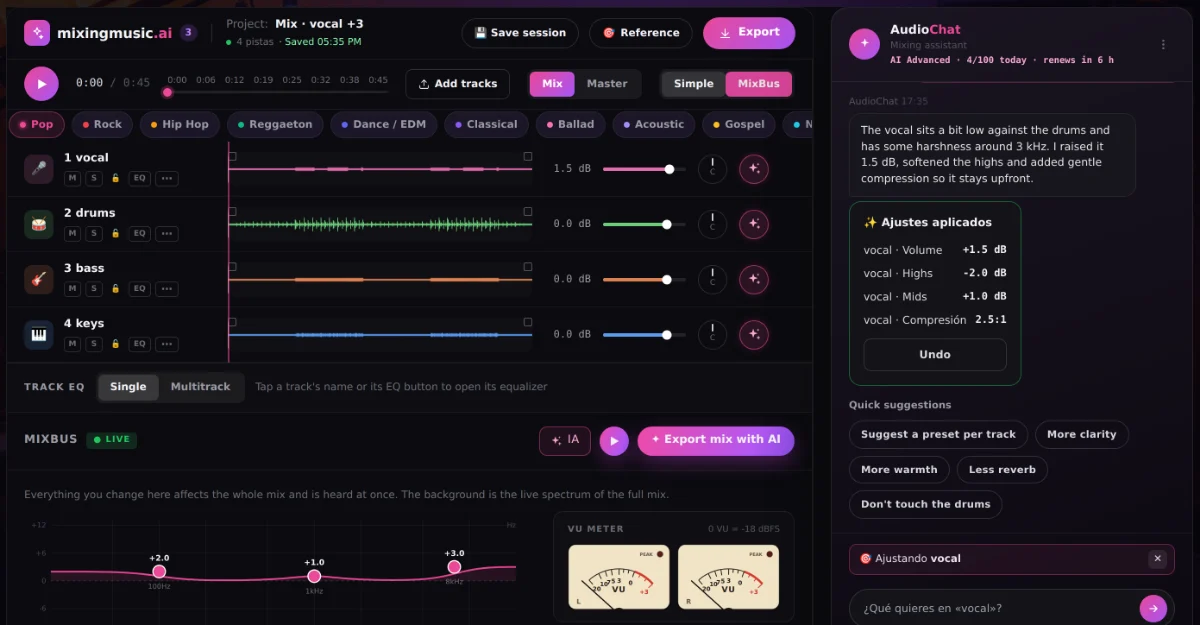
Ask the AI for what you want to hear
You write “more clarity” or “less reverb” and the AI proposes per-track adjustments you can hear and compare before applying them. With the analyze-mix function, it measures level, peaks and frequency bands and explains what to adjust.
- Commands such as /reverb 30 vocals or /bass +2 that use no AI messages
- Every change is undone with one click
- Free: 1 “analyze and adjust” try
A workflow that works
If you do not know where to start, follow this order: first the balance, with everything at the same low volume so you are not fooled; then EQ so tracks do not mask each other; then compression of the vocal and the bass; and finally space, with reverb and delay. Finish by listening on small speakers and on headphones before calling the mix done.
And remember that mixing is a skill sharpened by listening. Every mix you make teaches you something, and here you can try without fear because everything can be undone.
The best way to learn is to mix a song
Upload your tracks, try a preset and adjust one thing at a time. The first mix is free.
Try my first mix →Frequently asked questions
What do I need to start mixing?
Separate tracks (stems) of your song and some headphones. The tracks can be your own recordings or stems exported from an AI-made song.
What if I only have the finished song, without stems?
Then there is nothing to mix: you can master it to adjust loudness and tone, or use “Improve mix with AI” to fix clarity and width.
How many tracks can I mix?
From 2 to 12 tracks per project, each assigned a type (vocals, drums, bass, guitar, keys) to apply the right presets.
Can the AI ruin my mix?
Not without your permission: the AI’s adjustments are proposed, heard and only applied if you press apply. Everything can be undone.
How much does it cost?
The first mix is free. For unlimited mixes, Unlimited costs US$7.99 (was US$19.99), with a single payment.