

MIX VOCALS AND BEAT · RAP, URBAN AND POP
Mix your vocals with the beat online: upfront and noise-free
Upload the beat and your vocals, or record them over the beat without leaving the page. The vocal plugin, noise cleanup, reverb and delay make your voice fit in the mix.
Mix my vocals with the beat →Your first mix is free. Vocal plugins and unlimited tracks with a one-time payment from US$7.99.
- 5 vocal presets and 2 backing ones
- Real noise cleanup
- Record over the beat
- Reverb, delay and chorus per track
Your vocals over the beat, step by step
Load the beat and record or upload your vocals
Upload the beat as one track and your vocals as another. Or record them over the beat with your audio interface or the microphone, hearing yourself in real time.
Give the vocal character
Pick a vocal preset (bright pop, warm ballad, urban / rap, rock or radio / lo-fi), or two for backing vocals, and clean up the background noise.
Place it with some space
Add ROOM (reverb) and ECHO (delay) to the vocal track and balance its level against the beat until every word is clear.
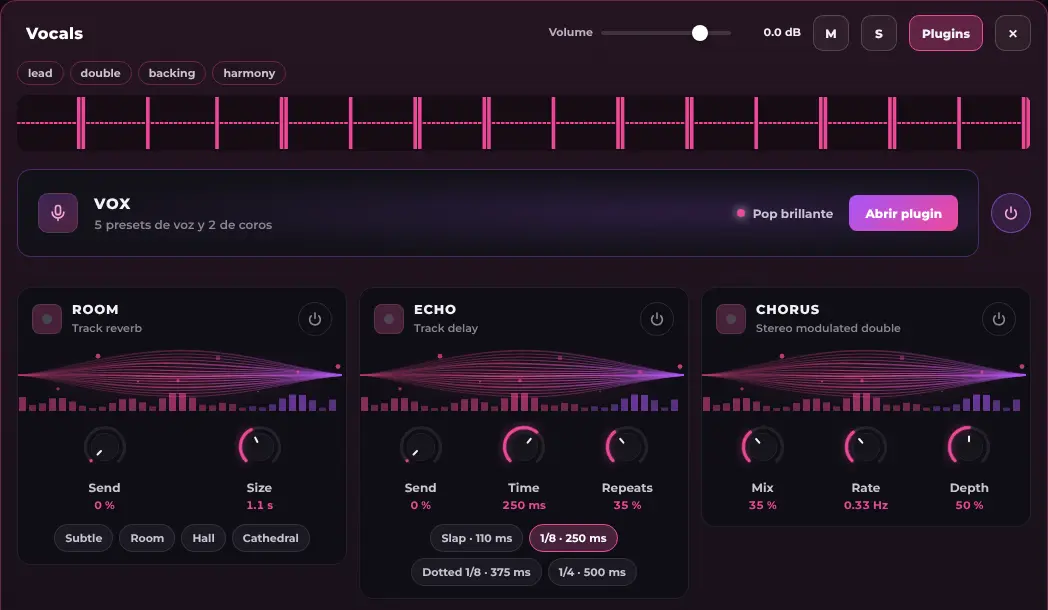
Record over your beat with effects on every track
On the Record screen every track has its instrument plugin plus ROOM, ECHO and CHORUS. What you hear while recording stays on the track, but the take is saved clean: you can change it later without singing again.
- Pick the interface and the input channel
- Hear your voice through the plugin you chose
- Up to 12 tracks per session
A recipe to make the vocal sit on the beat
There is no single recipe, but this order usually gives a good starting point and can be followed with each track’s controls:
- Level first: raise the vocal until every word is clear without covering the beat, and leave the kick and snare with presence.
- Remove what is not needed: a low cut on the vocal (below about 80 to 100 Hz) cleans bumps and rumble that add nothing.
- Gentle compression: if some words get lost and others jump out, a little compression brings them closer together.
- Space in moderation: reverb and delay add depth, but too much pushes the vocal back. Start low and raise it until you notice it, then lower it a little.
If your vocal has background noise
Recording at home leaves fan, street or room noise. Noise cleanup learns what that noise sounds like from the pauses of your own track and reduces it, with an optional noise gate. It is a non-destructive adjustment and is re-applied when you reopen the session.
What every vocal track has
VOX: 5 vocal presets and 2 backing ones
Bright pop, warm ballad, urban / rap, rock and radio / lo-fi, plus double and wide backing vocals.
ROOM, ECHO and CHORUS
Reverb with a size, delay with note-value times and repeats, and chorus with mix, rate and depth.
AI chat
Ask it for “clearer vocals” or type a command like /reverb 30 vocals; commands do not use AI messages.
Make your vocal sound like a record
Upload your beat and your vocal and hear it: the first mix is free.
Mix my vocals with the beat →Frequently asked questions
Can I record my vocal directly over the beat?
Yes. On the Record screen you upload the beat, pick your interface or microphone and record while hearing yourself. With 2 inputs at once and up to 12 tracks per session.
Does it work for rap and urban music?
Yes: there is an “urban / rap” vocal preset made for a dry, upfront voice, and you can add doubles and backing vocals with the two backing presets.
What latency does it have when recording?
No browser app reaches zero. With an audio interface and wired headphones it is not noticeable; with Bluetooth there is always a delay. If your interface has direct monitoring, use it.
Can I use my own vocal plugins?
No: browsers cannot load installed VST or AU plugins. The effects are MixingMusic.AI’s own; if you need specific plugins, mix in your DAW and master here.
How much does it cost?
Your first mix is free. Unlimited costs US$7.99 (was US$19.99) and AI Advanced US$15, one payment and no subscription.