
Hear your mix as it is
Real waveform, play, live EQ, LUFS and VU before any processing.
Mix your stems with AI, hear your mix with its real waveform and meters, let the AI analyze it and master your song with AI for Spotify, Apple Music and YouTube. All in your browser, in English and Spanish, with a one-time payment.
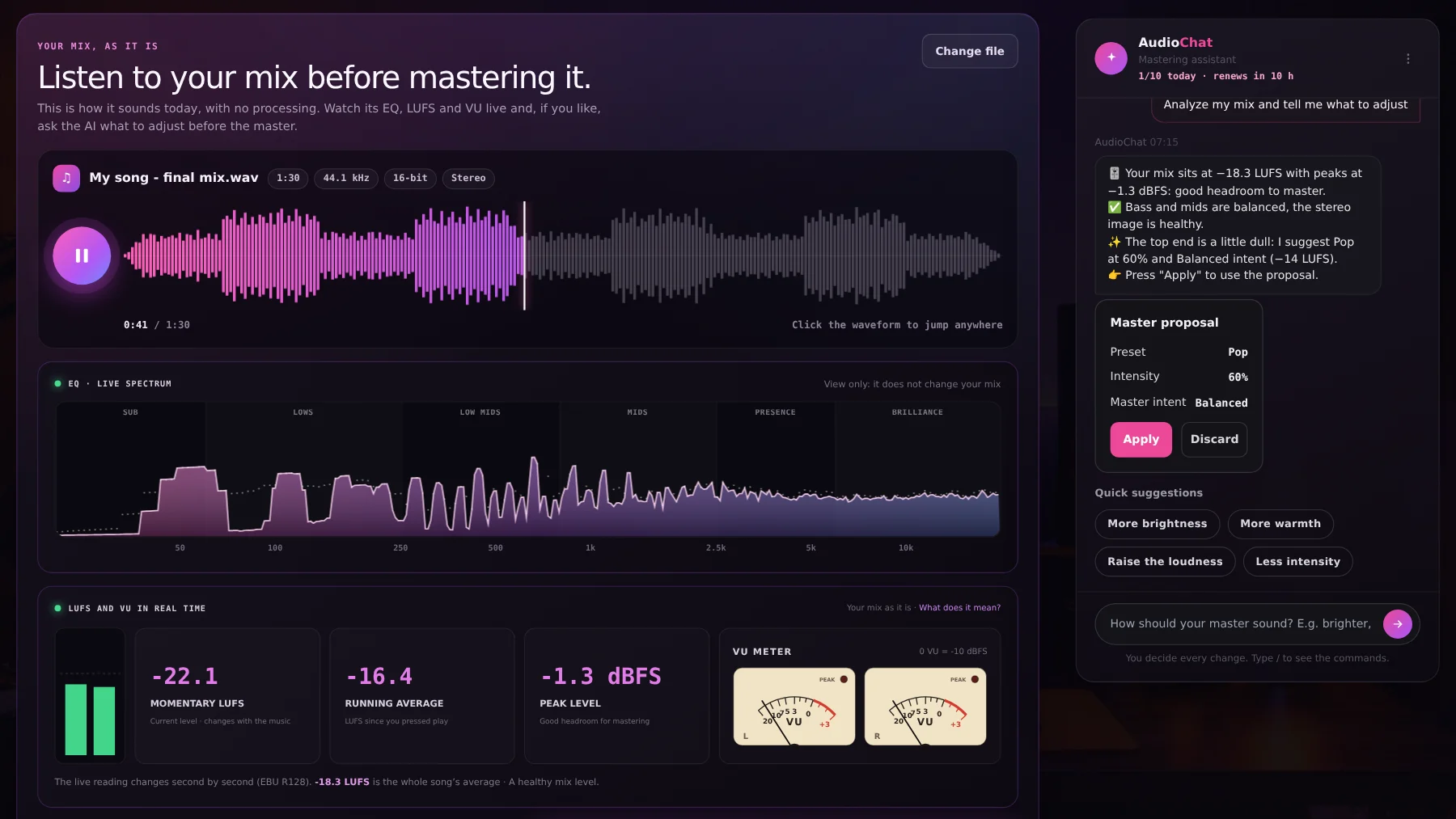
When you upload your mix you see its real waveform and hear it as it is, with the live EQ, the LUFS meter and the VU moving. If you like, press "Analyze mix with AI": the AI measures your file, tells you what works and what to adjust, and suggests the preset, intensity and loudness. You decide whether to apply it.
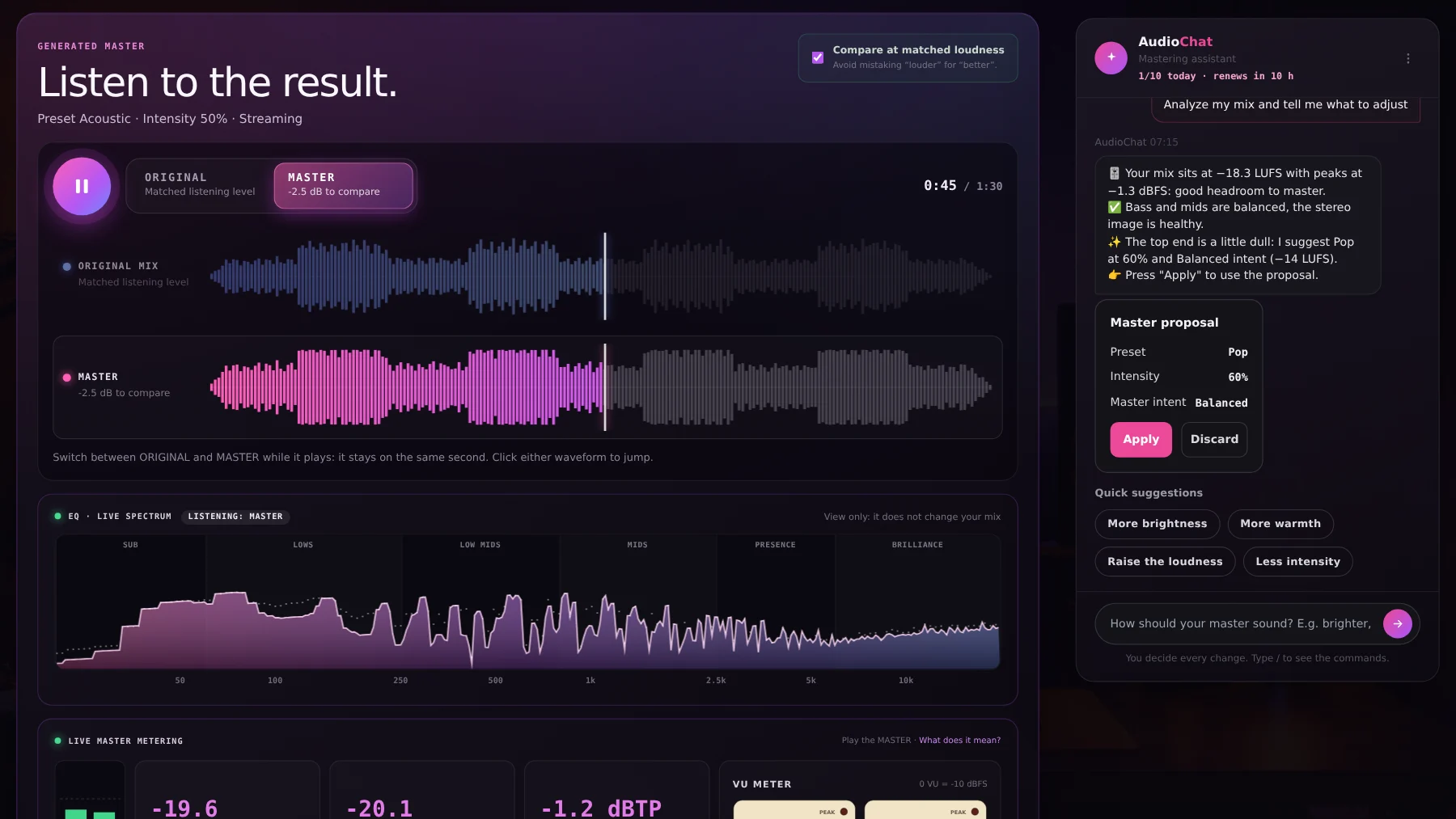
Switch between ORIGINAL and MASTER while it plays and it stays on the same spot, with no gap. Both waveforms are drawn to one scale so you see the change, and with matched loudness you never mistake "louder" for "better". The spectrum and meters follow the version you hear.
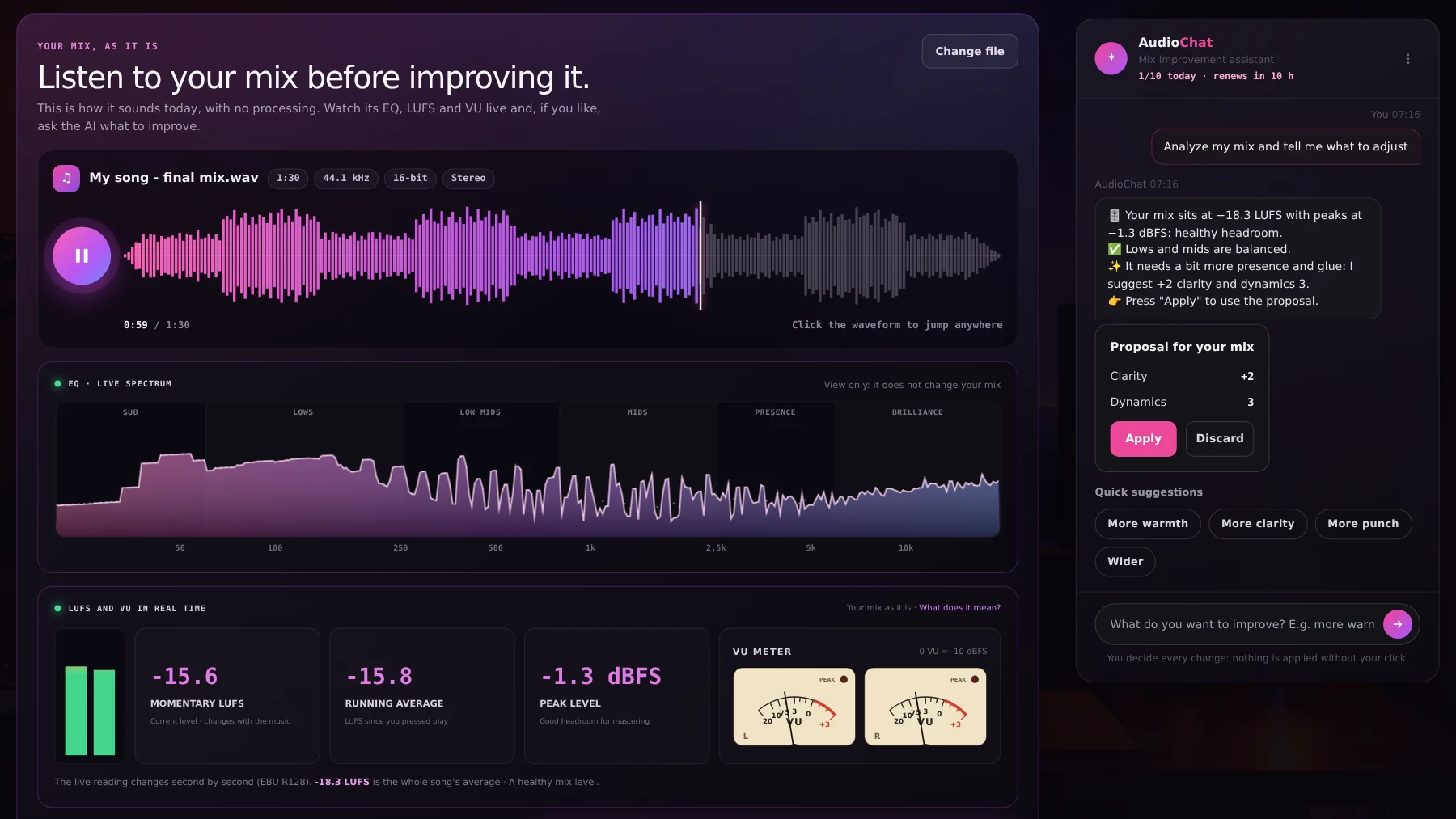
Only have the mix, not the stems? Improve mix adds warmth, clarity, punch and width carefully, with no limiter, leaving headroom for mastering. The AI analyzes it and suggests how far to move each control.
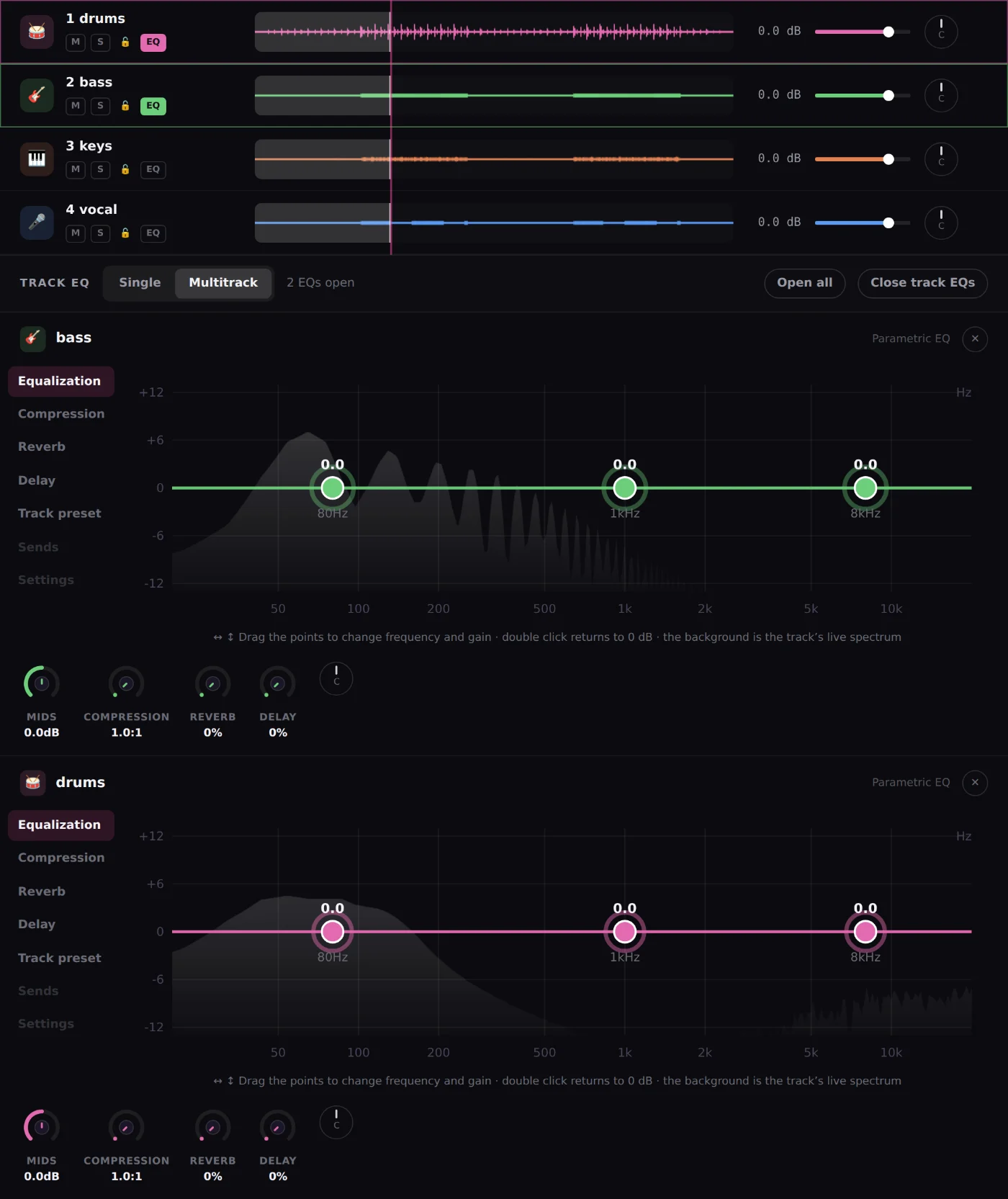
Upload up to 12 stems and the AI mixes them by your song’s style and each track’s instrument. Then fine-tune everything: per-track EQ with nodes over the spectrum, compression, reverb, delay, fades and pan. Drag tracks to reorder them, tick several to set one volume at once and come back any time: sessions save on their own.
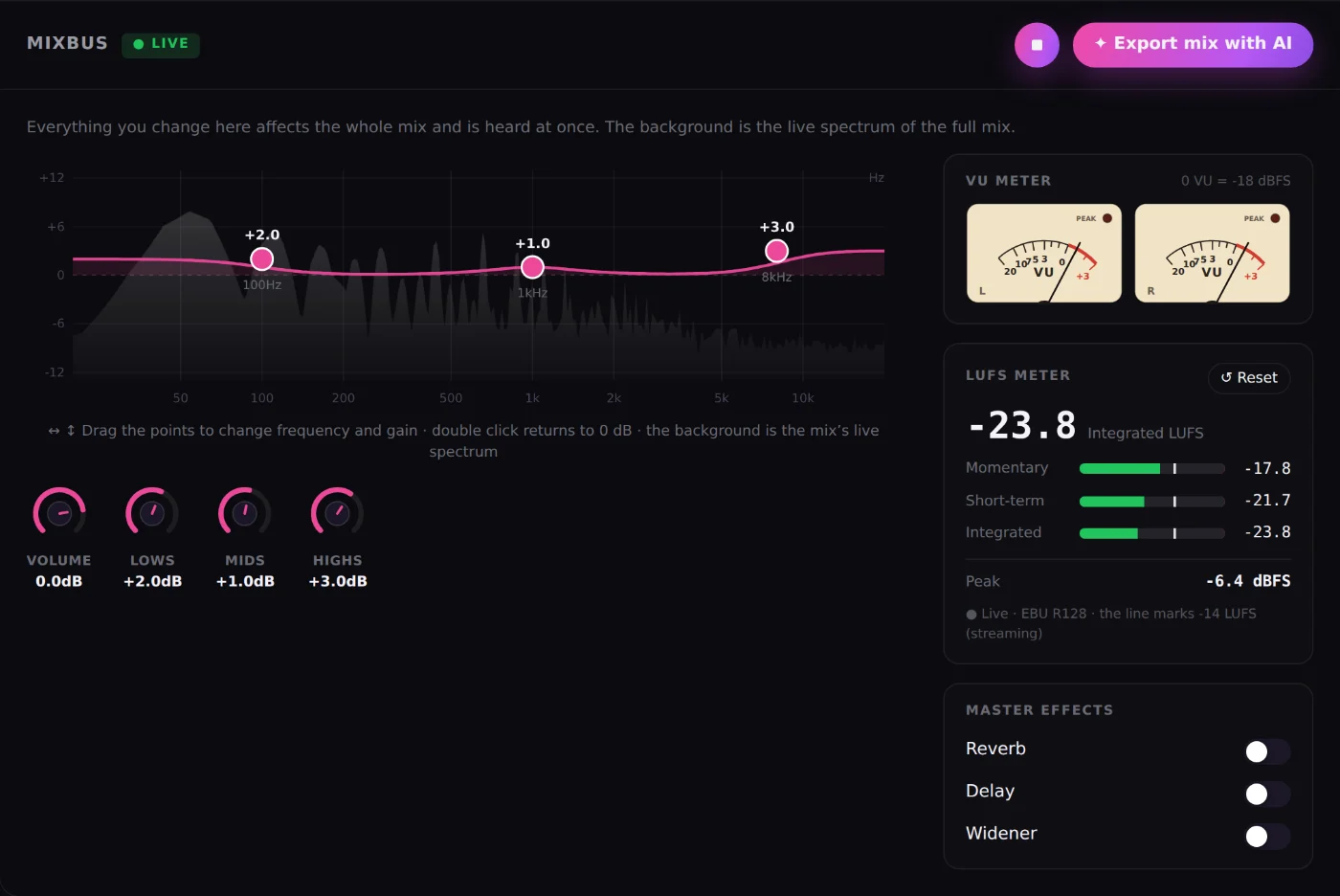
The MixBus shows your whole mix with an EQ over the live spectrum, a stereo VU meter and an EBU R128 LUFS meter. The 12-band IA EQ sets itself with "Adjust with AI" from what it measures in your song.
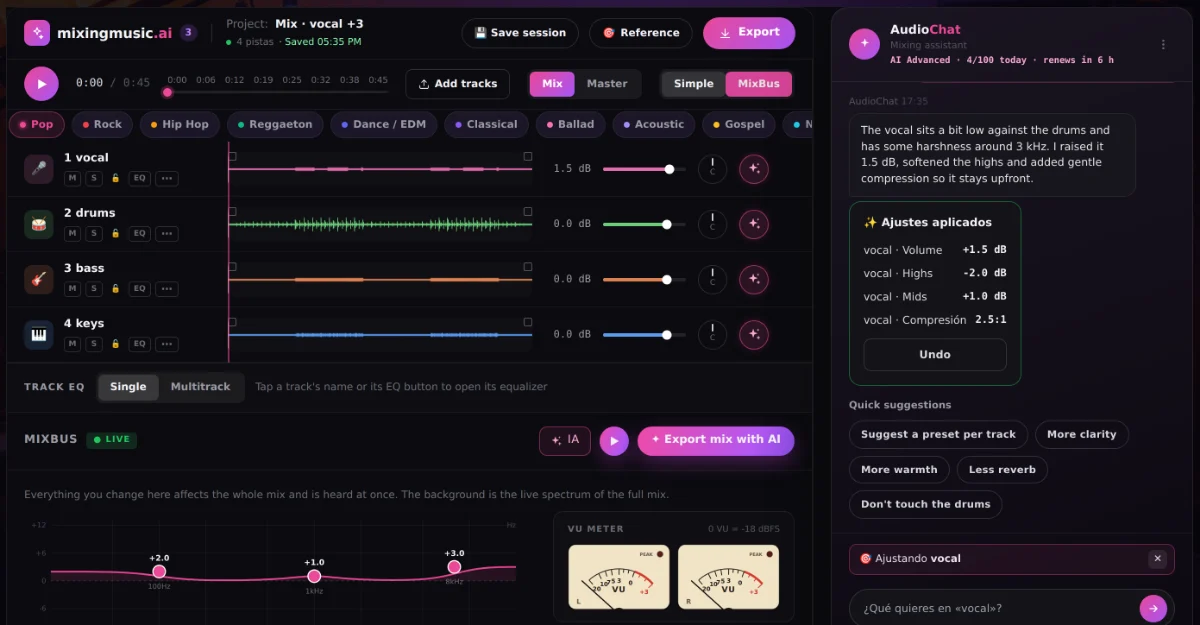
Tap ✦ on a track or the MixBus and AudioChat analyzes and adjusts it, or tell it what you want: "vocals more upfront", "less reverb", "brighter master". Every change can be undone, and the 100 / commands use no messages.
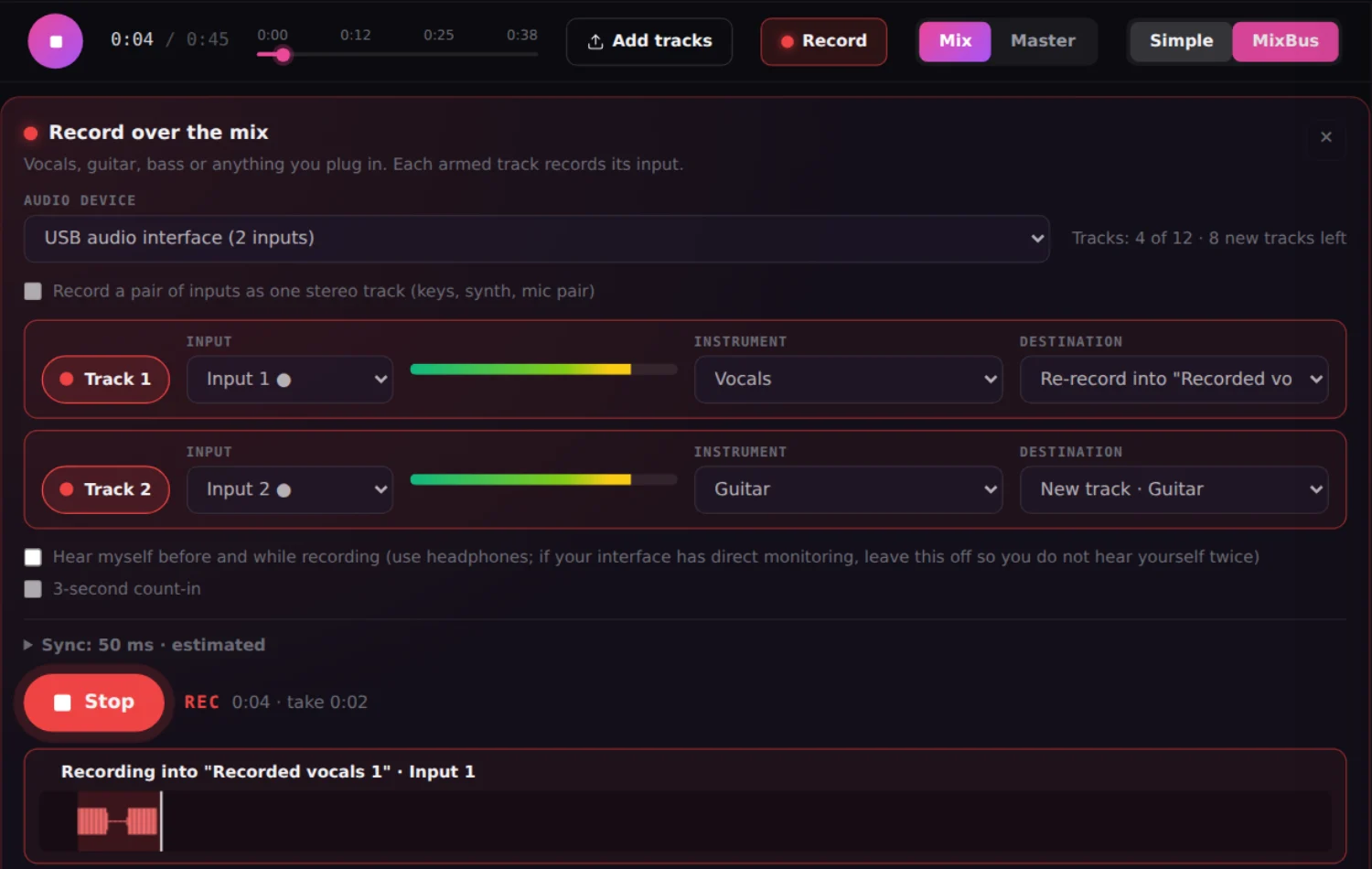
Plug in your interface or use the computer or phone microphone, hear the song and record. The take lands in time on its own track; if there is background noise, noise cleanup removes it without touching the original.
Real waveform, play, live EQ, LUFS and VU before any processing.
A diagnosis of your mix and a proposal you approve.
Original and master with no gap, at matched loudness.
Warmth, clarity, dynamics and stereo with the AI’s analysis.
Master towards the sound of a song you love.
Up to 12 songs with one character and consistent loudness.
Recommendations designed for AI-generated audio.
The MixBus is equalized with AI from your song.
Analyze and adjust a track or the MixBus, with 100 commands.
Record over the mix and remove background noise.
Drag tracks and set the volume of several at once.
Reopen your mixes and masters from the home or the menu.
Feature by feature, with what each service offers today according to its official pages. Checked on September 28, 2026.
✓ Available◐ Partly or with conditions— Not in their public information as of September 28, 2026
| Feature | MixingMusic.AIMixing + mastering | eMasteredAI mastering | LANDRMastering and more | MoisesApp and AI Studio | SunoGenerator + Studio | WavesOnline Mastering |
|---|---|---|---|---|---|---|
| Mixing your stems | ||||||
| Online mixing of your stems with per-track controlsUp to 12 tracks: volume, pan, EQ, compression, reverb and delay on each. | YesUp to 12 stems | Not in their public information | Not in their public information | PartlyAI Studio: presence, pan and reverb per track | PartlySuno Studio (Premier plan): volume, EQ and effects | Not in their public informationIts plugins run inside a DAW |
| Automatic AI mix by stylePop, rock, hip hop, reggaeton, ballad, acoustic, gospel and more. | Yes | Not in their public information | Not in their public information | YesAI Mixing by style | Not in their public information | Not in their public information |
| Per-instrument presetsVocals, drums, bass, guitars and keys get settings designed for each. | Yes | Not in their public information | Not in their public information | Not in their public information | Not in their public information | Not in their public information |
| Per-track and whole-mix (MixBus) EQ with a live spectrumDraggable points; several EQs open at once in Multitrack mode. | Yes | Not in their public information | Not in their public information | Not in their public information | Partly6-band EQ in Studio | Not in their public information |
| LUFS (EBU R128) meter and stereo VU meter while you mixMomentary, short-term, integrated, peak and L/R needles in real time. | Yes | Not in their public information | Not in their public information | Not in their public information | Not in their public information | Not in their public information |
| Chat assistant that applies changes to your mixAudioChat: tap ✦ on a track or on the MixBus and ask, for example, "clearer vocal". It adjusts volume, pan, EQ, compression, reverb or delay; hear it and undo it. | YesFree: 1 try · Unlimited: 10/day · AI Advanced: up to 100/day | Not in their public information | Not in their public information | Not in their public information | Not in their public information | Not in their public information |
| AI that analyzes a track and adjusts it on its own"Analyze and adjust": measures level, dynamics, band balance and stereo of the track or the MixBus, and applies moderate changes you can undo. | YesPer track and on the MixBus | Not in their public information | Not in their public information | Not in their public information | Not in their public information | Not in their public information |
| Record vocals or instruments over the mix, in the browserInterface, computer or phone microphone; two inputs at once on separate tracks, re-record a section and compensated sync. | YesUp to 2 inputs at once, each on its own track | Not in their public information | Not in their public information | PartlyMobile app: video of you playing along and voice memos | YesSuno Studio (Premier plan) | Not in their public informationRecording happens inside a DAW |
| Per-track noise cleanup inside the mixRemoves fan, air conditioning or hiss by learning the noise from the track's pauses; optional noise gate, original file untouched. | YesAny track, recorded or uploaded | Not in their public information | PartlyReHance (LANDR Studio): cleans a file you upload, outside the mix | Not in their public information | Not in their public information | Not in their public informationIts cleanup plugins run inside a DAW |
| Reference track applied from the mixTone, dynamics and loudness of a song you like, before mastering. | YesUnlimited plan | Not in their public information | Not in their public information | Not in their public information | Not in their public information | Not in their public information |
| Mastering | ||||||
| AI mastering | Yes | Yes | Yes | Yes | Not in their public information | Yes |
| Reference track mastering | YesUnlimited plan | Yes | Yes | Yes | Not in their public information | Yes |
| Manual control of the resultIntensity, tone, stereo or loudness after the analysis. | YesIntensity, stereo and loudness | YesCompression, EQ, width and volume | YesStyles and level | YesAdvanced mode | Not in their public information | YesStyle and tone |
| Coherent album mastering | YesUp to 12 songs · Unlimited | Not in their public information | Yes | Not in their public information | Not in their public information | Not in their public information |
| Price and access | ||||||
| Unlimited use for one payment, no subscription | YesUnlimited or AI Advanced: one payment | Not in their public informationSubscription | Not in their public informationSubscription or pay per master | Not in their public informationSubscription | Not in their public informationSubscription | Not in their public informationCredits per song |
| Start for free | Yes1 mix + 1 master + 1 AudioChat AI try | PartlyFree trial | PartlyFree trial | YesFree plan | YesFree plan | PartlyFree trial |
| What others offer and MixingMusic does not | ||||||
| Generate songs or tracks with AI | Not in their public information | Not in their public information | PartlyLANDR Layers generates parts | PartlyGenerates backing parts | YesFull songs | Not in their public information |
| Split a finished song into stems | Not in their public information | Yes | Yes | Yes | Yes | YesMix Unlock plugin in your DAW |
| Distribution to streaming platforms | Not in their public information | Yes | Yes | Not in their public information | Not in their public information | Not in their public information |
| Plugins for your DAW | Not in their public information | YesATOM synthesizer | Yes | YesStems plugin | Not in their public information | Yes |
No card and no expiration.
One payment with Mercado Pago or PayPal.
One payment. Already on Unlimited? Pay only the difference.
It is the new version of MixingMusic.AI, the platform to mix and master music with AI in your browser. It adds a screen to hear your mix with its real waveform, live EQ, LUFS and VU; an AI analysis of your mix; A/B comparison of the master at the same second; Improve mix with AI; and vocal recording with noise cleanup inside the mixer.
Upload your mix as WAV, AIFF, MP3, FLAC or M4A, listen to it with its meters, optionally ask the AI to analyze it and press "Master with AI". Within seconds you compare the original and the master at matched loudness and download the master as MP3 or 24-bit WAV.
It measures your file in the browser (level, peaks, dynamics, frequency balance and stereo image) and the AI explains what works, what to adjust and what can only be fixed in the mix. It suggests preset, intensity, width or loudness and you decide whether to apply it; nothing changes without your click. It uses 1 AudioChat message.
Yes. Upload up to 12 stems, the AI mixes them by style and by each track’s instrument, you fine-tune with EQ, compression, reverb, delay, the MixBus and AudioChat, record vocals if you need to and export straight to AI mastering.
Yes. You can master the full song or mix the stems you export from Suno Studio. When you mark the song as AI-generated, the recommendation adapts to audio that arrives already processed.
MixingMusic.AI brings together, in the browser, stem mixing with per-track controls, a MixBus with LUFS and VU meters, an AI chat that analyzes and adjusts, recording and AI mastering, for a one-time payment. The table on this page compares them feature by feature with official sources.
You can try it free: one mix and one MP3 master. Unlimited (US$14.99) and AI Advanced (US$69) are one-time payments, no subscription, with unlimited mixes and masters in 24-bit WAV.
No. MixingMusic.AI runs in Chrome, Edge, Firefox and Safari, on desktop and on your phone. Your sessions save on their own so you can pick up where you left off.
Upload your mix or your stems and hear the difference today.
No monthly renewal, confusing credits, or annual contracts. Free to try it, Unlimited for the whole studio and AI Advanced to work with the AI every day.
No card and no expiration.
One payment with Mercado Pago or PayPal.
One payment. Already on Unlimited? Pay only the difference.