
Listen to the problem first.
A beat downloaded as one file cannot be adjusted: if the 808 distorts or the hi-hats mask the vocal, you have to find another one.
Choose "Instrumental beat", type the style (trap, reggaeton, drill, lo-fi, afrobeats, boom bap…) and, if you want, set the BPM and key. You get a vocal-free track ready to record over.
Make my beat →Record vocals over a beat →A beat downloaded as one file cannot be adjusted: if the 808 distorts or the hi-hats mask the vocal, you have to find another one.
Split the beat into stems, turn down or process each element in MixingStudio and record your vocal on top in the same mixer. Then master the finished song.
Describe the style and energy. Set the BPM (60 to 180) and key, or let the AI suggest them.
From 1:00 to 4:00. Normal uses 1 song from your balance; Premium, with more polished vocals, uses 3.
Export the stems, open them in MixingStudio, record your vocal over the beat and master the result.
Load up to 12 stems and control every track like in a studio. The AI proposes the mix; you decide every change and hear it instantly.
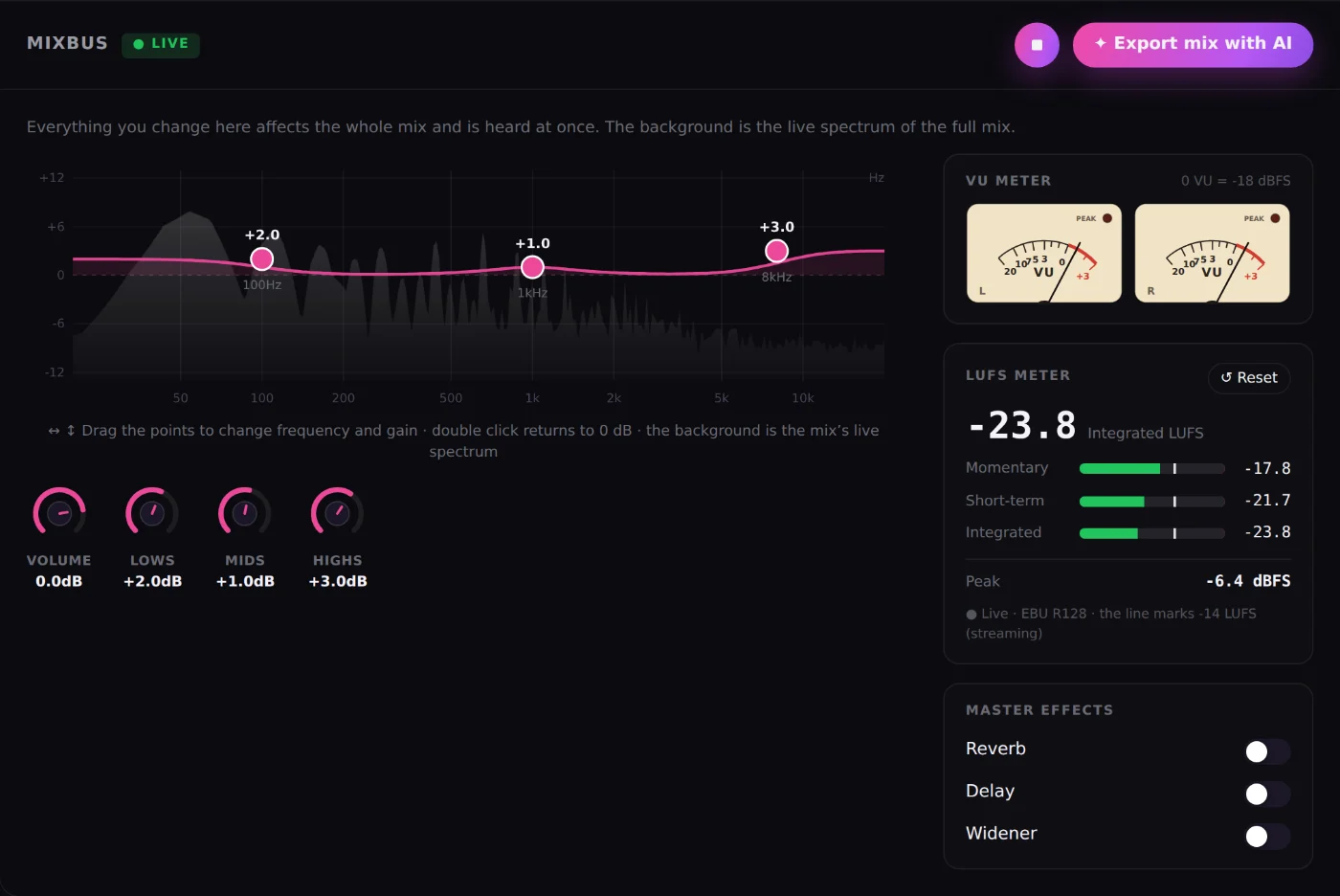
The whole-mix EQ over its live spectrum, overall volume and master effects, with no menus to dig through.
L/R needles with classic VU ballistics and an EBU R128 meter: momentary, short-term, integrated and peak.
Bring your mix closer to the tone, dynamics and loudness of a song you love, before mastering.
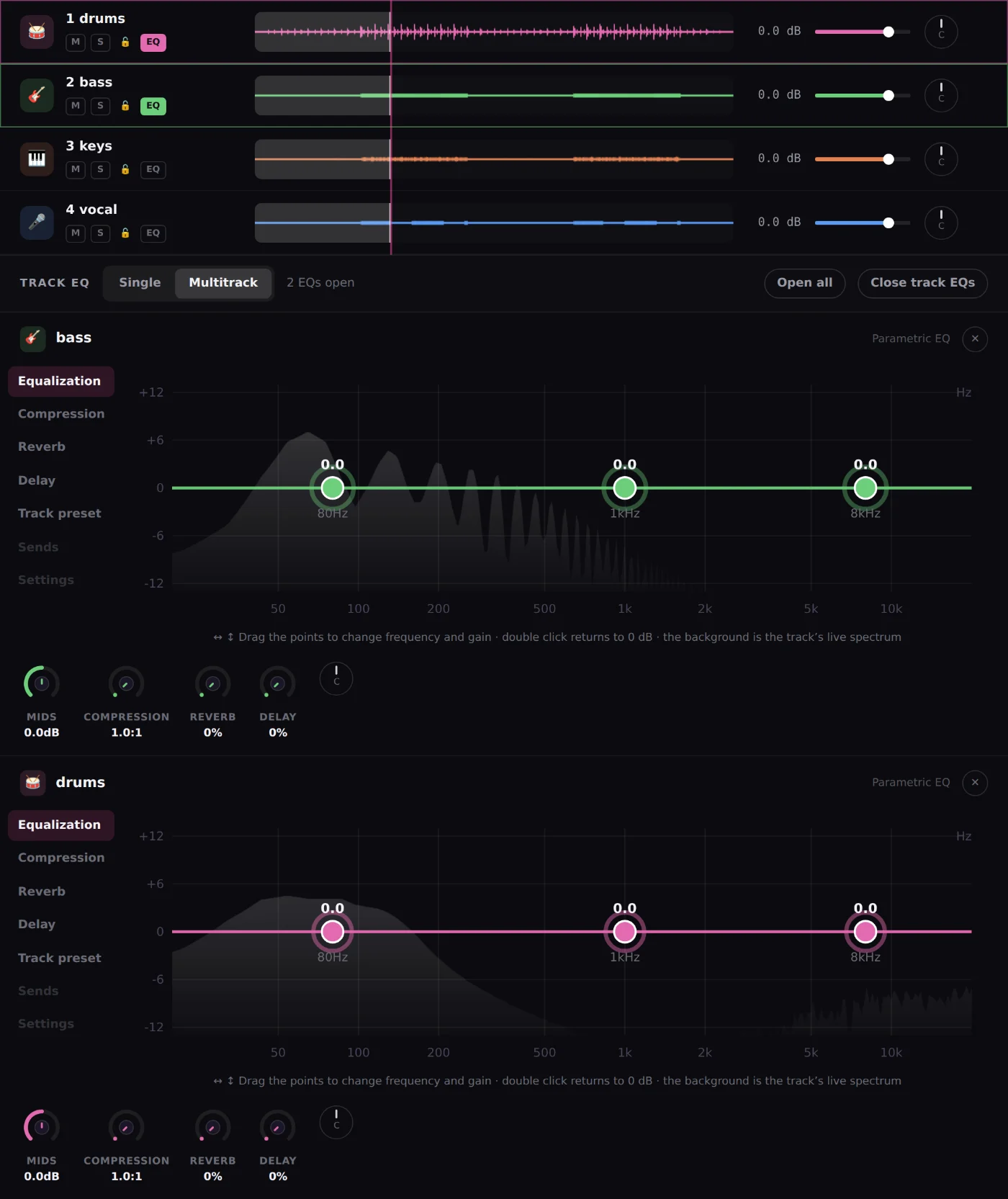
Drag the points over each instrument’s spectrum. Open one EQ or several at once and close them whenever you like.
Vocals, drums, bass, guitars and keys get EQ, compression, reverb and delay designed for each.
Type "more clarity on the vocal" and the assistant adjusts level, EQ or effects. You hear it and you can undo it.
Against eMastered, LANDR, Moises, Suno and Waves, feature by feature. Data from their official pages.
| Feature | MixingMusic.AICreate + mixing + mastering | eMasteredAI mastering | LANDRMastering and more | MoisesApp and AI Studio | SunoGenerator + Studio | WavesOnline Mastering |
|---|---|---|---|---|---|---|
| Create full songs with AIFrom an idea, your lyrics or your recorded voice; 2:30 or 5:00 songs. | YesFrom an idea, your lyrics or your voice | Not in their public information | PartlyLANDR Layers generates parts | PartlyGenerates backing parts | YesFull songs | Not in their public information |
| Export the song as stemsVocals, drums, bass, guitar, piano and other as WAV, ready for the mixer. | Partly6 WAV stems of the songs you create here | Yes | Yes | Yes | Yes | YesMix Unlock plugin in your DAW |
| Online mixing of your stems with per-track controlsUp to 12 tracks: volume, pan, EQ, compression, reverb and delay on each. | YesUp to 12 stems | Not in their public information | Not in their public information | PartlyAI Studio: presence, pan and reverb per track | PartlySuno Studio (Premier plan): volume, EQ and effects | Not in their public informationIts plugins run inside a DAW |
| Record vocals or instruments over the mix, in the browserInterface, computer or phone microphone; two inputs at once on separate tracks, re-record a section and compensated sync. | YesUp to 2 inputs at once, each on its own track | Not in their public information | Not in their public information | PartlyMobile app: video of you playing along and voice memos | YesSuno Studio (Premier plan) | Not in their public informationRecording happens inside a DAW |
| Per-track and whole-mix (MixBus) EQ with a live spectrumDraggable points; several EQs open at once in Multitrack mode. | Yes | Not in their public information | Not in their public information | Not in their public information | Partly6-band EQ in Studio | Not in their public information |
| LUFS (EBU R128) meter and stereo VU meter while you mixMomentary, short-term, integrated, peak and L/R needles in real time. | Yes | Not in their public information | Not in their public information | Not in their public information | Not in their public information | Not in their public information |
| Chat assistant that applies changes to your mixAudioChat: tap ✦ on a track or on the MixBus and ask, for example, "clearer vocal". It adjusts volume, pan, EQ, compression, reverb or delay; hear it and undo it. | YesFree: 1 try · Unlimited: 10/day · AI Advanced: up to 100/day | Not in their public information | Not in their public information | Not in their public information | Not in their public information | Not in their public information |
| AI that analyzes a track and adjusts it on its own"Analyze and adjust": measures level, dynamics, band balance and stereo of the track or the MixBus, and applies moderate changes you can undo. | YesPer track and on the MixBus | Not in their public information | Not in their public information | Not in their public information | Not in their public information | Not in their public information |
| Reference track applied from the mixTone, dynamics and loudness of a song you like, before mastering. | YesUnlimited plan | Not in their public information | Not in their public information | Not in their public information | Not in their public information | Not in their public information |
| Coherent album mastering | YesUp to 12 songs · Unlimited | Not in their public information | Yes | Not in their public information | Not in their public information | Not in their public information |
| Unlimited use for one payment, no subscription | YesUnlimited or AI Advanced: one payment | Not in their public informationSubscription | Not in their public informationSubscription or pay per master | Not in their public informationSubscription | Not in their public informationSubscription | Not in their public informationCredits per song |
✓ Available◐ Partly or with conditions— Not in their public information as of September 28, 2026
See the full comparison with sources →Yes. In Beat mode you can set the BPM between 60 and 180 and the key; on automatic, the AI picks them for the style.
Yes. Beat mode always generates an instrumental track.
Yes. Open the stems in MixingStudio and record from the browser over the beat.
Free includes 1 song (Normal engine, up to 2:30). Unlimited (US$19.99) includes 50 songs and AI Advanced (US$79) includes 150, both as one-time payments. If you run out, buy a pack of 20 (US$8.99) or 50 songs (US$14.99) that never expires.
Creating music with AI is in development and adaptation. It can produce errors; if a song fails, it is not deducted from your balance.
Three mixes and one MP3 master included in Free. No card required.
Make my beat →Record vocals over a beat →No monthly renewal, confusing credits, or annual contracts. Free to try it, Unlimited for the whole studio and AI Advanced to work with the AI every day.
No card and no expiration.
One payment by card or PayPal.
One payment. Already on Unlimited? Pay only the difference.