NEW · YOUR VOICE, YOUR BAND

Sing and the AI brings the band.

Record your voice on your phone or upload a voice note, pick a style and the AI plays with you: drums, bass, piano and strings, each on its own track. Your voice stays exactly as you sang it.

Record my voice
  1. 1Record or upload your voice
  2. 2Pick the style
  3. 3The AI plays with you
SIMPLE PRICING

Start free. Pay only once.

No monthly renewal, confusing credits, or annual contracts. Free to try it, Unlimited for the whole studio and AI Advanced to work with the AI every day.

-60%

Unlimited

Was US$19.99US$7.99One-time payment · 60% off

  • ✓ 450 AI songs and 5 covers
  • ✓ 1 custom song included
  • ✓ Unlimited mixes and masters
  • ✓ One-time payment, no subscription

Loading secure payment…

When the Black Friday and end-of-year promo ends, Unlimited goes back to US$19.99 and AI Advanced to US$79 · See the full plan comparison →

ARTISTS AND PRODUCERS

Results that help you finish and release music.

Quotes translated from Spanish.

“The vocal and the choir came out clear without losing the emotion. I finally finished a song that had been stuck for weeks.”
Carlos M.Gospel producer · Colombia
“I uploaded my mix, picked the character, and the master came out with more punch and width, but it still sounded like me.”
Valeria R.Singer-songwriter · Mexico
“The speed helps a lot and I still get to make decisions. It does not feel like a black box.”
DJ FontanaDJ and producer · Argentina
12stems per mix
24-bitprofessional WAV
12songs per album
1 paymentno subscription
INTERNATIONAL RECOGNITION

Winners of the 2026 Global Recognition Award.

MixingMusic.AI was recognized worldwide for innovation in artificial intelligence applied to music production. Technology built to make professional results accessible.

GRAWINNER 2026
MixingMusic.AI, winner of the 2026 Global Recognition Award for innovation in artificial intelligence applied to music production
MIXINGMUSIC.AI IN THE MEDIA

The Colombian AI transforming music production.

Caracol Radio, A Vivir and Blu Radio have covered how MixingMusic.AI brings mixing and mastering to independent musicians (coverage in Spanish).

MIXING

Create a mix

Upload vocals, drums, bass and guitars, or the stems you export from Suno Studio. AI prepares the balance and you keep control.

  • Up to 12 stems, Suno Studio too
  • Per-track EQ and live MixBus
  • VU meter and LUFS meter
  • Genre and instrument presets
How AI mixing works →
MASTERING

Master your song with AI

Upload your mix or your Suno song: the mastering AI improves clarity, punch and dynamics and brings it to Spotify loudness without losing its character.

  • Tonal and dynamic enhancement
  • Suno songs ready for Spotify
  • MixingMusic presets
  • MP3 and 24-bit WAV
What is AI mastering? →

Free: 1 mix, 1 MP3 master and 1 AI "Analyze and adjust". No card needed.

HEAR THE RESULT

Songs mixed and mastered with MixingMusic.

Listen to finished music on YouTube. These releases show how MixingMusic can support the final sound while the artist keeps the creative decisions.

Explore all demo songs
ONE-OFF COVERS · ONE-TIME PAYMENT

Only need one or two covers?

Upload or record your reference and choose a new style. Buy just what you need with your free account.

Bonus songs are created from your idea or lyrics. They are not covers or versions of your cover.

No plan or subscription · Balances do not expire

Create your cover

1 cover generation

US$1.99One-time payment

+ 2 original AI song generations as a bonus

Loading secure payment…

Create your cover →

Create 2 covers

2 cover generations

US$3.99One-time payment

+ 4 original AI song generations as a bonus

Loading secure payment…

Create 2 covers →
Need more? 50 songs + 50 covers · US$29.99 →
NEW · GIVE A SONG

Create your custom song

Tell us their story or record your own melody: the AI composes a full song of up to 4 minutes, with lyrics and cover art. You hear your full song before you pay and can regenerate once. When you pay it includes your 1080p Karaoke Video with synced lyrics, ready for YouTube and Shorts.

  • Record or hum your melody, or describe their story
  • AI-written lyrics or your own, in 5 languages
  • Studio or live · female, male or duet vocals
  • Two full versions and a page to give it, with likes and comments
  • Optional: release it on Spotify, Apple Music and YouTube Music
Create my song From US$5.99 (Black Friday) · one payment · 2 free with Unlimited and AI Advanced
Give a personalized song: full song with lyrics and custom cover art, with an option to release it on Spotify, YouTube Music and Apple Music. Black Friday offer.
TWO PATHS, THREE FUNCTIONS

Less technique. More musical decisions.

MixingMusic analyzes the audio and proposes a result; you choose the final character.

01

Pick your starting point

Upload up to 12 stems to mix, or your stereo song to master it with AI.

02

Shape your sound

Use MixingMusic presets and control intensity, dynamics, color, stereo and loudness.

03

Compare and download

Hear the original and the result at matched loudness. Export MP3 or true 24-bit WAV.

FREQUENTLY ASKED QUESTIONS

Before you upload your music.

What is the difference between mixing and mastering?

Mixing combines your separate stems and sets the balance of the song. Mastering works on a finished stereo mix to improve tone, dynamics, width and final loudness.

Is MixingMusic free? How much does it cost?

You can start free: 1 mix, 1 MP3 master and 1 AudioChat AI trial, no card needed. For more, Unlimited is US$7.99 and AI Advanced is US$15, both one-time payments: no subscription or monthly renewal. With Create music, Unlimited includes 450 songs and 5 AI covers, and AI Advanced 1,050 songs and 10 covers; if you run out you buy another pack (20, 50, or 50 with up to 50 covers for US$29.99).

How do I mix songs with AI for free?

Upload your stems (up to 12 tracks), pick a genre preset or tell AudioChat what you want, listen to the result and export. Free and with no card you get 1 mix, 1 MP3 master and 1 AudioChat AI trial. With Unlimited (US$7.99, one-time) mixes and masters are unlimited and the WAV is 24-bit.

Can I combine two songs with AI?

You can upload up to 12 audio files, full songs included, and combine them into one mix: you set volume, pan and EQ for each one and the AI proposes the balance. MixingMusic is a track mixer: it does not create automatic mashups or match tempo or key between songs.

Can I mix vocals with a backing track using AI?

Yes. Upload the vocal and the backing track as separate tracks, or record the vocal inside the mixer, and the AI applies a vocal-minded preset with EQ, compression, reverb and delay per track. You can ask for changes in the chat, like "clearer vocal", and undo them.

What does the free plan include?

You can create 1 mix from stems, master 1 song with an MP3 download and try AudioChat AI with 1 "Analyze and adjust". No card required.

What is AudioChat AI and how does it work?

It is the AI assistant inside the mixer and the mastering screen. Tap ✦ on a track or on the MixBus and choose: "Analyze and adjust automatically" (the AI measures the audio and applies the changes) or "I'll tell you what to do" (you type what you want). It adjusts volume, pan, EQ, compression, reverb and delay, and you can undo every change.

How many AudioChat messages do I get?

Free: 1 "Analyze and adjust". Unlimited (US$7.99, one-time): 10 messages a day. AI Advanced (US$15, was US$79, one-time): up to 100 a day. They renew every midnight in your local time. If the plan’s songs run out, they drop to 5 and 20 a day until you buy a pack.

Can I master a song made with Suno?

Yes. Upload it to mastering and mark it as AI-generated: the recommendation adapts to audio that is already mixed and limited, without over-compressing it or widening its stereo image.

Is the Unlimited WAV really 24-bit?

Yes. With Unlimited the export is encoded as true 24-bit PCM WAV, not a renamed 16-bit file.

What does album mode do?

It processes up to 12 mixes as a set to keep perceived loudness, tonal balance and dynamic range coherent, while keeping individual adjustments per song.

Does MixingMusic replace my decisions?

No. AI proposes a technical and musical starting point based on our presets; you compare, adjust and choose the final result.

TOOLS AND GUIDES

Music AI tools for every stage of your song.

MixingMusic.AI (Mixing Music AI) brings song creation, stem mixing and mastering into one workflow. Start with the audio you have.

MADE YOUR SONG WITH SUNO?

Mix, master and release your Suno songs.

Suno songs usually arrive already mixed, limited and sometimes as MP3. Upload your Suno Studio stems or the full song, mark it "AI-generated" and the recommendation adapts to what it measures: Spotify-ready without over-compression or stereo widening. Got several? Master them together as an album.

AI music production, from idea to master

MixingMusic is an AI music production studio: create songs with Suno and Mureka, record your voice, add instruments, mix stems and master, all in your browser.

AI music production: everything in the studioPlugins, AI instruments, recording, the AI chat, presets, free tools and more
PLUGINS INCLUDED

A complete studio of plugins. Included in Unlimited and AI Advanced.

Plugins per instrument, online recording and effects on every track, inside the same mixer. What other studios sell plugin by plugin comes with your one-time plan here.

  • Included in Unlimited
  • Included in AI Advanced
  • One-time payment, no subscription
  • Heard instantly and included in the export
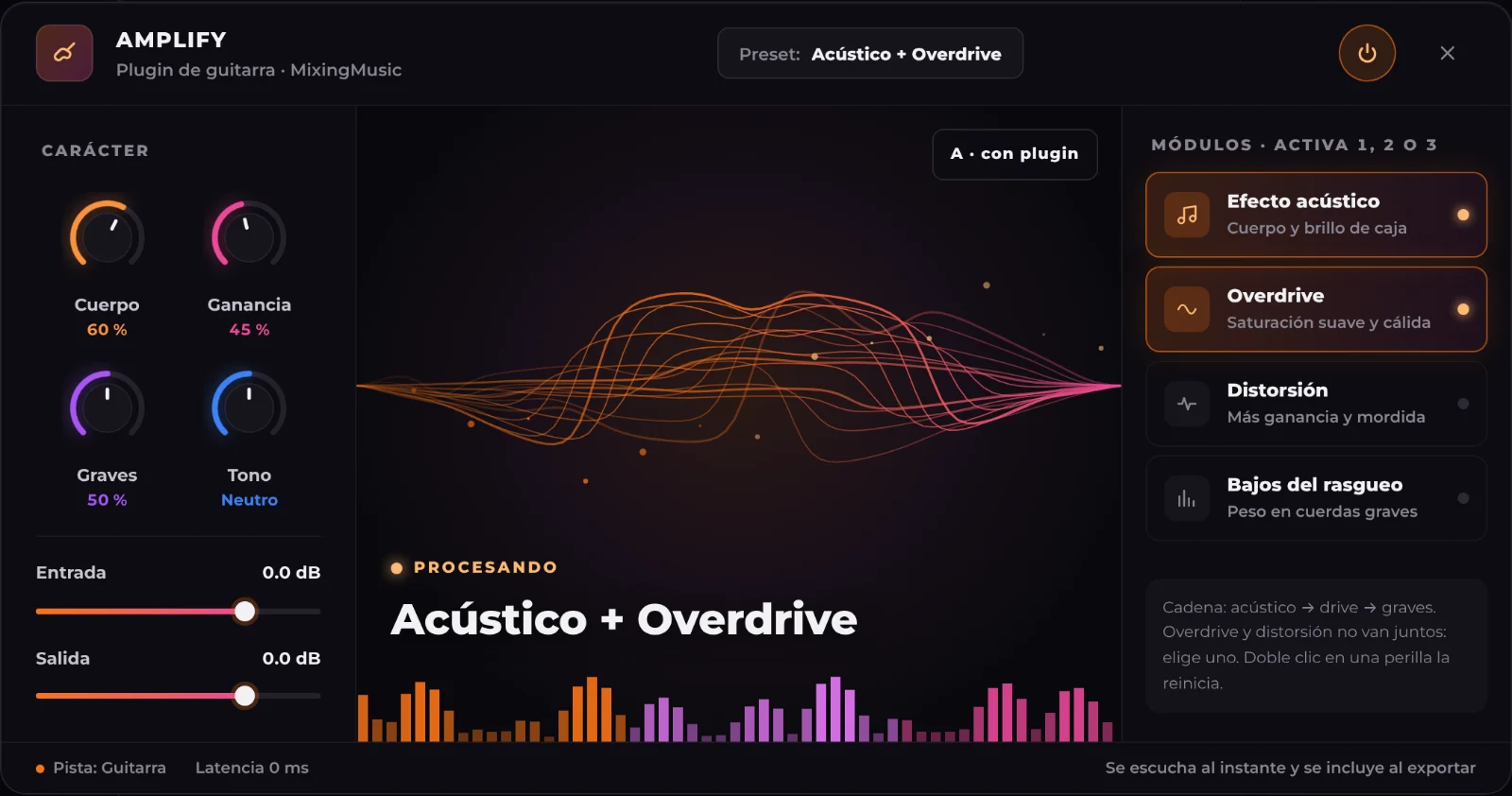
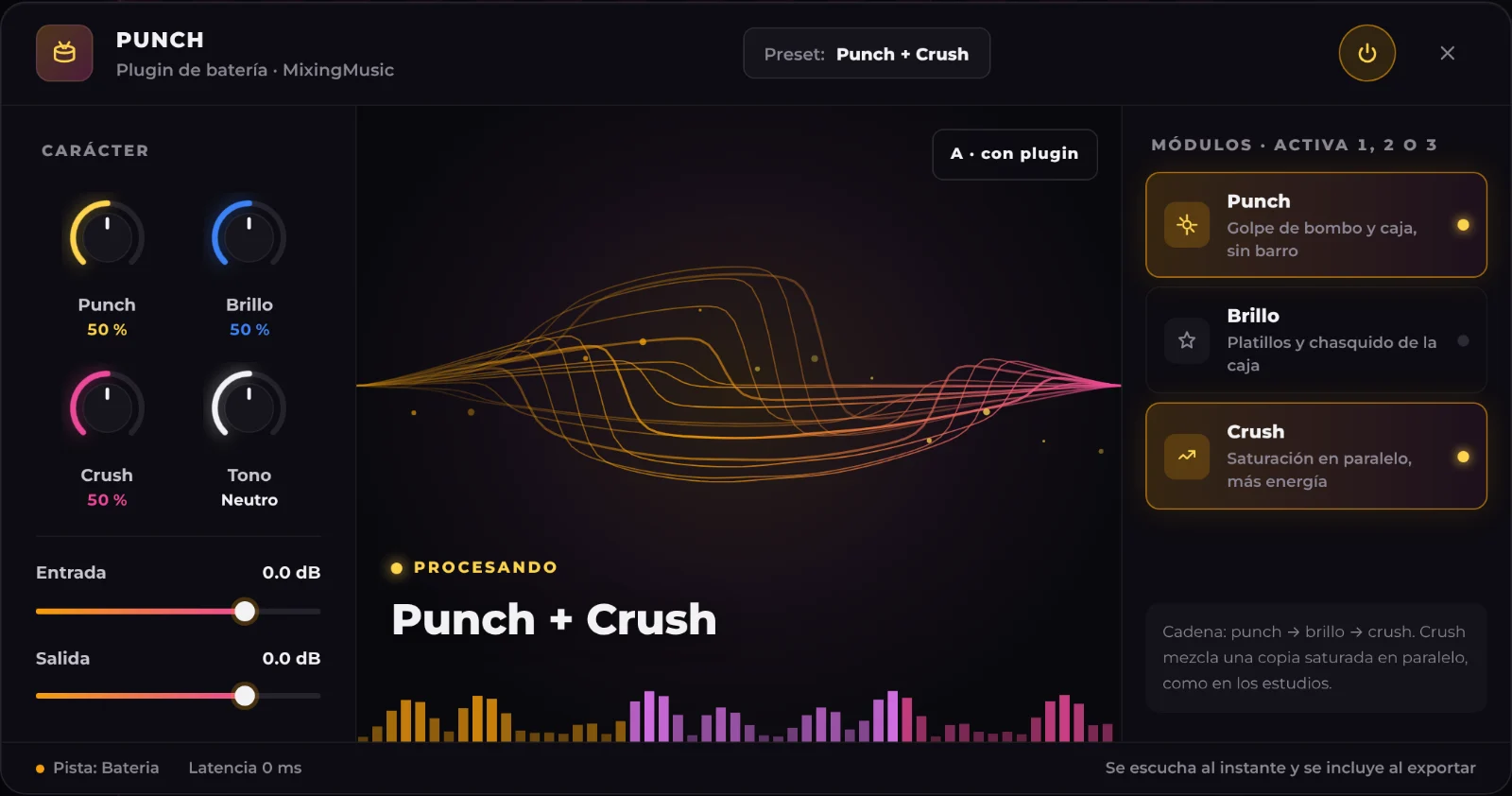
MixingMusic AMPLIFY plugin: body, gain, lows and tone knobs, wave visualizer and acoustic, overdrive, distortion and strum-lows modulesGuitarAMPLIFYTurns an electric or line guitar acoustic, adds overdrive or distortion with a cabinet cut, and gives weight to the low strings when strumming. Use one, two or all three modules.See plugin →
9track and recording plugins
3master plugins
17vocal and genre presets
1single payment
NEW · AI INSTRUMENTS

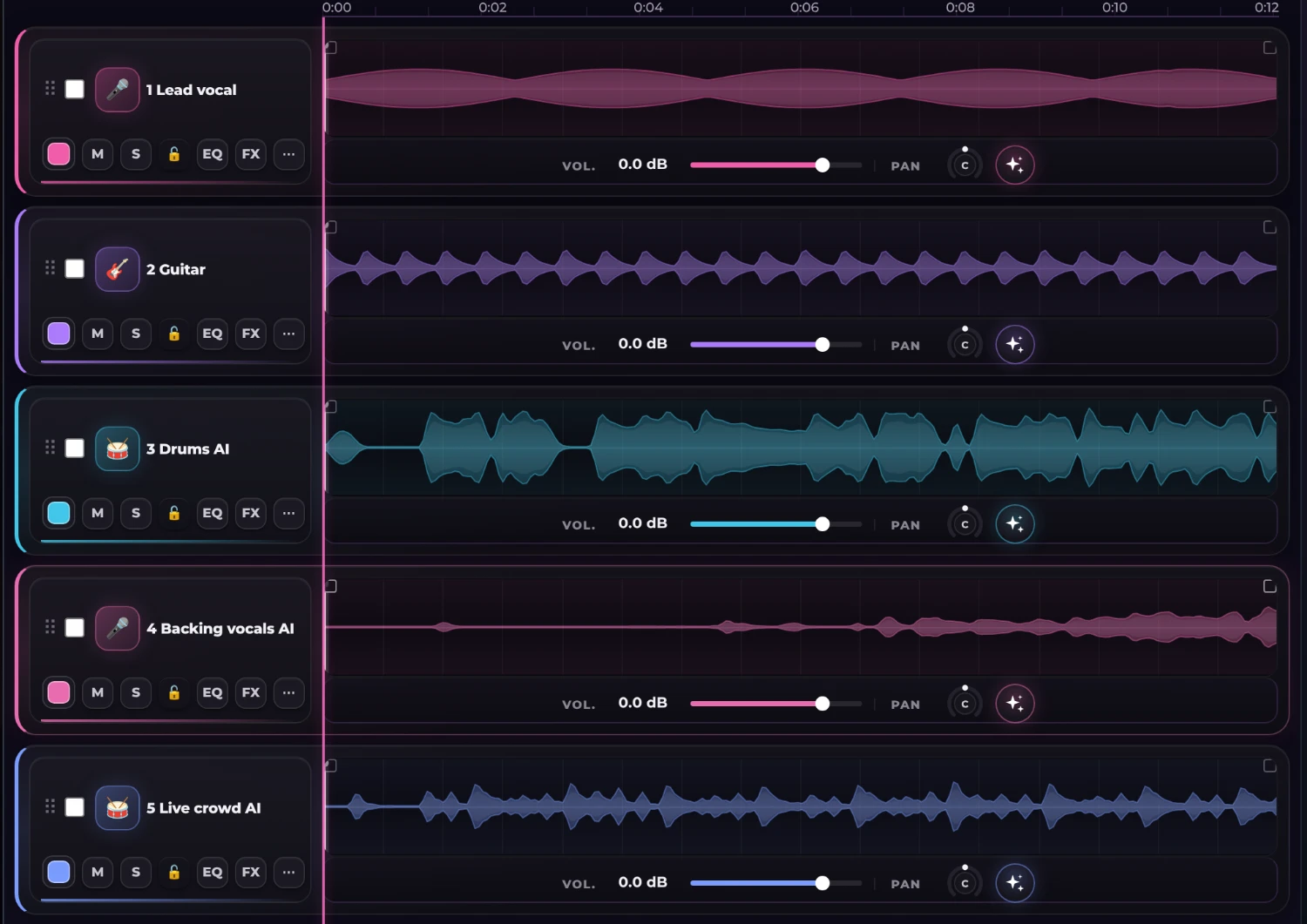
Ask the chat for the instruments your song is missing. They arrive as new tracks.

Type “add drums” or “give it a bass, backing vocals and a live crowd”. The AI listens to your mix, follows its tempo, key and chords, and adds each instrument as a track you mix like any other.

  • Each instrument uses 1 song
  • Unlimited: 20 a month · AI Advanced: 60
  • One-time payment, no subscription
Mixer with the Lead vocal and Guitar tracks plus the AI tracks Drums, Backing vocals and Live crowd
EXPORT TO YOUR DAW

Download your mixer session and open it in Logic Pro, LUNA or Fender Studio

Mix with AI here and continue in your DAW. Export a ZIP with an AAF session, 24-bit WAV audio and an import guide for your named, positioned tracks in Logic Pro, LUNA or Fender Studio. Imported settings depend on the DAW.

  • One track per stem, from bar 1
  • 24-bit WAV at your stems’ sample rate
  • A DAW-specific import guide

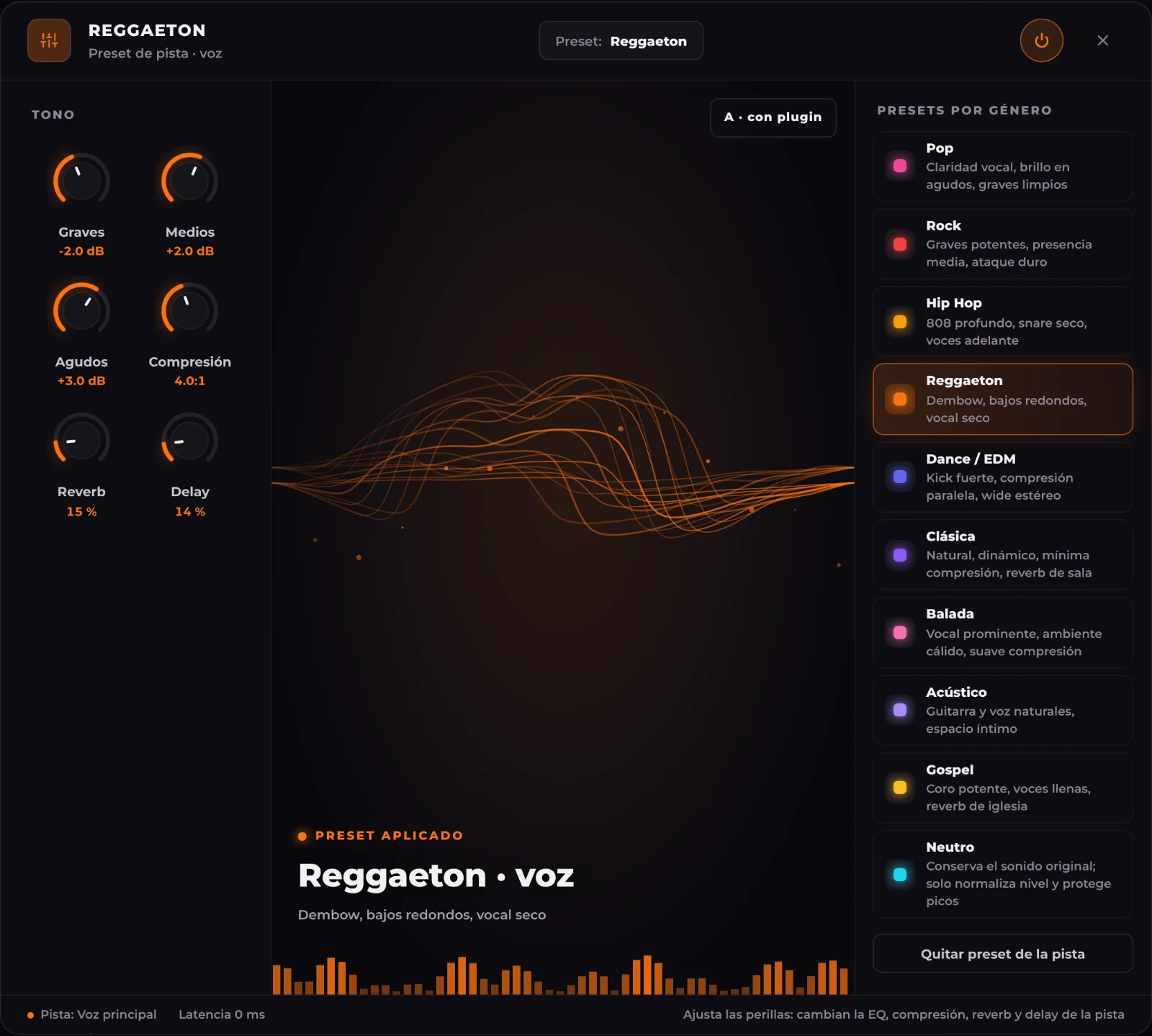
10 presets to find the sound of your music

Choose a starting point and adjust the result in the mixer. Each preset keeps its own EQ, compression and effects settings.

01

Pop

Vocal clarity, bright highs and clean lows
02

Rock

Powerful lows, midrange presence and punch
03

Hip Hop

Deep 808s, dry snare and upfront vocals
04

Reggaeton

Dembow, rounded bass and dry vocals
05

Dance / EDM

Strong kick, parallel compression and wide stereo
06

Classical

Natural dynamics, minimal compression and room reverb
07

Ballad

Prominent vocals, warm ambience and gentle compression
08

Acoustic

Natural guitar and vocals, intimate space
09

Gospel

Powerful choir, full vocals and church reverb
10

Neutral

Preserves the original sound; only normalizes level and protects peaks
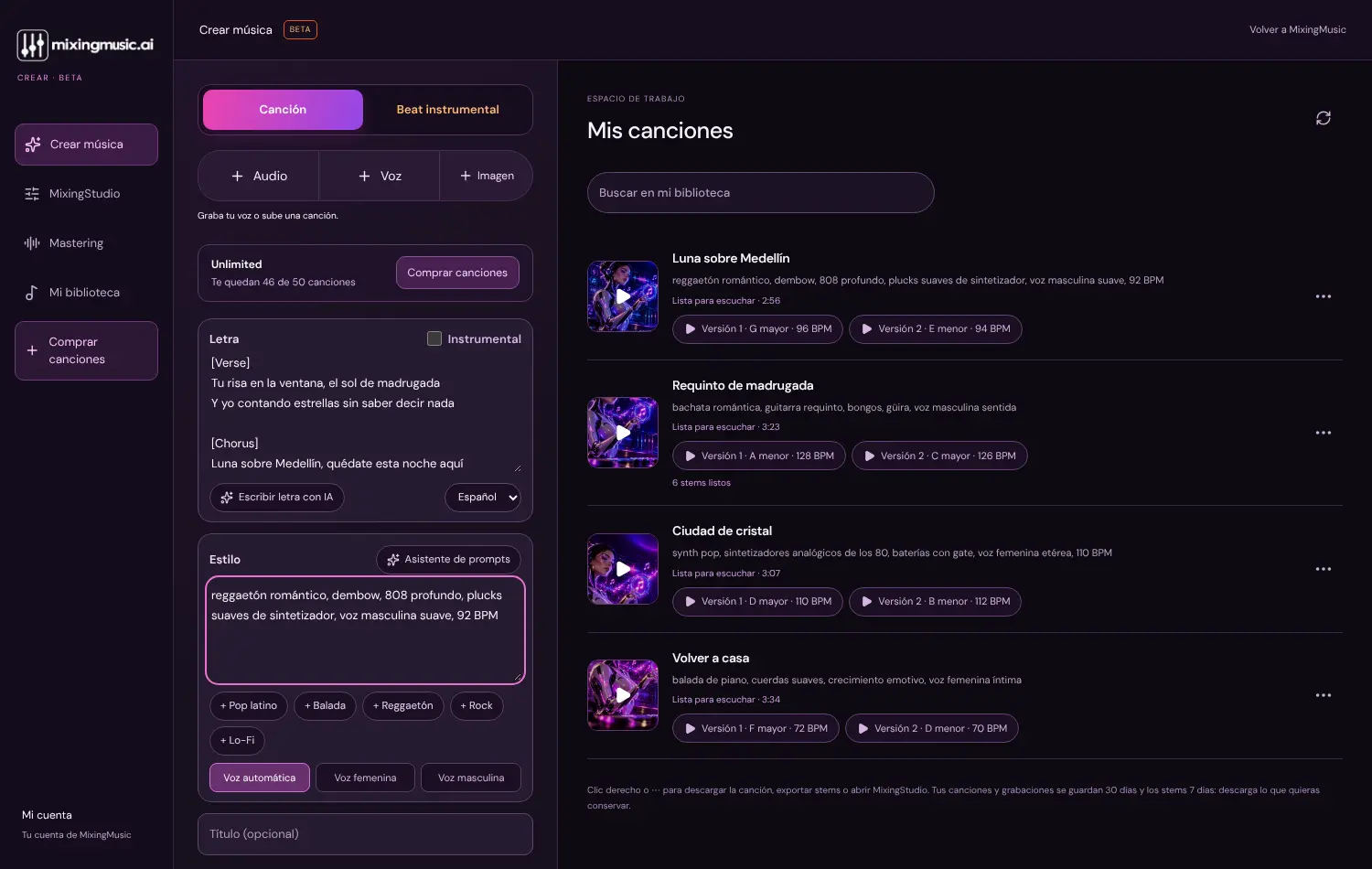
Create music screen in MixingMusic.AI: lyrics and style of a romantic reggaeton on the left; on the right a library of four songs created with the Suno V6 model, each with two versions, its key and its tempo in BPM
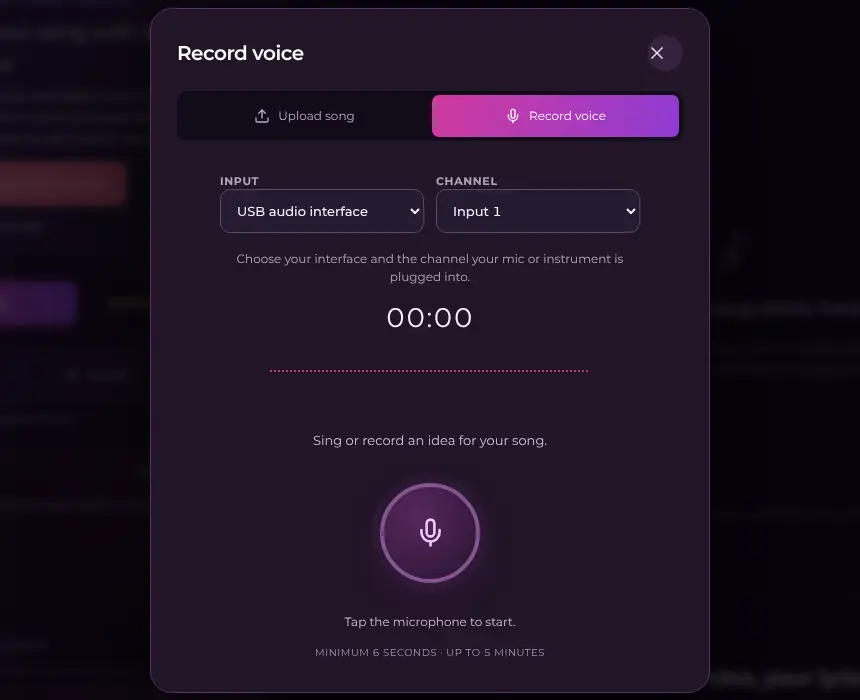
MixingMusic.AI voice recorder with the Input menu to choose a USB audio interface and the Channel menu to choose input 1
Pick your audio interface and the channel your microphone is on: it records without filters, as in Record and Live.
NEW · CREATE YOUR SONG WITH SUNO AND MUREKA · BETA

Create a full song with AI and finish it right here.

Choose a Suno or Mureka model and create from your idea or lyrics. With Suno you can also use your voice. Then split stems, mix and master in the same account.

  1. 1Describe or recordStyle, your own or AI-written lyrics, your voice or a hum.
  2. 2Record with your audio interfacePick your interface or USB microphone and the input channel: your voice arrives clean, with no call filters, as in Record mode. It works when creating the song and also in the custom song.
  3. 3Choose the modelSuno returns two versions per generation; Mureka returns one.
  4. 4Stems, mix and masterSplit it into stems, open it in MixingStudio and master it for Spotify.
  5. 5Karaoke Video for YouTubeTurn your song into a 1080p video with lyrics synced word by word, neon waves and random colours, ready for YouTube and Shorts.
1 free song up to 1:00 with Suno through KIE.ai. Mureka requires a plan or pack. MixingMusic.AI is not affiliated with Suno or Mureka.
THE MIXER

A real mixer, with AI at your side.

Load up to 12 stems and adjust each track. Export your manual mix or generate a separate AI version from the originals or your current settings. Audition the result before downloading.

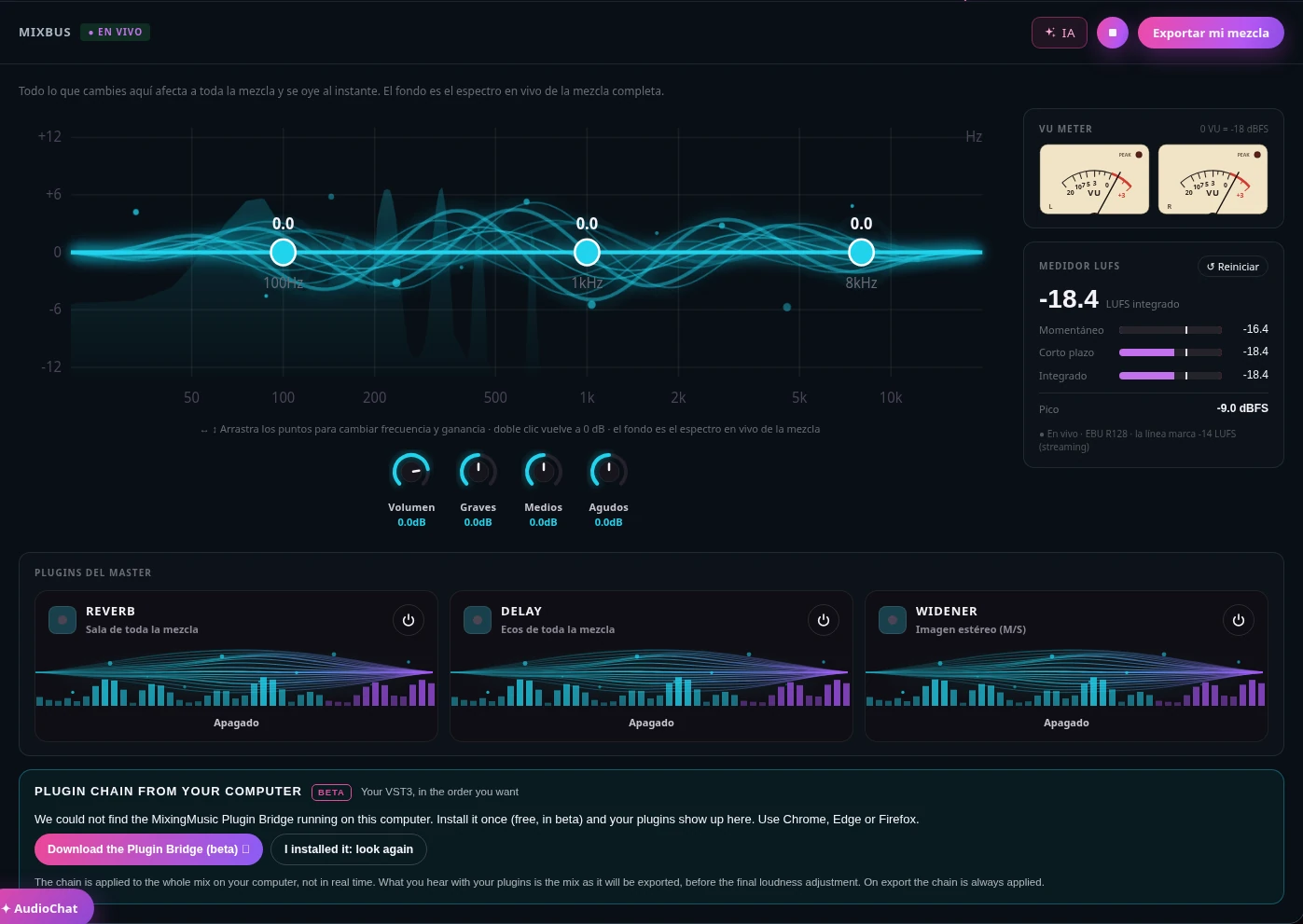
MixingMusic.AI MixBus: whole-mix EQ over its live spectrum, stereo VU meter and LUFS meter
Current MixBus: EQ and meters, centered knobs and three effects in a row.
  • MixBus always in view

    The whole-mix EQ over its live spectrum, overall volume and master effects, with no menus to dig through.

  • Real-time VU meter and LUFS

    L/R needles with classic VU ballistics and an EBU R128 meter: momentary, short-term, integrated and peak.

  • Reference trackUNLIMITED

    Bring your mix closer to the tone, dynamics and loudness of a song you love, before mastering.

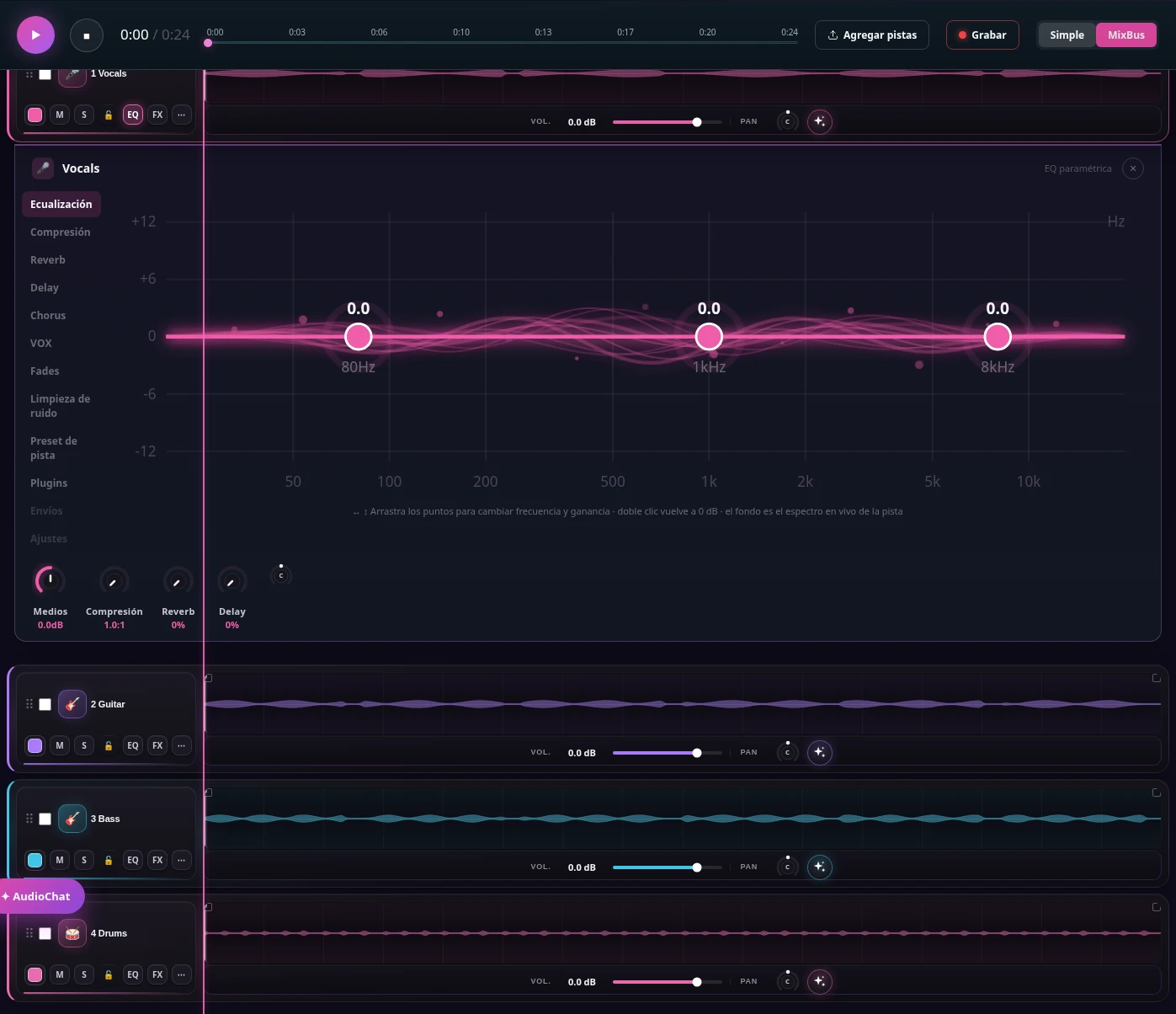
MixingMusic.AI mixer: vocal, guitar, bass, drum and keys tracks with waveforms and per-track EQ over the spectrum
Current interface with demonstration tracks, wide waveforms and per-track EQ.
  • Per-track EQ, single or multitrack

    Drag the points over each instrument’s spectrum. Open one EQ or several at once and close them whenever you like.

  • Per-instrument presets

    Vocals, drums, bass, guitars and keys get EQ, compression, reverb and delay designed for each.

  • AudioChatUNLIMITED

    Type "more clarity on the vocal" and the assistant adjusts level, EQ or effects. You hear it and you can undo it.

Current waveform editor: a demonstration track split into clips with per-clip gain and fades
Current interface with demonstration audio: clips, gain and fades.
  • Edit the waveform

    Double-click a track to select a range, split it or delete the selection while leaving silence.

  • Gain, fades and zoom

    Adjust gain for a selection, a clip or the whole track. Use fades, zoom and beat snapping.

  • Listen and undo

    Play from the editor, undo or redo changes and restore a saved version. Edits are heard in the mix and included in exports.

Create my mix for free
AUDIOCHAT AI

A mixing engineer that understands what you ask

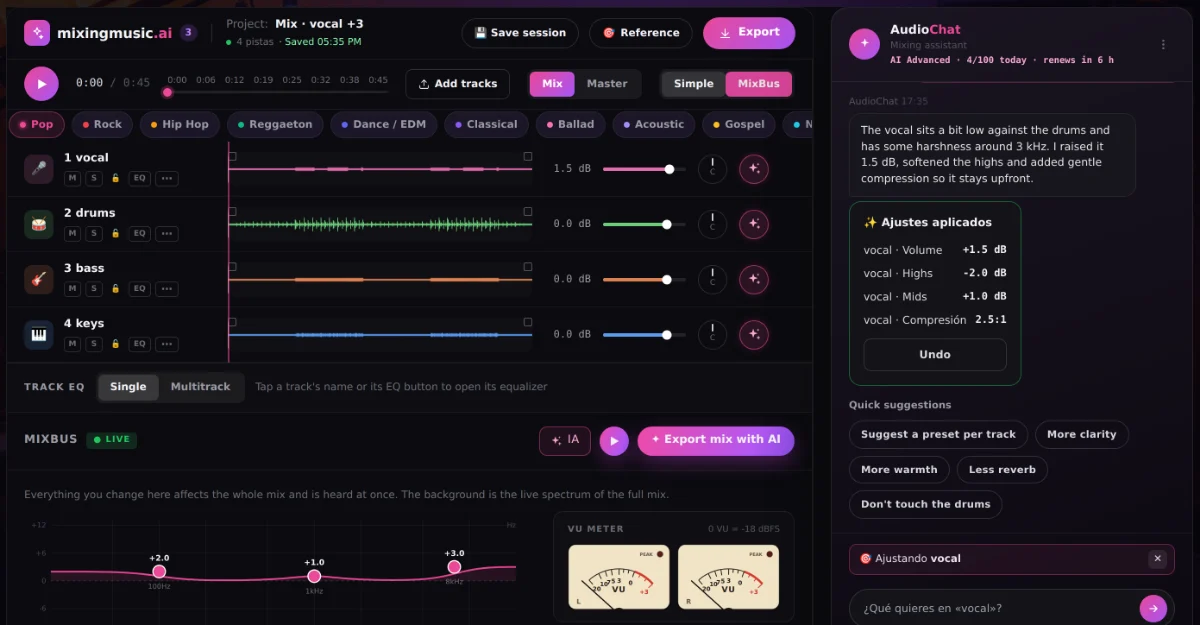
AudioChat is the AI assistant inside the Mixer Studio AI and the mastering screen. It really measures your audio (levels, dynamics, frequency balance and stereo) and adjusts volume, pan, EQ, compression, reverb and delay on each track, or the whole MixBus. You listen, and every change can be undone in one click.

  1. 1Tap ✦ on a track or on the MixBusThe chat focuses only on what you picked, so the rest of the mix stays as it is.
  2. 2Choose how to work"Analyze and adjust automatically": the AI measures and applies the changes. "I'll tell you what to do": type, for example, "vocal more upfront and less harsh".
  3. 3Listen and decideYou see every change with its value. Apply, discard or undo. Tracks with a lock 🔒 are never touched.
Free
1 "Analyze and adjust" to try it
Unlimited
10 messages a day
AI Advanced
Up to 100 messages a day
See how AudioChat works →
MixingMusic.AI AudioChat AI focused on one track: the AI analyzed the vocal and applied EQ and compression changes that can be undone
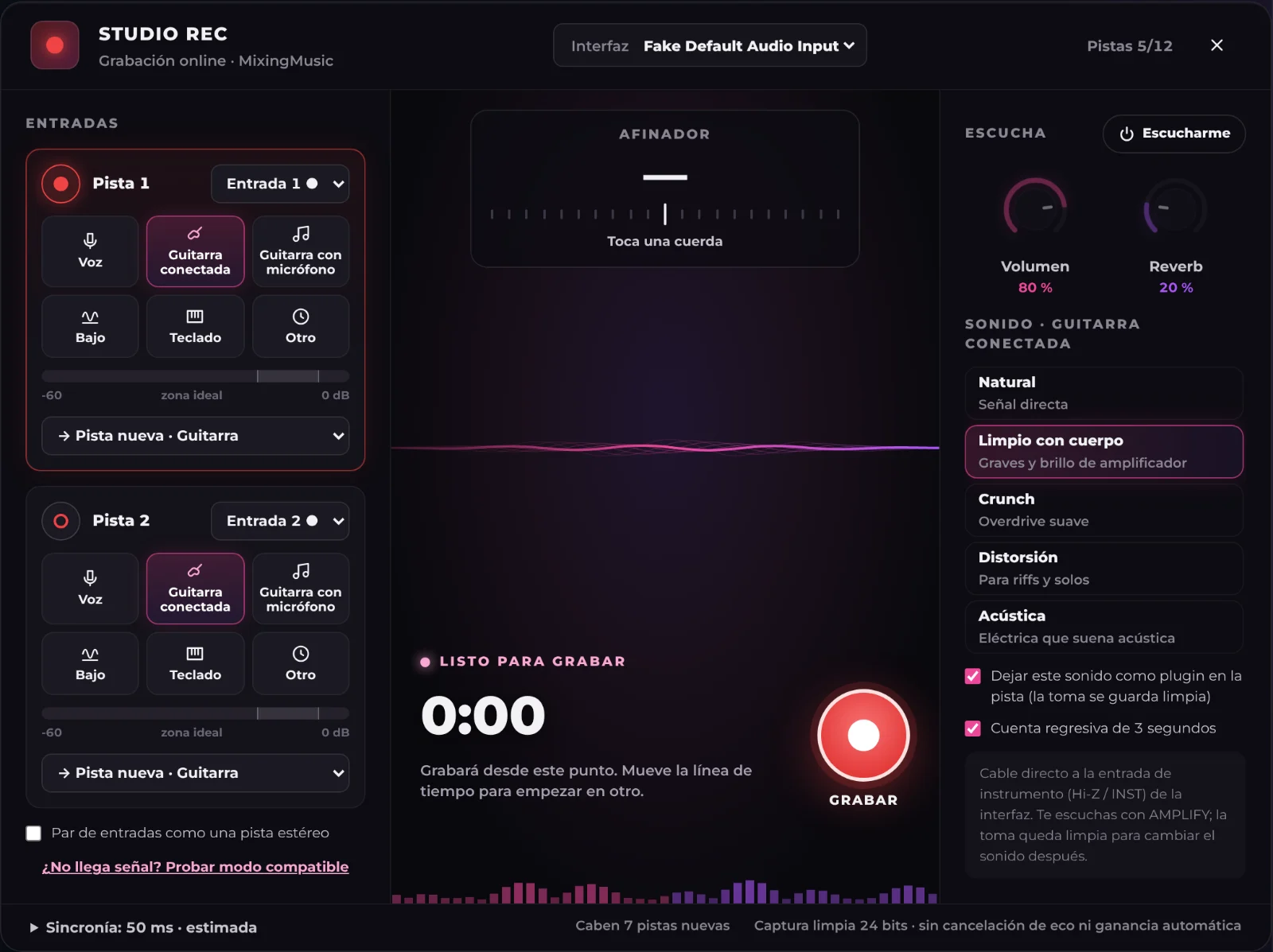
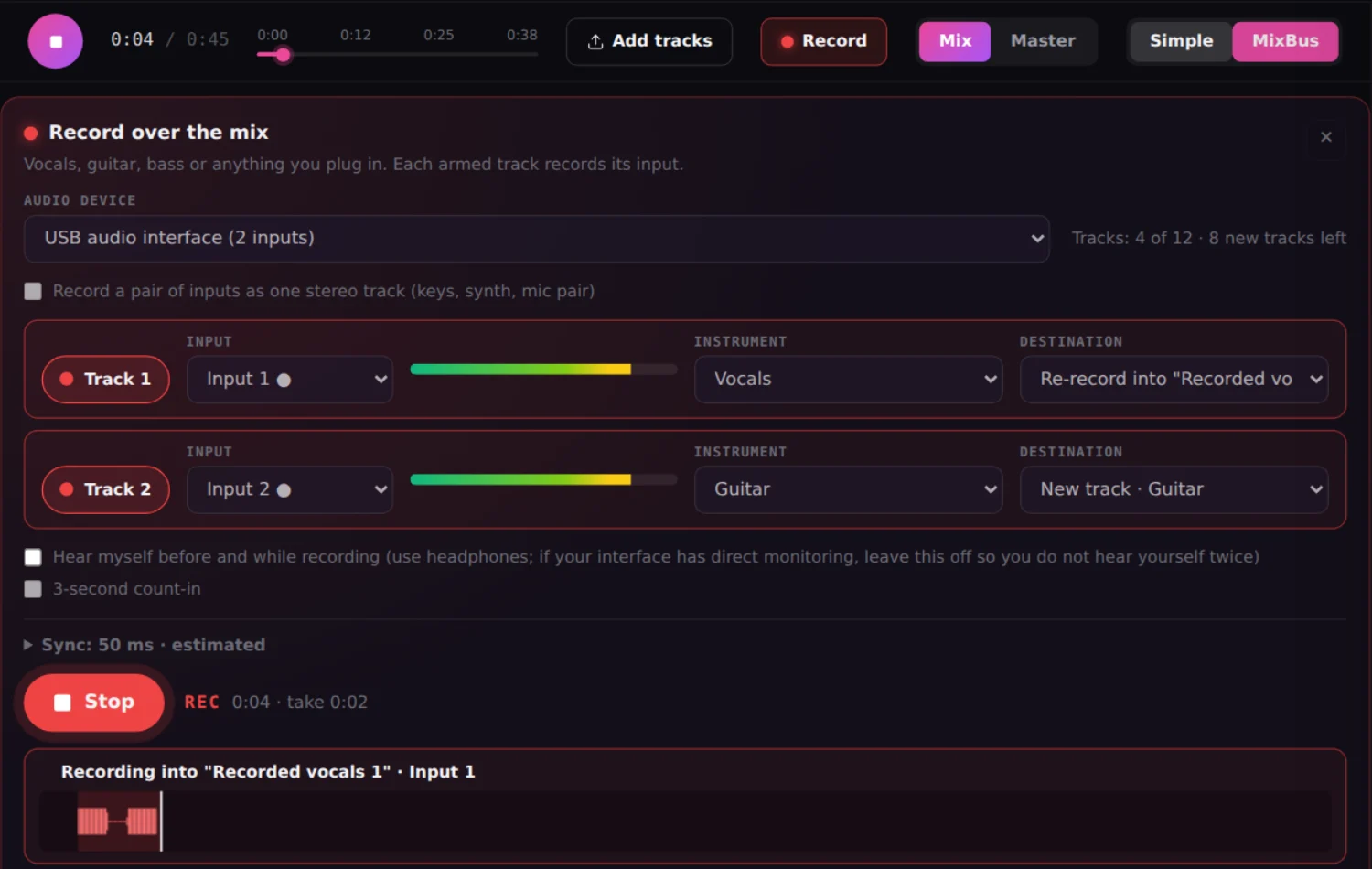
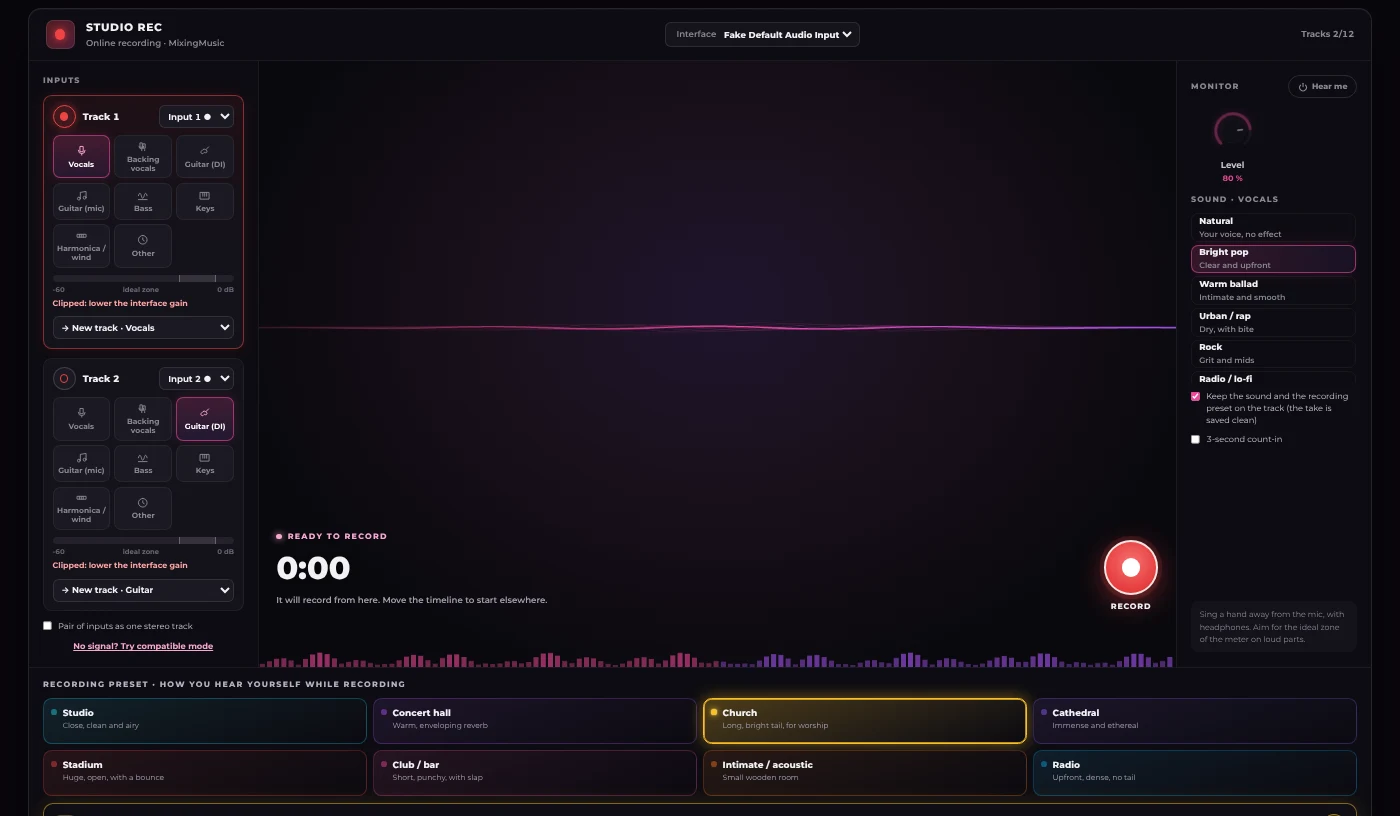
MixingMusic.AI STUDIO REC recording a guitar through a DI: a source per track, meters with an ideal zone, monitor sounds, the record button and the live take waveform
NEW · RECORD IN THE BROWSER

Record your vocals over the mix, without leaving MixingMusic.

Plug in your audio interface or use the computer or phone microphone. You record while hearing the song and the take lands in time, ready to clean up, mix with AI and master.

  1. 1Two inputs at onceVocals and guitar on separate tracks, never more than 12 tracks.
  2. 2Re-record just a sectionRedo a line without using a track or cutting the rest of the take.
  3. 3Real noise cleanupRemoves fan, air conditioning or mic hiss on any track.
How to record vocals online →
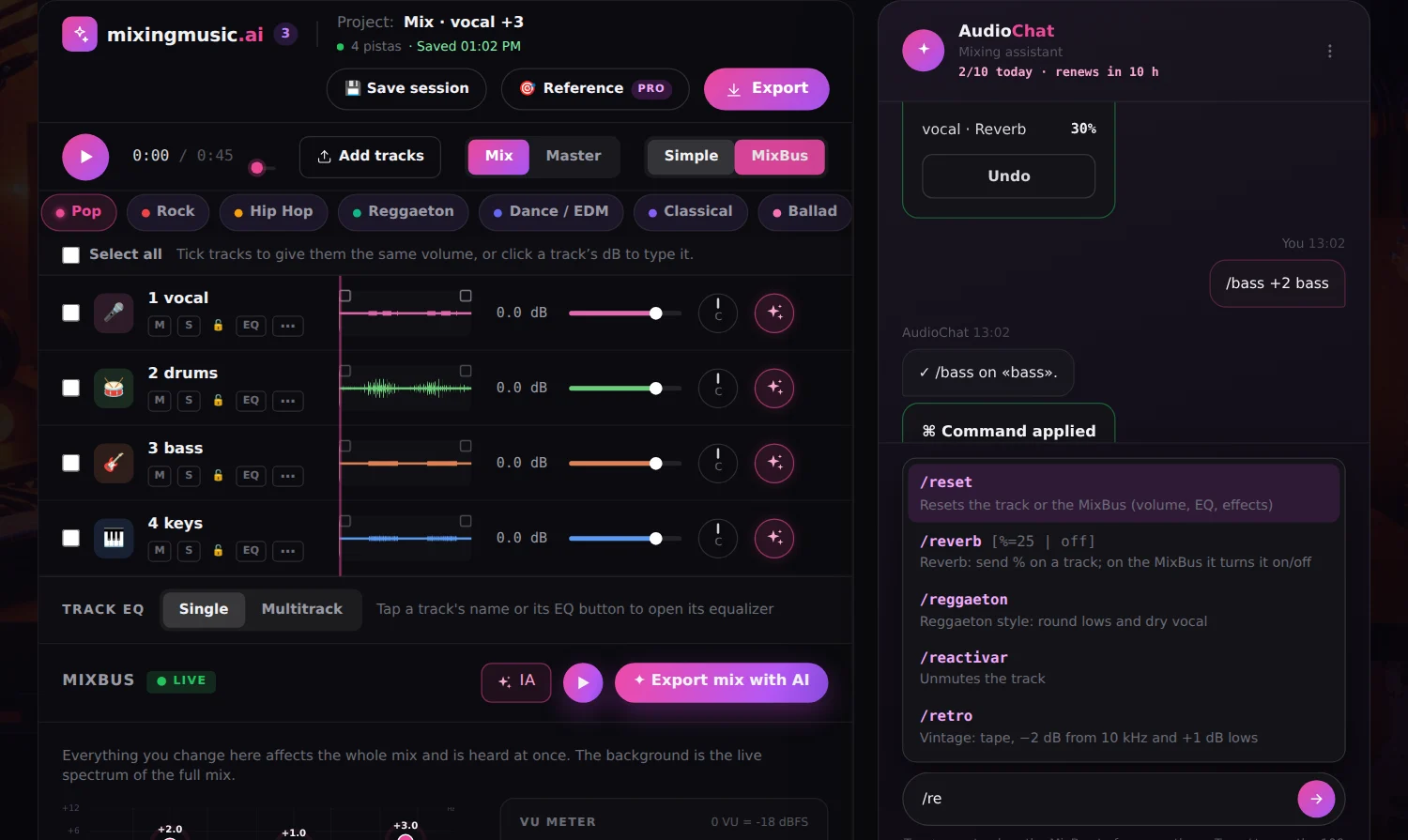
MixingMusic.AI AudioChat with the command list open after typing "/" and a /reverb command applied to the vocal with an undo option
100 COMMANDS · NO AI MESSAGES USED

Type / and the chat makes the change instantly.

Besides asking in your own words, AudioChat understands mixing and mastering commands in English and Spanish. Each one moves the real controls of the track or the MixBus, undoes in one click and uses no AI messages.

  • /reverb 30 vocals
  • /bass +2 bass
  • /vol -6 all
  • /pan L30 guitar
  • /deess vocals
  • /listen car mixbus
See all 100 commands →
FREE · NO SIGN-UP

Free audio tools with AI

Build your Suno prompt, convert your audio, measure its LUFS, make a karaoke video of your song, record with effects and play live, in your browser.

See all free tools →
NEW · FREE TOOL

Suno prompt: the perfect prompt for your song, step by step

Pick genre, mood, voice, key and chords, and copy a Suno-ready prompt. Does Suno push your voice too high or does your song sound small? The “Improve my song” mode fixes it.

  • 40+ genres
  • Real key and chords
  • Keeps your voice in range
  • No sign-up
SUNO PROMPT94
NEW SERVICES

Record your song and take it on stage. Included in Unlimited and AI Advanced.

Two new services inside MixingStudio: a multitrack recording session and a console for playing live. Same plugins, same room presets, one payment.

MixingMusic Record screen with recording presets
RECORD

Online multitrack recording

Record vocals and an instrument at once and keep adding backing vocals, guitars, bass or harmonica, hearing what is already recorded. Hear yourself in a studio, a church or a stadium while you record, and the preset stays on the track.

  • Up to 12 tracks, 2 at once
  • 8 room presets: studio, church, stadium…
  • MP3, WAV and separate stems download
  • Free: 2 tracks and MP3; unlimited on Unlimited and AI Advanced
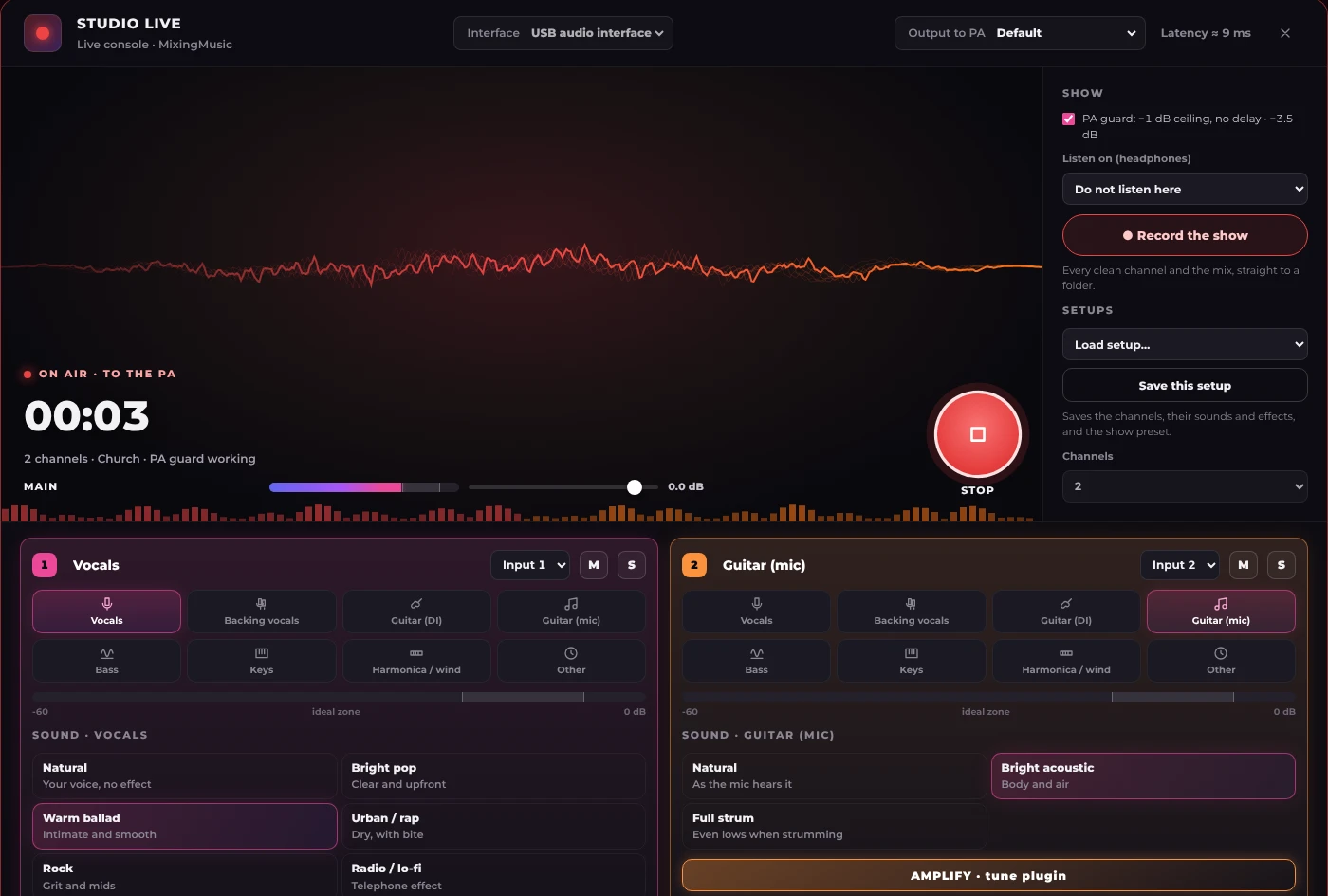
MixingMusic STUDIO LIVE with vocal and guitar channels, show preset and Transmit button
LIVE

Live sound console

For musicians singing in churches, bars and clubs: the same sound and presets as Record mode, but transmitted. Each channel picks its sound, reverb, delay and cleanup, and Transmit sends the mix through your interface to the PA.

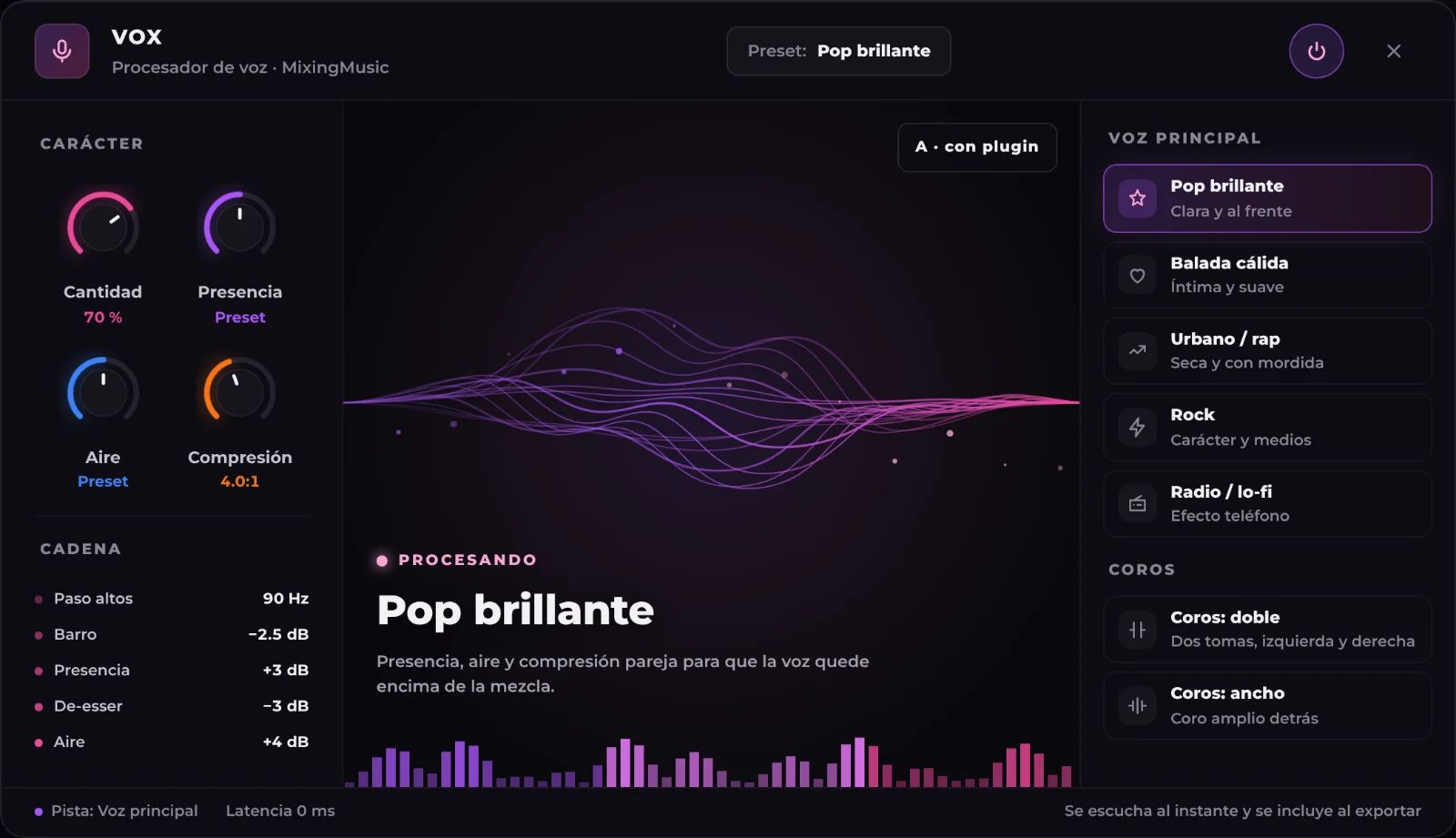
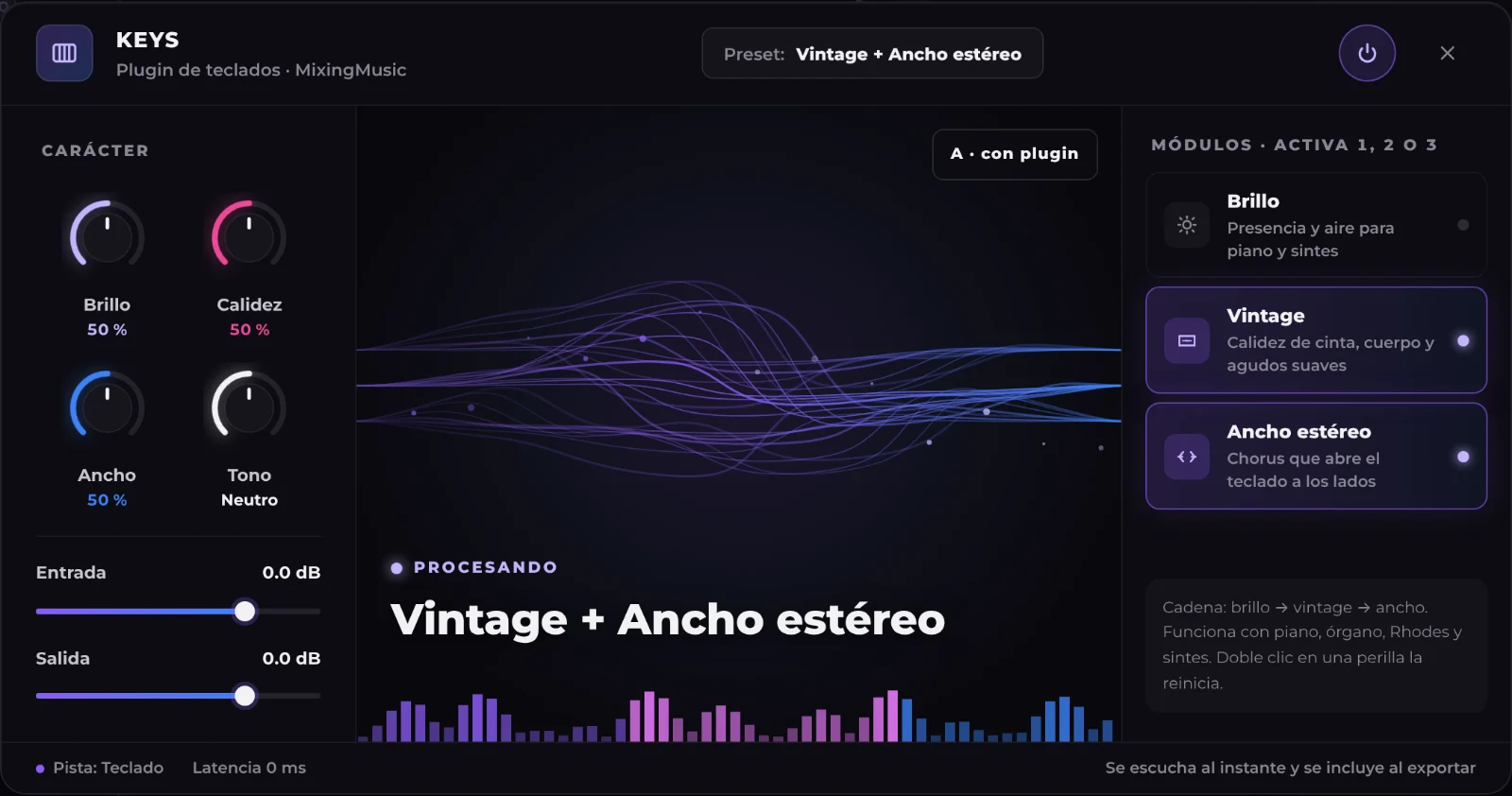
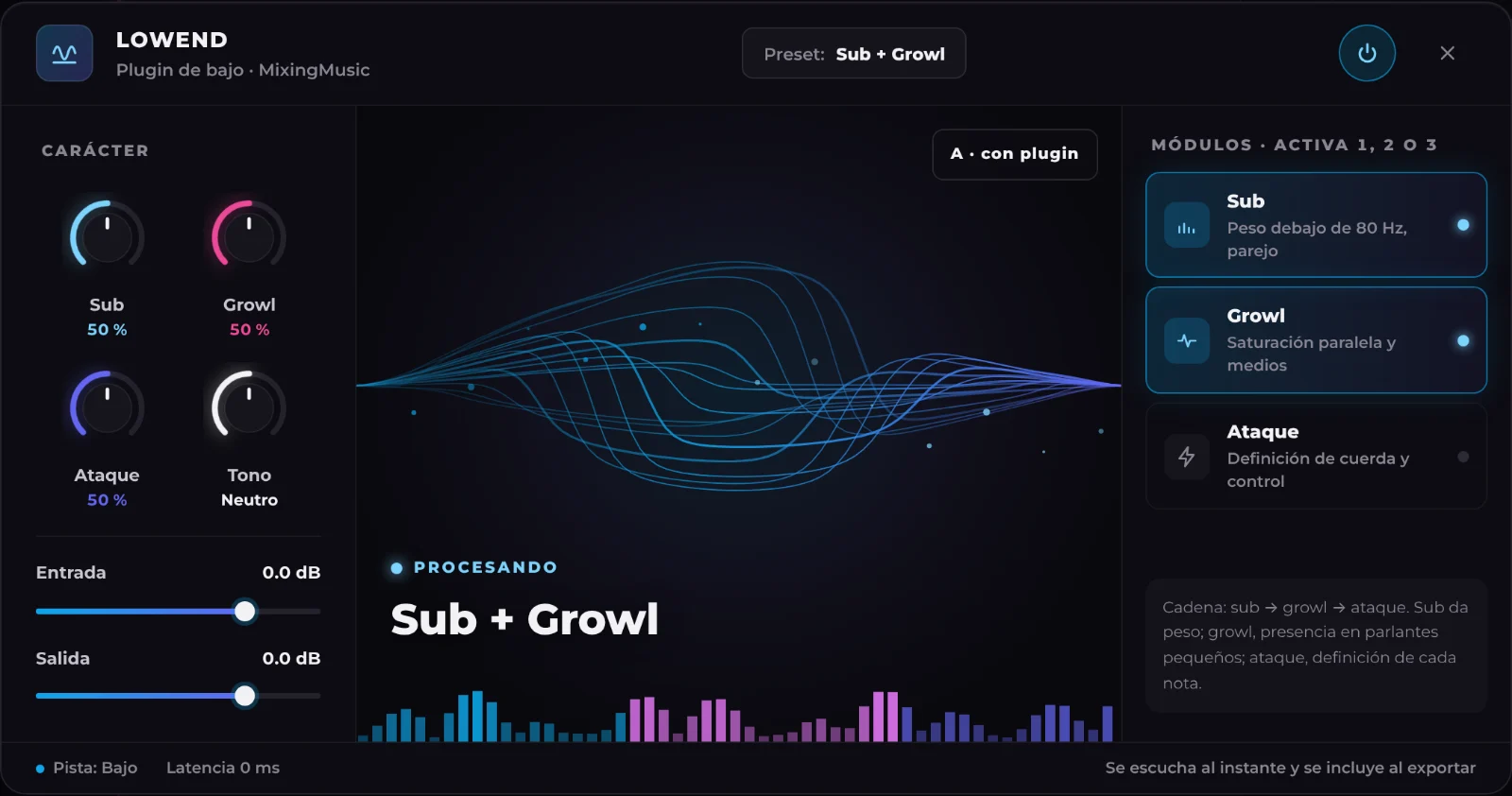
  • Up to 4 channels with VOX, AMPLIFY, LOWEND and KEYS sounds
  • Venue preset: church, club, stadium…
  • Transmit to the PA, anti feedback and reusable setups
  • Channel-by-channel show recording (Unlimited and AI Advanced)

See plans →

NEW · SONG CREDITS

Just want songs? Buy credits, not subscriptions.

Pay once and create at your own pace. Usage depends on the model. Packs refill balance without changing your plan: 6-stem separation uses 1 song on Unlimited or Advanced; up to 12 uses 2 on Advanced. Free excludes separation.

  • No monthly plans
  • No hidden fees
  • Never expire
20 songsUS$8.99US$0.45 per song

Loading secure payment…

50 songsUS$14.99US$0.30 per song

Loading secure payment…

COMPARISON

Create, mix and finish your song in one studio

Against eMastered, LANDR, Moises, Suno, Mozart AI and Waves, feature by feature. Sources linked in the full table; unverified features are marked.

Features of MixingMusic.AI, eMastered, LANDR, Moises, Suno, Mozart AI and Waves
FeatureMixingMusic.AICreate + mixing + masteringeMasteredAI masteringLANDRMastering and moreMoisesApp and AI StudioSunoGenerator + StudioMozart AIAI music appWavesOnline Mastering
Create full songs with AIIdea, lyrics or voice with Suno; lyrics or text with Mureka on paid accounts. Duration and controls depend on model and plan.YesFrom an idea, your lyrics or your voiceNot in their public informationPartlyLANDR Layers generates partsPartlyGenerates backing partsYesFull songsYesFull songsNot in their public information
Choose between Suno and Mureka modelsSuno V6 Mini, V6 and V6 Wild via KIE; Mureka V7.6, V8, V9 and V9.5. V9.5 uses 3 song units; the others use 1. Availability depends on account and operation; V7.6 may use V8 as a disclosed fallback.YesNot verifiedNot verified for this featureNot verifiedNot verified for this featureNot verifiedNot verified for this featureNot verifiedNot verified for this featureNot verifiedNot verified for this featureNot verifiedNot verified for this feature
Export the song as stemsSplit uploaded or generated songs: 6 stems on Unlimited (1 song); 6 or up to 12 on AI Advanced (1 or 2 songs). Free excludes separation.Yes6 stems: 1 song; up to 12 on Advanced: 2YesYesYesYesYesExports stems (paid plans)YesMix Unlock plugin in your DAW
View chords above lyrics and download a timestamped TXTEstimated chords from the selected audio version. Uses available timings to align lyrics; if alignment is unreliable, lyrics and chords remain separate. Review by ear.YesNot verifiedNot verified for this featureNot verifiedNot verified for this featureNot verifiedNot verified for this featureNot verifiedNot verified for this featureNot verifiedNot verified for this featureNot verifiedNot verified for this feature
Online mixing of your stems with per-track controlsUp to 12 tracks: volume, pan, EQ, compression, reverb and delay on each.YesUp to 12 stemsNot in their public informationNot in their public informationPartlyAI Studio: presence, pan and reverb per trackYesSuno Studio 2.0 (Premier plan): volume, EQ, effects, compression, automation, MIDI and synthesizersPartlyWorkstation with tracks and MIDI in its app (per reviews)Not in their public informationIts plugins run inside a DAW
Complete AI mix from originals or your current settingsSeparate 24-bit WAV result; editable AudioChat instructions, settings based on per-track measurements and the manual session preserved. Uses no chat interactions. Mastering is separate.YesNot verifiedNot verified for this featureNot verifiedNot verified for this featureNot verifiedNot verified for this featureNot verifiedNot verified for this featureNot verifiedNot verified for this featureNot verifiedNot verified for this feature
AI mix trial on a section, with A/B comparisonSelect 30–45 seconds of the loaded project. Compare before/after with volume matched by attenuation, without uploading the full project or changing it.YesNot verifiedNot verified for this featureNot verifiedNot verified for this featureNot verifiedNot verified for this featureNot verifiedNot verified for this featureNot verifiedNot verified for this featureNot verifiedNot verified for this feature
Generate an instrument from chat and insert it as a trackTTAPI Add Stem with the mix as reference; Mureka fallback for supported rejection cases. Independent track with its own controls. Uses no chat interactions; separate allowance and limits apply. Musical alignment needs listening.YesNot verifiedNot verified for this featureYesLANDR LayersYesBacking-part generationYesInstruments in StudioNot verifiedNot verified for this featureNot verifiedNot verified for this feature
Record vocals or instruments over the mix, in the browserInterface, computer or phone microphone; two inputs at once on separate tracks, re-record a section and compensated sync.YesUp to 2 inputs at once, each on its own trackNot in their public informationNot in their public informationPartlyMobile app: video of you playing along and voice memosYesSuno Studio (Premier plan)Not in their public informationNot in their public informationRecording happens inside a DAW
Per-track and whole-mix (MixBus) EQ with a live spectrumDraggable points; several EQs open in Multitrack mode. MixBus resizes with the chat, with centered knobs and a row of reverb, delay and widener panels.YesNot in their public informationNot in their public informationNot in their public informationPartly6-band EQ in StudioNot in their public informationNot in their public information
LUFS (EBU R128) meter and stereo VU meter while you mixMomentary, short-term, integrated, peak and L/R needles in real time.YesNot in their public informationNot in their public informationNot in their public informationNot in their public informationNot in their public informationNot in their public information
Chat assistant that applies changes to your mixAudioChat: tap ✦ on a track or on the MixBus and ask, for example, "clearer vocal". It adjusts volume, pan, EQ, compression, reverb or delay; hear it and undo it.YesFree: 1 try · Unlimited: 10/day · AI Advanced: up to 100/dayNot in their public informationNot in their public informationNot in their public informationPartlySuno Studio 2.0: chat to modify projects, generate effects and work with instrumentsNot in their public informationNot in their public information
1080p Karaoke Video with synced lyrics, ready for YouTube and ShortsLandscape and portrait, with neon waves and random colours, lyrics aligned using provider timings when available, audio recognition as a fallback and a manual sync editor. Available in the song generator and included with paid custom songs.YesFree 3 a month · Unlimited 30 a month · AI Advanced 60 a monthNot in their public informationNot in their public informationNot in their public informationNot in their public informationPartlyAI music videos (per reviews)Not in their public information
Coherent album masteringYesUp to 12 songs · UnlimitedNot in their public informationYesNot in their public informationNot in their public informationNot in their public informationNot in their public information
Unlimited mixes and masters with one paymentYesUnlimited or AI Advanced: one paymentNot in their public informationSubscriptionNot in their public informationSubscription or pay per masterNot in their public informationSubscriptionNot in their public informationSubscriptionNot in their public informationMonthly or yearly subscriptionNot in their public informationCredits per song

✓ Available◐ Partly or with conditions? Not verified— Not in their public information as of October 30, 2026

See the full comparison with sources →
MIXINGMUSIC COMMUNITY

Listen to 251 songs made with AI by our community

Love songs, christian, reggaeton, pop, rock and more. New songs every day: play them, like them and share them.

Listen to the songs →