Mixing is hundreds of small decisions: a little more level here, a little less 300 Hz there, a touch of compression so the vocal stops jumping. An AI chat is useful when it takes over the mechanical part of those decisions while you keep the musical ones. That is what AudioChat is built for inside the MixingMusic.AI mixer.
What AudioChat can and cannot change
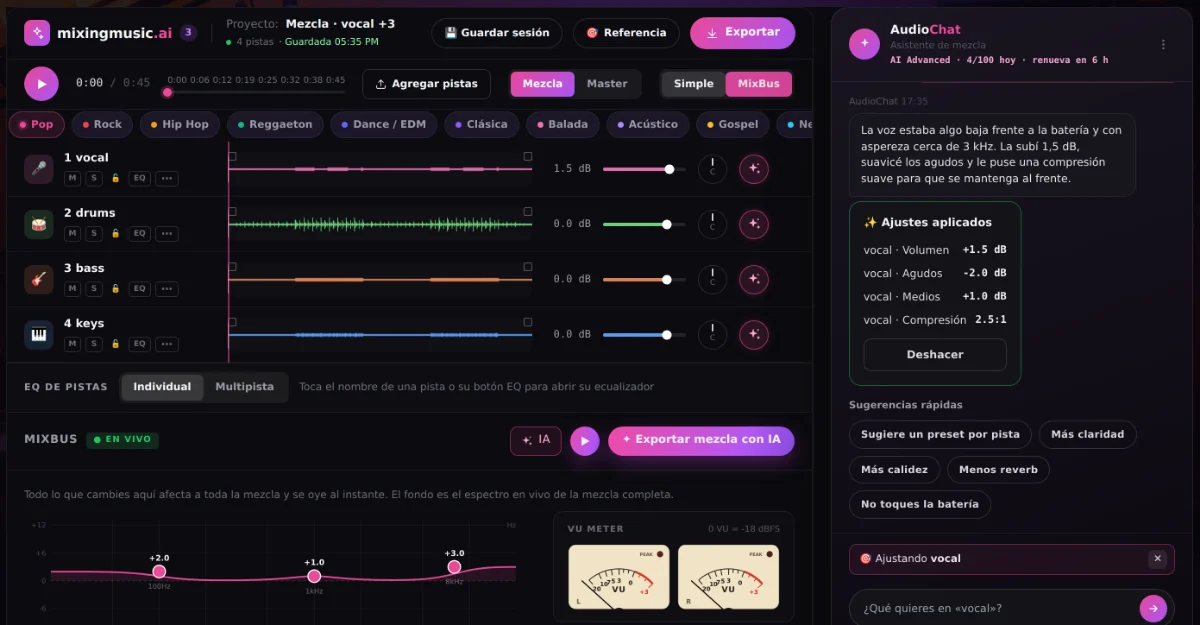
AudioChat works with the same controls you have on screen:
- Per track: volume, pan, low/mid/high EQ, compression, reverb and delay sends, and presets designed for each instrument.
- On the MixBus (the whole mix): master volume, low/mid/high EQ, and the master reverb, delay and stereo widener.
It does not generate audio, separate stems or remove reverb that was recorded into a file. Every change appears with its value and can be applied, discarded or undone.
Step 1: focus the chat on one track or the MixBus
Tap the ✦ button next to a track's pan knob, or the ✦ AI button on the MixBus. The chat then works only on what you picked, so a request about the vocal never moves the drums. You can also name a track in the chat ("track 3", "the bass") without the button.
Step 2: choose "Analyze and adjust" or tell it what to do
- Analyze and adjust automatically: the app measures the audio of that track (or the whole mix): level, peaks, dynamics, balance across six frequency bands and stereo correlation. The AI then applies one to four moderate changes and explains them with simple numbers.
- I'll tell you what to do: type the request the way you would ask an engineer, for example "vocal more upfront and less harsh" or "less reverb on the backing vocals".
Step 3: listen, then keep or undo
Play the section that matters and compare. If a change is too much, undo it with one click; the previous values come back exactly. Tracks with a lock 🔒 are never touched, even if you ask.
Requests that work well
- "The bass is eating the kick" (on the bass track)
- "More brightness, but not harsh" (on the MixBus)
- "More punch on the drums without raising the level"
- "Track 3 a little to the left"
Short, concrete and about sound works best. If a request fits two tracks, AudioChat asks which one before changing anything.
How many messages you get
- Free: one "Analyze and adjust" to try it.
- Unlimited: 10 messages a day.
- AI Advanced: up to 100 messages a day (30 per hour at most).
Messages renew every midnight in your local time, and a message that fails is not counted. All paid plans are one-time payments, not subscriptions; see pricing.
Where the meters fit in
AI suggestions are a starting point, not a verdict. Keep an eye on the MixBus LUFS and VU meters while you apply changes: if a request makes the mix louder, the meters tell you whether it actually sounds better or just louder.